


Ever whip up a song in Suno AI, only to have it cut off before you’re ready? It’s exasperating. But you can fix that. By using Suno’s extension feature, you can stitch on extra verses, a new chorus, or even an outro.
Basically, you get to finish your song the way you want. In this post, we’ll outline how to combine song and extension in Suno AI, step by step. Moreover, we’ll also toss in a few tips to help you get the smoothest, most natural results.

Table of Contents
Part 1: What Is Suno AI?
Suno AI is a music-making application that incorporates artificial intelligence to compose entire songs with vocals and instruments based on basic text prompts. It allows any person, even without musical abilities, to transform his or her ideas into realistic and complete songs. In addition, Suno AI maintains high-quality, realistic vocals and studio-grade audio, giving creators more control and a polished, professional result. Here are its core functions:
- Full Song Creation: Makes complete songs with vocals, lyrics, and instrumentals.
- Lyrics Options: Can write new lyrics or use ones provided by users.
- Quality Sound: It produces sound quality that is studio-level and professional.
- Genre Variety: Allows creativity in mashups and supports more than 1,200 music genres.
- Music Extension: Allows users to extend songs by retaining the original sound and style.
- Covers Feature: Paid users can make cover songs in different genres.
- Accessible to All: Designed for anyone to create music, no experience needed.
- User Friendly: An easy interface to quickly create songs
- Teamwork: Provides the ability to work and be creative in real-time with other people.
- Personalizable: Provides customization to create music.
Part 2: Why and How to Combine Song and Extension in Suno AI?
Users might want to combine song and extension in Suno AI to complete and improve music projects. The extend feature allows one to insert additional sections, such as verses, choruses, or outros, to unfinished or short songs. It also harmonizes the new sections perfectly with those of the original piece. In addition, the Suno AI does not change the style and sound quality, which guarantees a natural flow.
Users can also edit songs directly, replace or remove sections, and adjust the length for better endings. After you combine song and extension in Suno AI, you can download it. Here’s how to extend a song with AI Suno and combine it with the original track:
Step 1: Log in to the Suno AI website and find the song you want to extend. Click the three-dot menu (⋮) next to the song.
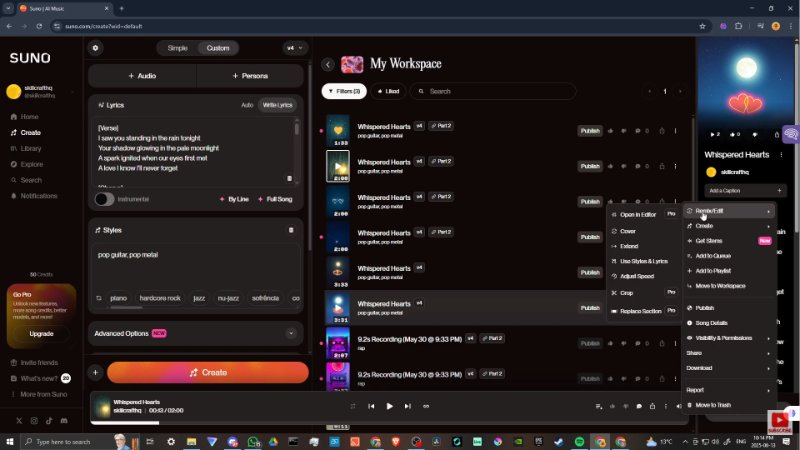
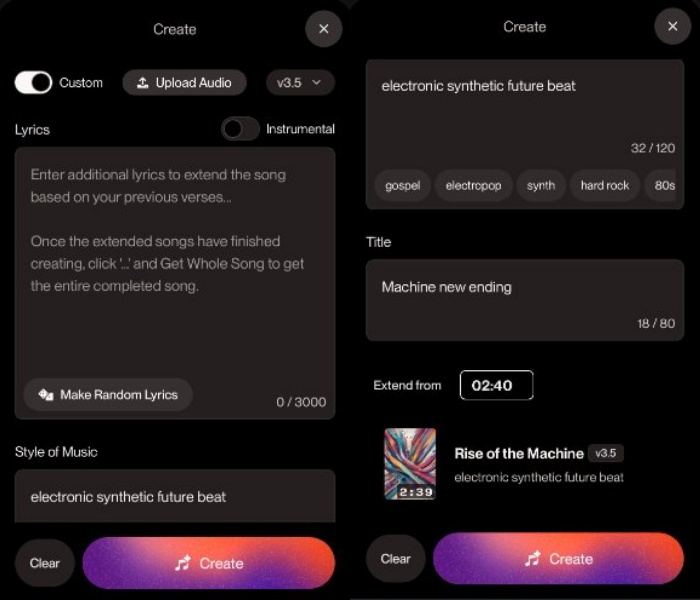
- Step 2: Then, select “Remix/Edit.” Next, choose “Extend.” Pick the timestamp where the new section should start by typing it or moving the bar.
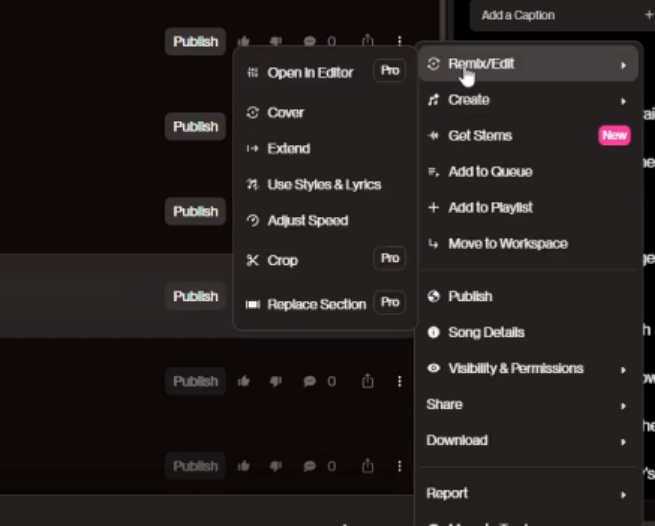
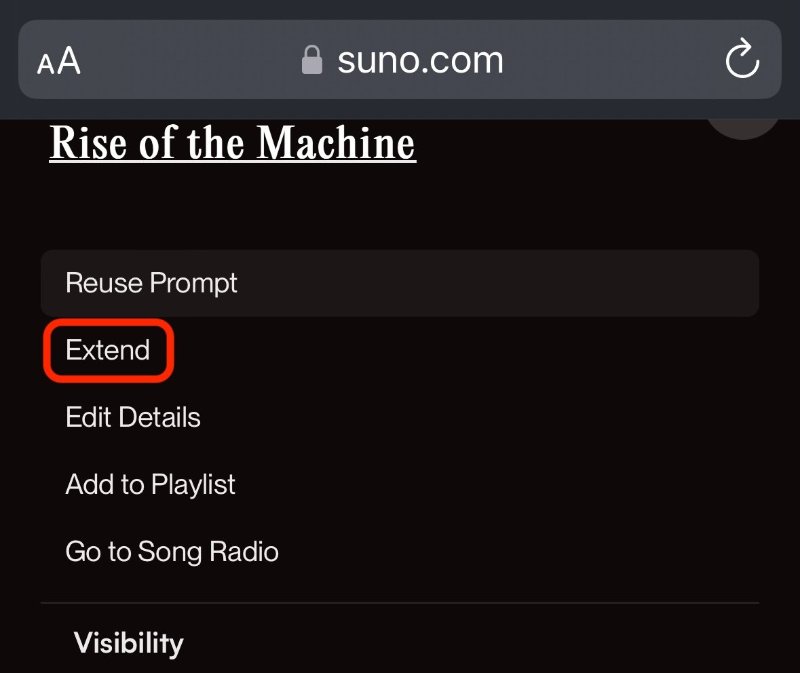
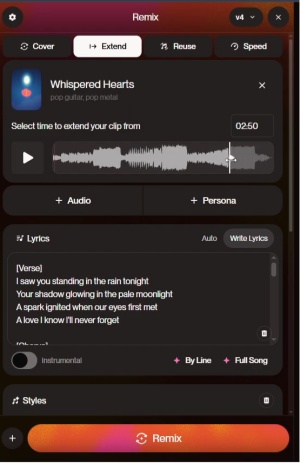
- Step 3: You can also switch “Custom Mode” to add new lyrics or change the style prompt, or leave it blank for an instrumental part.
Step 4: Click “Create” to generate the extension. Then, choose your favorite version. Listen to the results.
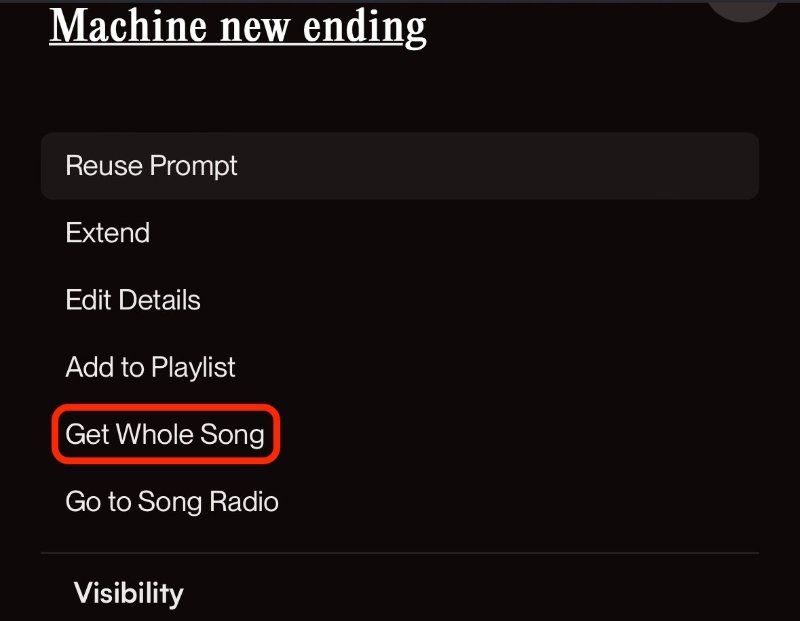
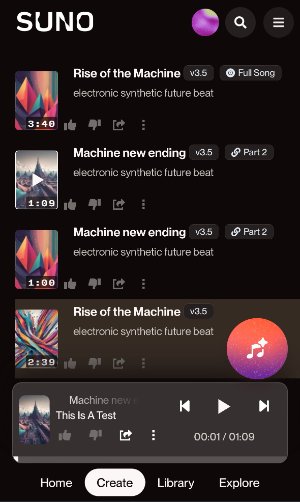
- Step 5: Afterward, click the three-dot menu on the chosen part. Next, select “Get Whole Song” to merge it.
- Step 6: The result will be labelled as “Full Song.” So, that’s how to extend a song with AI Suno and combine it with the original track.
Step 7: After you combine song and extension in Suno AI, download it. You can also extend songs multiple times to create longer or looped tracks.


[Bonus Tip] Use an AI Enhancer to Boost Image Quality For the Suno AI App
The mobile application created by Suno AI can convert images into 30-second music videos. It dissects the picture and builds a song that is in line with its mood or theme. But you must have high-quality pics to begin with. However, if you don’t have them, an AI Enhancer like Tenorshare PixPretty is a good tool to boost image quality.
It is able to touch-up faces, sharpen body and facial features, and offers countless shadow effects, presets, and filters to refine image quality. Also, you can edit, resize, compress, and convert images in bulk, remove backgrounds, and watermarks. Moreover, the tool also enables you to expand the backdrop and change its colors as well.
Part 3: Tips For Better Results in Combining Song and Extension in Suno AI
In case you are genuinely curious about how to extend songs with Suno AI and mix them with the original track with more favorable outcomes, follow the tips beneath:
- 1. Be Specific: Be clear about the genre, mood, instruments, and vocal style you desire.
- 2. Employ Tags: These can be used to give your song structure [Verse], [Chorus], or [Outro].
- 3. Add Style Words: Incorporate upbeat or calming words to create the tone.
- 4. Mention Instruments: List the instruments and how they should sound or be arranged.
- 5. Set Tempo: Add tempo/BPM to pace.
- 6. Keep It Simple: Do not have long or opposing prompts (e.g., sad and energetic).
- 7. Extend Feature: Add new parts, such as verses or outros, with timestamps to give a smooth flow.
- 8. Custom Mode: Change lyrics or style in extensions for variety.
- 9. Limit Extensions: Extend only a few times to keep quality high.
- 10. Limit Extensions: Extend to a limited number of times to maintain quality.
- 11. Experiment: Test various prompts and forms to reach the best results.
- 12. Stay Consistent: Keep the same key and tempo when extending.
- 13. Edit Smartly: Have tools such as Audacity to cut out clips in a presentable manner before uploading.
- 14. Covers and Remixes: Remix and/or change genre, vocals, or instruments to make a cover.
- 15. Vocal Options: Swap vocal style, tone, or gender for a new sound.
- 16. Join the Community: Share ideas and learn from other Suno AI users online.
- 17. Add Details: Use adlibs, dynamic or spoken word tags for realism and variety.
- 18. Get Creative: Try mixing unique styles to discover new sounds.
Conclusion
So, that’s all there was to knowing how to extend songs with Suno AI and combine them with the original track. You can combine song creation and extension in Suno AI to turn simple ideas into complete, high-quality songs. The extend feature lets users flawlessly add parts like verses or outros while keeping the same sound and style.
With its easy-to-use tools, Suno AI functions well for both beginners and pros. If you’re using the Suno AI mobile app to make music from images, start with clear, high-quality photos. You can employ an AI Enhancer like to refine image quality or edit it for better results.
PixPretty AI Photo Editor
- 100% free AI Image Generator (Nano Banana 2 powered)
- 4K image quality with fast generation speed
- AI effects & filters for personal and e-commerce use



