


The Microwave AI Filter is a viral trend on TikTok that transforms your photos or videos into a fun, rotating, sci-fi-style animation. It’s become popular for couple edits, POV videos, and creative content that stands out.
Whether you want to use TikTok, CapCut, or free online AI tools, this guide will help you. You will learn the best ways to apply the microwave ai filter. This will make your videos look unique, engaging, and easy to share.
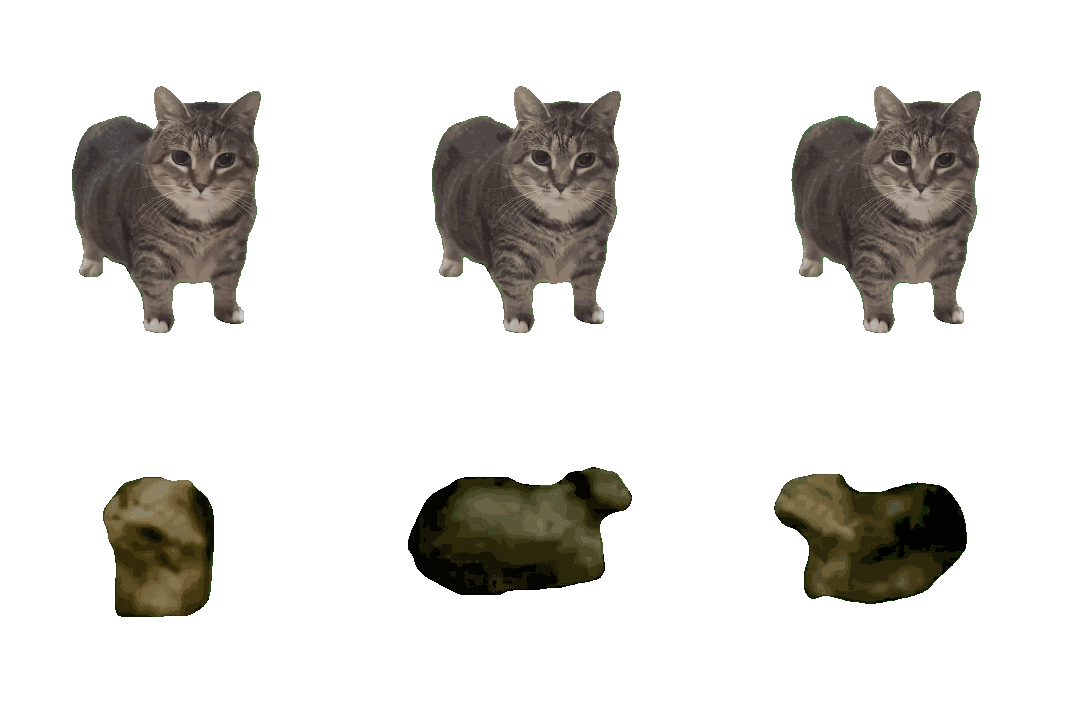
Table of Contents
- Part 1: What Is the Microwave AI Filter & Why Did It Go Viral?
- Part 2: Best Tools to Use the Microwave AI Filter (Free & Online Options)
- Part 3: How to Use the Microwave AI Filter (Step-by-Step Guide)
- Bonus Tip: Turn Any Photo into a Unique 3D Action Figure with PixPretty AI
- Part 4: FAQs About Microwave AI Filter
- Final Words
Part 1: What Is the Microwave AI Filter & Why Did It Go Viral?
The microwave ai filter is a viral video effect that transforms your photos or videos into a futuristic “inside a microwave” animation. It creates rotating, glowing, and sci-fi-style distortions that make content more fun and eye-catching.
Why it went viral:
- The rotating microwave animation stands out in feeds.
- AI templates make the effect accessible to everyone.
- Works well with TikTok challenges and trending sounds.
- Can be applied to selfies, couples, pets, or group videos.
- Short, fun clips are perfect for TikTok, Instagram, and Reels.
Part 2: Best Tools to Use the Microwave AI Filter (Free & Online Options)
The Microwave AI Filter isn’t limited to Tiktok anymore many powerful ai tools now let you create the same viral effect with higher quality and more animation control. Below are the top 5 trusted platforms, each offering a unique style of the microwave trend so you can pick what fits your content.
Tool 1: HitPaw AI Video Generator
HitPaw is one of the most advanced platforms to create cinematic Microwave AI Filter TikTok videos. With HitPaw, you can turn any static image into a dynamic microwave-style clip or even generate AI characters that respond to motion.
What Makes HitPaw Stand Out
- Creates animated microwave POV effects from a single photo
- Online tool + desktop software for faster processing
- Auto facial expression enhancement for realistic motion
- Template library updated regularly for viral trends
- Direct export in HD resolution for TikTok/Reels
- Works without TikTok ideal for privacy-focused users
Tool 2: pxz.ai AI 360 Microwave Filter
PXZ.AI is well-known for immersive 360° rotation effects, making your video look like a camera is spinning inside a microwave. It’s a top pick for creators who want maximum movement in their edits.
What Makes PXZ.AI Great
- 360-degree rotating microwave ai filter online
- Smooth and dramatic motion effects
- Designed for sci-fi style video trends
- Easy drag-and-drop workflow
- Multiple scene options beyond microwave
Tool 3: Pippit AI Filter Microwave
Pippit is a trend-focused AI platform designed for social media creators. Its microwave templates are optimized for TikTok and Instagram, making it simple to create viral content.
Why Creators Use Pippit
- One-click template editing for microwave ai filter tiktok videos
- Optimized for platform-specific formats (TikTok, Instagram)
- Supports couple edits + group photos
- Minimal learning time, perfect for beginners
- Free plan available
Tool 4: CapCut AI Microwave Filter
CapCut is a go-to tool for TikTok creators because it integrates directly with trending templates. Using CapCut, you can apply the Microwave AI Filter CapCut effect instantly by replacing a sample image.
Why CapCut Is Popular
- Official TikTok editing app = more visibility
- Thousands of microwave-style community templates
- Syncs animations perfectly with TikTok trending sounds
- Works on desktop, Android, and iPhone
- Exports without quality loss
Tool 5: TikTok’s Built-in Microwave Filter
The original trend starter. TikTok’s built-in filter is still the fastest way to join the challenge no separate editing tools needed. And because it’s native, TikTok sometimes boosts posts using trending effects. Perfect for users who want to try microwave ai filter tiktok instantly without any extra software.
Why TikTok Built-In Is a Must-Try
- 100% free access no logins or downloads
- Instant preview while recording
- Trend-linked audio suggestions
- High chance of views through effect challenges
- Privacy controls available
Part 3: How to Use the Microwave AI Filter (Step-by-Step Guide)
You're not alone in wanting to join the viral microwave ai filter trend. Many users want to try the effect but struggle to locate it inside capcut. The trick is: this filter is mainly accessed through TikTok templates, not directly from CapCut’s main interface.
So, instead of searching endlessly, follow these simple steps below to apply the microwave ai filter quickly and correctly.
Steps to Use the Microwave AI Filter via TikTok + CapCut
- Step 1: Open TikTok on your iPhone or Android device.
- Step 2: Tap the Search (magnifying glass) icon at the top-right of the screen.
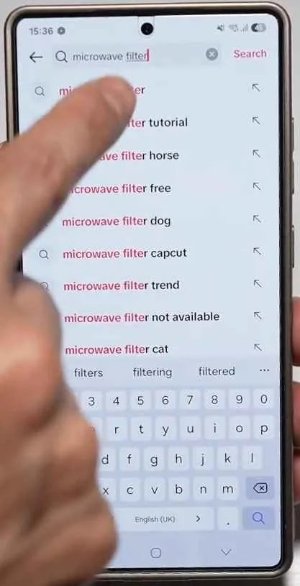
Step 3: In the search bar, type Microwave Filter and tap Search.
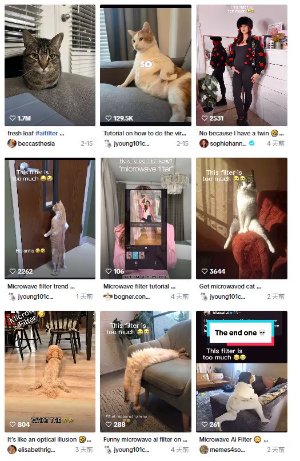
Step 4: Browse the results and pick any video using the microwave filter template.
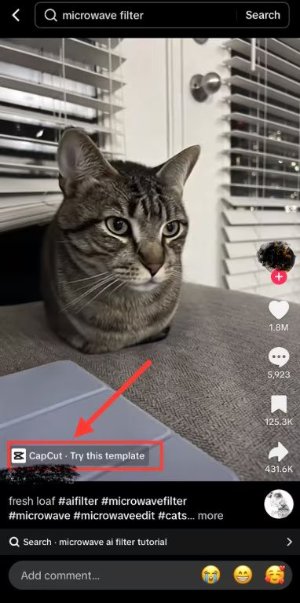
Step 5: Above the creator’s username, tap the button that says “CapCut Try this template”.


Bonus Tip: Turn Any Photo into a Unique 3D Action Figure with PixPretty AI
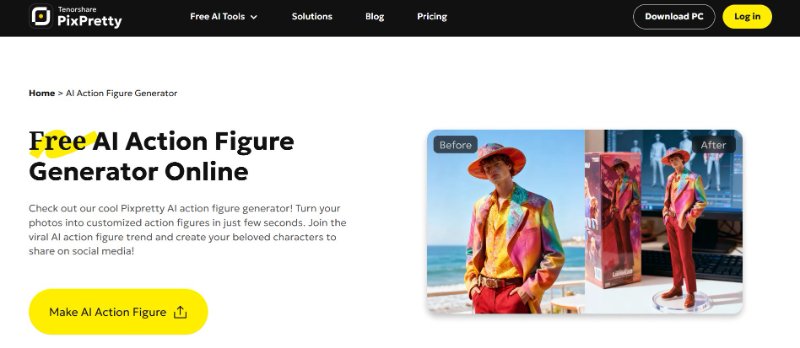
WithPixPretty AI , you can turn any photo into a realistic 3D action figure in just a few clicks. Upload a selfie, a friend’s picture, or a favorite character, and the AI will create a detailed figure. You can change poses, colors, and backgrounds, making it fun and easy to share your creations on social media or use them for personal projects. No design skills are needed the ai does all the work.
Features of PixPretty AI 3D Action Figure Generator
- Turn any photo into a 3D figure instantly.
- Choose from different styles like anime, Marvel, Funko, LEGO, or Barbie.
- Change poses, colors, and backgrounds to make it unique.
- Remove or edit backgrounds for multiple images easily.
- High-quality output that keeps your photo details.
- Ready to share on TikTok, Instagram, X, and more.
- Free and easy to use for everyone.
How to Create Your Own 3D Action Figure
Step 1: Upload Your Image
Select a clear photo of yourself, a friend, or a favorite character from anime, movies, or real life.
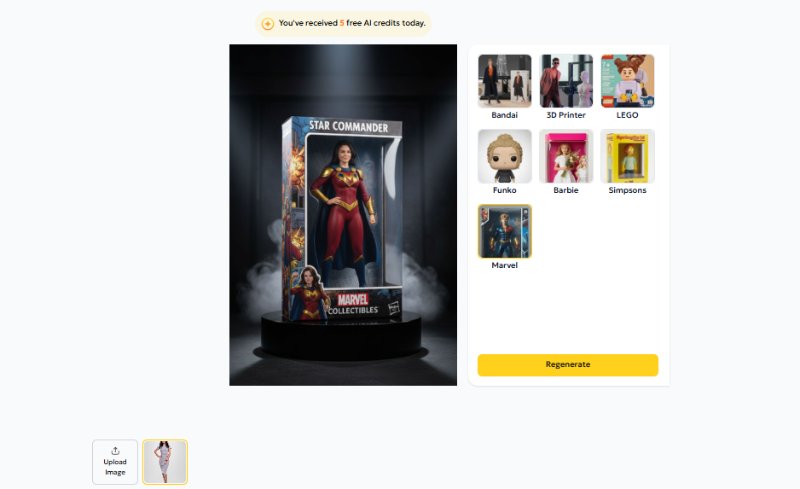
Step 2: Choose a Style
Pick a style for your figure realistic, anime, Marvel, Funko, Barbie, or any other design you like.
Step 3: Generate Your Figure
Click to start the AI process. The tool will instantly transform your photo into a 3D action figure.


Part 4: FAQs About Microwave AI Filter
Q1: How to do a Microwave AI Filter? Open tiktok or capcut, choose a microwave filter template, upload your photo or video, and the ai will create the effect automatically.
Q2: Is there a Microwave Filter? Yes! Tiktok has a built-in microwave ai filter, and similar filters are available on capcut, HitPaw, PXZ.ai, and Pippit ai. These options give you free or paid ways to create viral microwave-style videos.
Q3: What is the Microwave Rotation Trend? It’s a viral trend where your video or photo spins inside a microwave-style effect, giving a fun, futuristic animation popular on Tiktok.
Final Words
The Microwave AI Filter is a fun way to make your videos stand out on Tiktok. It’s easy, creative, and perfect for trends or personal clips. For even more creativity, try PixPretty AI . Turn photos into 3D action figures, remove backgrounds, and create unique visuals quickly and easily.
PixPretty AI Photo Editor
- 100% free AI Image Generator (Nano Banana 2 powered)
- 4K image quality with fast generation speed
- AI effects & filters for personal and e-commerce use



