


AI tools have made it simple to appear beside your favorite stars without meeting them in real life. The celebrity selfie (Celebrity AI) trend lets people create lifelike photos that look like genuine moments with celebrities. These pictures are popular on social media because they look real and are easy to make. In this guide, you’ll learn what celebrity selfie (Celebrity AI) means, why people love it, and how to create your own. You’ll also discover useful tips, safety advice, and a helpful tool you can use as a smart alternative for better image results.
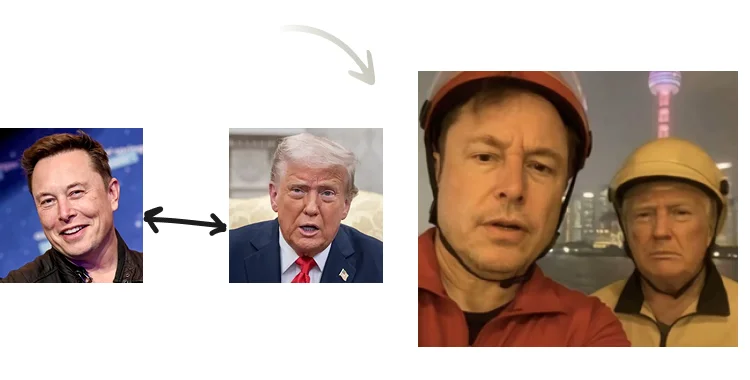
Table of Contents
- Part 1: Understanding Celebrity Selfies (Celebrity AI)
- Part 2: Reasons Behind the Popular Trend
- Part 3: Step-by-Step Guide to Making a Celebrity Selfie (Celebrity AI)
- Part 4: Safety and Legal Guidelines
- Part 5: Tips for Better and More Realistic Results
- Part 6: PixPretty AI Action Figure Generator: Turn Photos into Creative 3D-Style Images
- Frequently Asked Questions
- Conclusion
Part 1: Understanding Celebrity Selfies (Celebrity AI)
Learn what this new AI trend means and why it’s becoming part of online creativity. A celebrity selfie (Celebrity AI) is an AI-generated image that shows you with a famous person, often in a natural setting such as a café or event. These pictures look like real selfies taken during casual moments. With a simple prompt and one selfie, AI software can blend faces, lighting, and backgrounds automatically.

Why People Make Celebrity Selfies
People enjoy making celebrity selfie (Celebrity AI) images because they’re entertaining and easy to share. Many fans use them to show admiration for actors, singers, or athletes. Others create them for profile pictures, fun posts, or digital art. This trend also helps users experiment with AI tools and learn how realistic photo generation works.
Main Types of Celebrity Selfies
You can create different kinds of celebrity selfie (Celebrity AI) images:
- Casual photos: You and a celebrity smiling or posing together.
- Event shots: Looks like you met at a concert, movie set, or awards show.
- Creative edits: Artistic backgrounds or themed images for fun posts.
Each type depends on the user’s imagination and the prompt written for AI.
Part 2: Reasons Behind the Popular Trend
See why the idea of creating celebrity selfies using AI attracts millions of users online.

Easy Access for Everyone
Making a celebrity selfie (Celebrity AI) doesn’t need special skills. Many free and paid websites allow you to upload your photo and generate results quickly. This convenience has made the trend grow among regular users who just want to test new AI tools without advanced knowledge.
Social Media Engagement
Posts showing celebrity selfie (Celebrity AI) images often get higher likes and comments. They look interesting and catch people’s attention easily. Viewers usually react out of curiosity, asking whether the photo is real or AI-made. This natural engagement motivates more users to try the same idea.
Creative and Fun Expression
People use celebrity selfie (Celebrity AI) photos as a form of self-expression.
- They can combine humor and imagination in one picture.
- They use it to support their favorite celebrity or show admiration.
- Some creators make story-based posts featuring AI-made selfies.
The trend helps ordinary users enjoy digital creativity without complex editing work.
Part 3: Step-by-Step Guide to Making a Celebrity Selfie (Celebrity AI)
Follow these clear steps to create your own AI-generated selfie with any celebrity.
Step 1: Prepare Your Selfie and Celebrity Choice
Choose a clear selfie of yourself with good lighting. Then select a celebrity image that matches the same lighting and angle. The closer both images match, the more realistic your celebrity selfie (Celebrity AI) will look.

Step 2: Write a Clear AI Prompt
Use simple words to describe what you want. Example:
“Selfie of me standing next to [Celebrity Name] outdoors in daylight, both smiling.” The AI uses this short description to understand pose, expression, and setting. Writing short, clear sentences gives the best output.

Step 3: Generate and Edit
Upload both photos to the AI tool and let it process them. Once you receive the generated selfie, edit it slightly for brightness, color, or contrast.

Helpful tips:
- Add a soft blur for realism.
- Crop unnecessary background areas.
- Adjust tones to balance both faces naturally.
Part 4: Safety and Legal Guidelines
Stay informed about the right way to use celebrity selfies made with AI.

Respect Public Image Rights
Celebrities have control over their likeness. You can create celebrity selfie (Celebrity AI) images for personal use, but don’t sell or promote them commercially without permission. Always clarify that the image is AI-generated when posting publicly.
Avoid Misleading Content
AI selfies should never mislead viewers into believing a real meeting occurred. Adding a small note like “AI-generated” keeps things honest and avoids confusion. Responsible use maintains credibility and prevents problems online.
Follow Platform Rules
Social networks may limit posting fake celebrity photos. Before uploading your celebrity selfie (Celebrity AI), read their policies. Avoid using these images in advertisements or promotions to stay compliant.
Part 5: Tips for Better and More Realistic Results
Simple techniques can make your AI selfies look believable and visually appealing.
Match Light and Background
Keep lighting consistent between both faces. If your selfie is bright, use a celebrity photo with similar brightness. Matching shadows and tones helps blend the images smoothly.
Add Small Realistic Details
- Use slight camera tilt or hand blur to mimic a real phone shot.
- Keep imperfect framing; perfect alignment can look fake.
- Add mild grain or noise for natural quality.
These small edits make the celebrity selfie (Celebrity AI) appear authentic.
Try Multiple Prompts
Don’t stop at one result. Change the background or scene description slightly each time. Generating multiple selfies helps you pick the most realistic version to post or save.
Part 6: PixPretty AI Action Figure Generator: Turn Photos into Creative 3D-Style Images
Improve your generated selfies or make creative mockups with a reliable AI tool. If you want to enhance your celebrity selfie (Celebrity AI) or design custom images for social media, the PixPretty AI Action Figure Generator is an excellent choice. This online tool allows you to turn photos into realistic digital figures, posters, or product-style visuals. It’s easy to use and works for anyone who wants clean, high-quality results without complex editing software. Whether you create fun images, profile pictures, or digital designs, PixPretty AI provides clear outputs with accurate details. It’s the best alternative for users who want both creativity and simplicity in one place.

Key Features of PixPretty AI
- AI-based image creation: Automatically turns selfies or photos into detailed digital artwork within seconds.
- High-quality resolution: Produces clear, sharp images suitable for online posts or printed material.
- Custom background options: Lets you change scenery or add creative effects that fit your design idea.
- Fast and user-friendly: Simple interface with quick upload and instant result generation for beginners.
- Perfect for marketing or fun projects: Great for social posts, posters, or adding creativity to personal content.
PixPretty AI offers an easier way to edit, improve, and personalize your celebrity selfie (Celebrity AI) while keeping natural quality.
Frequently Asked Questions
1. What is a celebrity selfie (Celebrity AI)?
It’s an AI-generated image that shows you taking a selfie with a celebrity. The picture looks real but is made digitally.
2. Is it safe and legal to create such selfies?
Yes, as long as you use them for personal or creative purposes and avoid commercial use without permission.
3. Which tools can I use for making these selfies?
You can use free AI image generators online. For better editing and design features, PixPretty AI is a strong alternative.
4. How can I make the photo more realistic?
Match lighting, use a casual background, and avoid perfect symmetry. Add slight blur or shadows for a natural finish.
5. Can I post my AI selfie online?
Yes, but it’s good to mention that it’s AI-generated. Honest posting prevents misunderstandings and builds trust with your audience.
Conclusion
Creating a celebrity selfie (Celebrity AI) is an enjoyable and easy way to see yourself beside your favorite stars without ever meeting them in person. With just a few clicks, anyone can generate realistic photos using AI tools and share them safely online. However, for users who want sharper images, better lighting, and creative customization, the PixPretty AI Action Figure Generator
is an excellent choice. This tool helps you enhance your AI selfies, design posters, and make professional-looking product images effortlessly. Try PixPretty AI today to bring your digital ideas to life with clarity and creativity.
PixPretty AI Photo Editor
- 100% free AI Image Generator (Nano Banana 2 powered)
- 4K image quality with fast generation speed
- AI effects & filters for personal and e-commerce use

Related Articles:


