


Polaroid photos are making a huge comeback, and with AI Polaroid tools, you can recreate that vintage look without a camera or film. In 2025, this trend is everywhere from TikTok challenges to Instagram’s “hug my younger self” posts.
The best ai polaroid makers let you turn selfies, portraits, or text prompts into retro-style photos instantly. Here, we’ll explore the top 5 free ai polaroid tools, show how to use them.
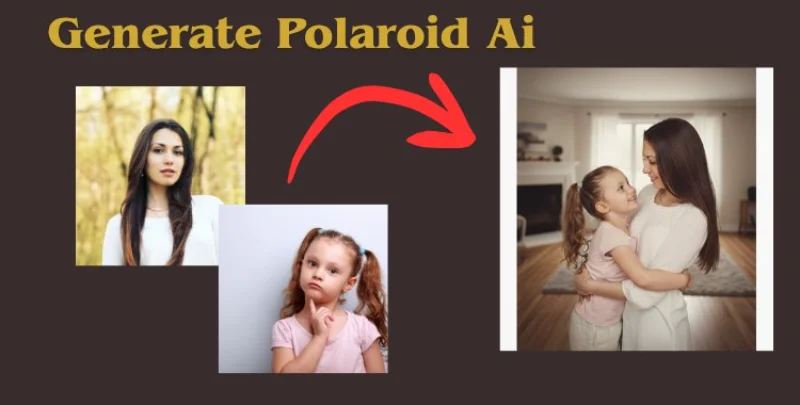
Table of Contents
Part 1: What is an AI Polaroid?
An ai polaroid is a fun, digital version of the classic Polaroid photo. It gives your pictures that vintage look with Polaroid frames, film grain, and retro vibes without needing a camera or film.
This trend has gone viral in 2025, especially on TikTok and Instagram. People love turning selfies, childhood photos, or even creative ideas into Polaroid-style images. These AI Polaroids grab attention, get more likes, and make your posts super shareable, helping you reach more people online.
Part 2: How to Use AI Polaroid Tools (Prompts & Tips)
Making your own ai polaroid is super easy. Using Media.io as an example, here’s how you can do it in simple steps:
- Step 1: Open the AI Polaroid Maker
Click Start Now to launch the online ai polaroid tool. No downloads, no sign-ups just instant fun.
- Step 2: Upload Your Photos & Add a Prompt
- Single photo: Apply a Polaroid frame, retro effects, and film grain to give it that classic look.
- Two photos: Upload both and add a prompt like “two friends hugging in Polaroid style”. You can tweak the prompt to match your scene perfectly.
- Step 3: Generate & Save Your Polaroid
Click Generate and watch your Polaroid come to life in seconds. Once you’re happy with it, download or save it. Share it on TikTok, Instagram, or with friends to show off your retro-style creation.


Tips for Making the Perfect AI Polaroid
To make your ai polaroid look great, try these tips when writing your prompt:
1. Background
Choose where your photo takes place: beach, park, city street, or bedroom. Example: Girl smiling at the beach in Polaroid style.
2. Filter / Style
Add the look you want: vintage, retro, film grain, warm tones. Example: Retro Polaroid style with warm tones and soft film grain.
3. Subject / Pose
Describe what’s happening in the photo: “two friends hugging,” “puppy sitting,” or “selfie with sunglasses.”
Example: Boy jumping in the park, Polaroid style.
4. Extra Effects
Optional details: light leaks, sun flare, vintage frame. Example: Selfie with Polaroid frame and light leaks.
5. Combine Elements
You can mix background, style, pose, and effects for a full prompt: Example: Two friends hugging in a city street at night, retro Polaroid style, soft film grain, light leaks, vintage frame.
Part 3: Top 5 AI Polaroid Tools
Tool 1: Fotor AI Polaroid Generator
Fotor lets you turn your photos into Polaroid-style images quickly. You can merge two photos, add classic white borders, and film grain. It’s perfect for trends like AI Polaroid trend with younger self. Fotor is free and easy to use.

Key Features:
- Merge two photos into a single Polaroid-style image.
- Apply classic white borders and film grain effects.
- Supports prompts like "hug my younger self" for trending content.
- Free to use with no sign-ups required.
Tool 2: Pollo.ai
Pollo AI's Polaroid Maker transforms your photos into authentic Polaroid-style images with customizable labels. Ideal for creating nostalgic snapshots of friends, family, or special moments.

Key Features:
- Add personalized text to your Polaroid images, making them unique and memorable.
- Choose from various aspect ratios to fit your desired photo style.
- Easily upload images and apply effects without the need for advanced editing skills.
Tool 3: AI Polaroid Gemini
Polaroid Gemini can turn your pictures into realistic Polaroid-style images. You can add soft vintage lighting and film grain. It’s great for viral trends like AI Polaroid trend TikTok. This tool is free and works quickly.

Key Features:
- Built on the Gemini Nano Banana model for realistic results.
- Supports the viral "hug my younger self" trend.
- Free to use with no sign-ups required.
Tool 4: Media.io AI Polaroid Generator
Media.io lets you make Polaroid photos in seconds. You can add frames, film grain, or merge two photos into a cute AI hug. It’s free and does not need sign-ups. Perfect for creating trendy Polaroids.

Key Features:
- Instantly transform photos into Polaroid-style images.
- Merge two pictures into a natural AI hug or AI kiss.
- Apply classic borders, film grain, and date stamps.
Tool 5: Clipfly AI Polaroid photo generator
Clipfly's AI Polaroid Photo Generator boasts an intuitive interface without complex settings, allowing you to create your own Polaroid photos in three steps. The tool supports various artistic styles and is designed for users seeking a quick and easy way to generate Polaroid-style images.

Key Features:
- Intuitive interface with no complex settings.
- Create Polaroid photos in three simple steps.
- Supports various artistic styles.
- Free to use with no sign-ups required.
Bonus Tip: Create Trending 3D Action Figures with PixPretty AI
With PixPretty AI, you can easily change any photo into a trending 3D action figure. The AI analyzes your image and generates a lifelike, detailed 3D model in seconds.
Ideal for social media, creative projects, or e-commerce visuals, it allows background editing, customization, and batch processing. Fast, intuitive, and user-friendly, PixPretty AI helps you create high-quality 3D action figures without any design experience.
Key Features of PixPretty AI
- Create lifelike 3D action figures from any photo.
- Generate trending, eye-catching designs instantly.
- Remove or change image backgrounds easily.
- Process multiple photos at once with batch editing.
- Produce high-quality, detailed images ready to share.
- Customize poses, styles, and backgrounds.
- Fast, easy, and user-friendly for everyone.
How to Create a 3D Action Figure
- Step 1: Go to PixPretty AI Action Figure Generator
Open the PixPretty AI website and navigate to the Action Figure Generator tool.
- Step 2: Upload Your Photo and Choose Style
Select the photo you want to transform, then pick your preferred 3D style or design.
- Step 3: Click Generate, Check, and Download
Click the “Generate” button, review the result, and download your new 3D action figure.


Conclusion:
AI Polaroid tools make it easy to turn ordinary photos into stylish, vintage-inspired Polaroid images. With frames, filters, and instant editing, anyone can create unique and eye-catching photos for social media, personal collections, or creative projects.For trending and creative image styles, try PixPretty AI. Its AI-powered tools make generating high-quality, stylish images fast and effortless.
PixPretty AI Photo Editor
- 100% free AI Image Generator (Nano Banana 2 powered)
- 4K image quality with fast generation speed
- AI effects & filters for personal and e-commerce use



