


Thinking about switching from ChatGPT to Claude? This complete guide explains how to move smoothly while keeping all your memories, settings, and workflows intact. We compare ChatGPT vs Claude in terms of ethics, privacy, and usability so you can decide which AI suits your needs better.
Learn step-by-step methods to export your data, import it into Claude, and get started without losing context. Discover which tool performs better for coding, writing, research, and everyday tasks.
Table of Contents
. ChatGPT vs Claude: Overview of the Two AI Models
ChatGPT and Claude are two popular AI chatbots. Both tools help users write content, answer questions, analyze data, and assist with coding. However, their focus is slightly different. ChatGPT works as an all-in-one AI assistant, while Claude is often preferred for writing, analysis, and coding tasks.
Brief Introduction to Both Models
Both AI tools are based on large language models (LLMs). They can understand questions and generate human-like responses. Users commonly rely on them for writing articles, summarizing information, generating ideas, or solving problems.
While their abilities are similar, the main difference is their approach and features. ChatGPT offers more built-in tools, while Claude focuses more on deep reasoning and natural writing.
Who Built Them?
OpenAI → ChatGPT

ChatGPT was created by OpenAI. It is designed to handle many types of tasks such as writing, research, coding, and image generation. The tool is known for its wide range of features and easy-to-use interface.
Anthropic → Claude

Claude was developed by Anthropic, a company that focuses on building safe and reliable AI systems. Claude is widely used for long writing tasks, analysis, and coding support because of its strong reasoning ability.
Core Design Philosophies
Both companies built their AI models with different goals.
-
ChatGPT focuses on versatility. It offers many features like image generation, voice mode, and custom AI tools.
-
Claude focuses on thoughtful responses, deeper understanding, and more natural writing.
OpenAI → Safety Policies and Usage Rules
OpenAI places strong emphasis on AI safety policies and responsible usage. ChatGPT follows strict guidelines to reduce harmful or misleading content and provide safer AI interactions for users.
Anthropic → Constitutional AI Approach
Anthropic uses a concept called Constitutional AI, where the model follows a set of guiding principles to evaluate and improve its own responses. This approach aims to make the AI more transparent, balanced, and aligned with human values.
. Why Are People Asking "Is Claude More Ethical Than ChatGPT?"
The debate around chatgpt vs claude is not only about features or performance anymore. Many people are now discussing the ethical side of AI. As artificial intelligence becomes more powerful and widely used, questions about responsibility, safety, and transparency are becoming more important.
AI Ethics Is Becoming a Major Topic
Today, AI is used in many areas such as education, business, healthcare, and security. Because of this rapid growth, governments, researchers, and everyday users are asking whether AI companies are building these systems responsibly. This is why comparisons like chatgpt vs. claude often include discussions about ethics and safety policies.
Major Concerns People Are Talking About
AI Militarization
One concern is whether AI technology could be used for military purposes. Some people worry that advanced AI tools might help develop autonomous weapons or military decision systems.
Surveillance
Another concern is AI-powered surveillance. AI systems can analyze huge amounts of data, images, and videos. Critics worry this technology could be used to monitor individuals or communities too closely.
Misinformation
AI can generate realistic text, images, and videos. While this technology has many benefits, it can also be misused to spread fake news or misleading information online.
Online Discussions and Social Media Debates
These concerns often appear in online discussions where people compare ChatGPT vs Claude from an ethical perspective. Some users believe Claude focuses more on safety and careful responses, while others say ChatGPT provides stronger safety controls and broader moderation systems.
In many articles and forums, screenshots of social media discussions are shared to show public opinion. However, it is important to hide personal user information when using such screenshots to protect privacy.
Debate Around AI and Defense Partnerships
Another reason this topic became popular is the discussion about AI companies working with defense agencies. Some reports mention partnerships between AI companies and government defense organizations, including discussions involving Pentagon.
This has raised questions about how AI might be used in warfare, national security, and intelligence systems.
Should AI Companies Work With Defense Agencies?
The issue has created a major debate in the tech community. Some experts believe AI companies should support governments to improve national security. Others argue that AI developers should avoid military partnerships to prevent harmful uses of the technology.
. What Is the Best: ChatGPT or Claude?
The debate around chatgpt vs claude is growing. Both AI tools are popular for coding, writing, and research. They can do many similar tasks, but each tool has different strengths.
In a simple chatgpt vs claude comparison, many users say Claude works better for deep analysis and long tasks. ChatGPT is often better for explanations, brainstorming ideas, and learning new concepts.
. Claude vs ChatGPT for Coding
When it comes to programming, many developers compare claude vs chatgpt for coding to see which tool produces better and cleaner code.
ChatGPT for coding
-
Generates code quickly for many languages such as Python, JavaScript, and SQL
-
Provides detailed explanations of how the code works
-
Useful for beginners who want to understand programming concepts
-
Often includes comments and step-by-step guidance
However, some developers report that ChatGPT sometimes adds extra libraries or overly complex solutions when a simpler approach would work.
Claude for coding
Claude has become popular among developers for several reasons:
-
Produces cleaner and more production-ready code
-
Often asks clarifying questions before generating code
-
Handles debugging and code review efficiently
-
Works well with large code files and complex logic

Many users on developer forums and communities like Reddit say Claude feels more like a collaborative coding partner, especially when reviewing or improving existing code.
. Claude vs ChatGPT for Writing
Another major topic in claude vs chatgpt for writing is content creation. Writers, marketers, and bloggers often test both AI tools for articles, newsletters, social posts, and marketing content.
ChatGPT is widely used for writing tasks because it generates ideas quickly. It is very good at brainstorming blog topics, outlining articles, and explaining complex ideas in simple words. This makes it a popular choice for students and beginner writers.
Claude, however, is often praised for producing more natural and structured writing. Many creators say it handles tone consistency better, especially when writing long content such as newsletters or reports.
Another advantage of Claude is its ability to handle large context windows. It can process longer documents and remember more text at once. Because of this, many users prefer Claude for tasks like:
-
chatgpt vs claude summarizing transcripts
-
analyzing research papers
-
editing long articles
-
working with multiple documents

ChatGPT, however, still performs well for short content like social posts, quick blog drafts, and brainstorming.
. Claude Pro vs ChatGPT Plus: Pricing and Limits
When comparing claude pro vs chatgpt plus, pricing is actually very similar for individual users.
| Plan | Monthly Price | Key Benefits |
|---|---|---|
| ChatGPT Free | Free | Limited access to models and features |
| ChatGPT Plus | $20/month | Access to advanced models, web browsing, image tools |
| Claude Free | Free | Limited daily messages |
| Claude Pro | $20/month | Higher message limits and priority access |
| Claude Max | $100–$200/month | Much higher usage for heavy users |
Usage Limits
Claude Pro Limits
Claude Pro does not have a fixed number of messages per day, but it has usage windows based on conversation size.
Typical usage includes:
-
Around 45 messages every 5 hours for normal conversations
-
Limits depend on message length, file uploads, and conversation size
-
Usage resets automatically every 5 hours
-
Provides about 5× more usage than the free plan
Claude also supports a large context window of about 200K tokens, meaning it can process very long documents or multiple files in one conversation.
ChatGPT Plus Limits
ChatGPT Plus uses flexible message limits depending on the model used.
Typical limits include:
-
Higher message limits compared with free users
-
Access to advanced AI models and tools
-
Ability to use features like browsing, image generation, and custom assistants
Unlike Claude, ChatGPT focuses more on tool integrations and multi-feature access, rather than extremely large context windows.
. How to Move from ChatGPT to Claude Smoothly?steps by steps
In early 2026, a wave of AI users began publicly questioning their loyalty to ChatGPT. Over 1.5 million people joined campaigns to boycott ChatGPT and switch to alternatives like Claude. For many, this wasn't just about features it was about data ownership, privacy expectations, and long‑term trust.
Switching from one AI platform to another isn't as simple as deleting an app. When you use an AI daily, you build up a digital "memory" your preferences, tone, workflows, and project history and losing that means starting from zero.
This guide walks you through the exact steps to move from ChatGPT to Claude without losing your context.
Step 1: Don't Delete Your ChatGPT Account Yet
Before you remove your ChatGPT account, it's crucial to secure your data. ChatGPT stores much more than just chat logs it holds:
-
Your custom instructions
-
Writing tone and formatting preferences
-
Frequent tasks or workflows
-
Long‑running projects
-
Uploaded files
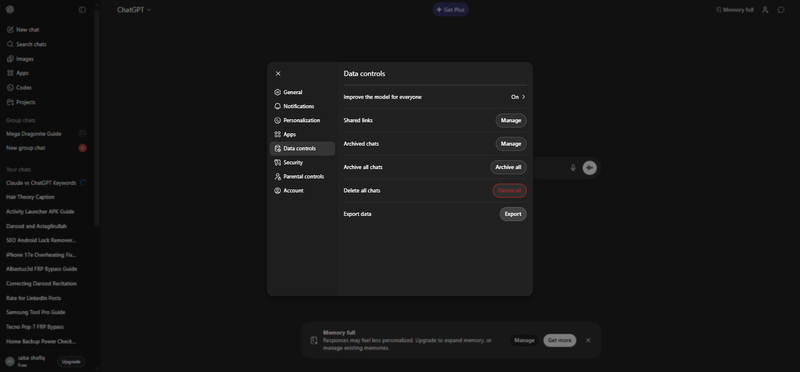
Step 2: Export Your ChatGPT Data
ChatGPT provides tools for exporting your history:
-
1.Go to Settings → Data Controls → Export Data.
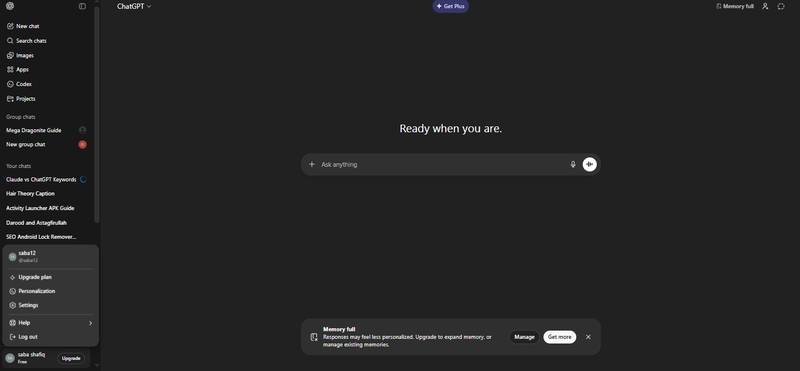
2.Click Export and wait for ChatGPT to package your chats.
-
3.You'll receive a link to download your full chat history in email.


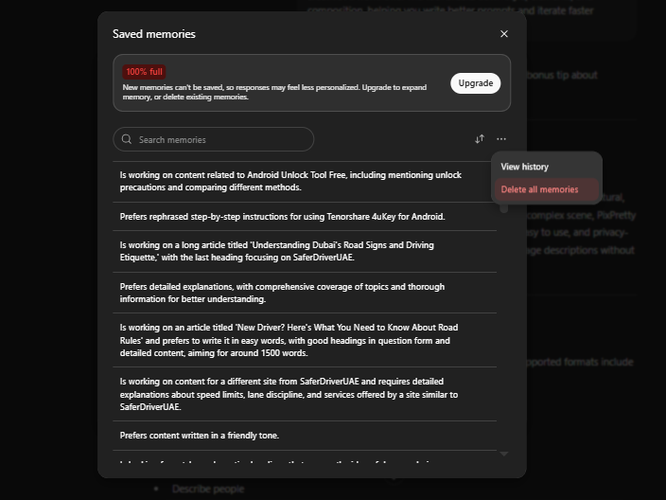
Step 3: Extract and Save Your ChatGPT Memory
ChatGPT's Memory feature stores your personalized preferences. To access and export it:
-
Open Settings.
-
Go to Personalization.

-
Choose Memory and select Manage Memory.
-
Copy the key details you want to preserve, such as:
Preferred writing style
Formatting rules
Personal information you want Claude to know
Step 4: Prepare a Memory Export Prompt
Claude supports importing memory through prompts. Use a detailed command like this:
Please list all memories you have stored about me, including:
- Personal details such as name, profession, interests
- My preferences for tone, structure, and formatting
- Past projects, workflows, and tools I use
- Anything else you recall from our conversations
Provide all details in a single code block for easy copying.

Send this prompt to ChatGPT. The output will contain all stored memories in a structured format you can copy and reuse.
Step 5: Import Your Exported Context into Claude
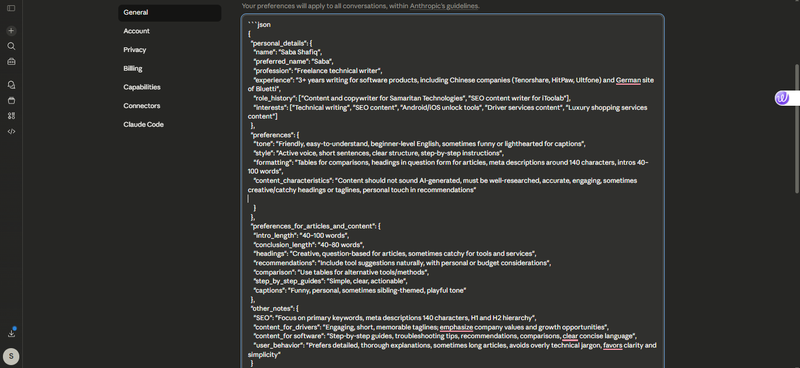
With your exported memory content and chat history in hand, you are now ready to bring it into Claude. One of Claude's strengths is its ability to work with long context windows, meaning that it can take in large amounts of text, files, and preferences in one place and apply them to future interactions.
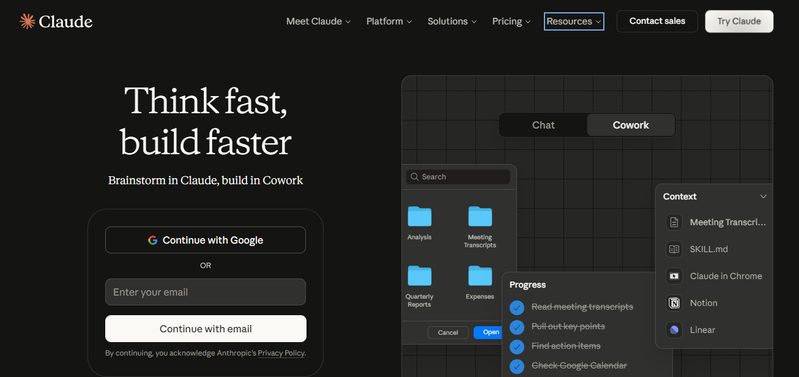
To import your data into Claude:
-
1.Sign in to your Claude account.
-
2.Create a new project or opening prompt where you plan to store your imported context.
-
3.Paste the memory content and any other key details you copied from ChatGPT.
-
4.Review the imported content and remove anything that is outdated or no longer relevant.


Step 6: Verify and Update Your Memories in Claude
Claude organizes memory into categories like:
-
Long‑term identity and preferences
-
Recent projects and tasks
Check that your imported memories are correctly categorized. Update anything that has changed since the export. This ensures Claude understands your work style and preferences accurately.
Step 7: Clean Up Your ChatGPT Account (Optional)
Once you've successfully migrated your data and confirmed that Claude has everything it needs to mirror your previous context, you can decide whether to delete your ChatGPT memories or the entire account. To clean up your ChatGPT presence:
-
1.Go back to Settings.
-
2.Open Personalization and then select Memory.
3.Delete all stored memories about you.
-
4.Optionally choose Account Delete if you no longer wish to use ChatGPT at all.

Bonus Tip: Turn Any Image into Clear, Natural Text with PixPretty AI
PixPretty AI Image Describer is a powerful online tool that instantly converts any image into clear, natural, and meaningful text. Whether it's a product photo, artwork, social media visual, or a complex scene, PixPretty accurately interprets and describes images in a way that matches your intent.
Fast, easy to use, and privacy-focused, it is ideal for creators, marketers, and anyone who needs quick, accurate image descriptions without compromising security.
Why PixPretty AI Stands Out
Intelligent Scene Analysis
Understand every detail of complex visuals objects, text, and environment quickly and accurately.
Flexible Output for Every Need
Short summaries, long explanations, marketing content, or focused object descriptions PixPretty adapts to your intent.
Multilingual Support for Global Use
Create natural, localized descriptions in your preferred language for international audiences and content creators.
Privacy-First Design You Can Trust
All processing is local. Images remain private with zero cloud storage or data retention, safe for sensitive visuals.
Steps to Describe Any Image Instantly
Step 1: Upload Your Image Effortlessly
Drag and drop, paste a URL, or copy-paste your image. Supports JPG, JPEG, PNG, WebP, and JFIF formats.

Step 2: Choose Your Description Style
Select from prebuilt templates or write custom prompts, such as:
-
Describe in detail
-
Describe briefly
-
Recognize objects or fashion
-
Generate marketing copy
-
Analyze artistic style
-
Convert images to AI prompts

Step 3: Generate Natural, Accurate Descriptions
Get instant descriptions ready to copy, download, or integrate into creative workflows or social media.
Conclusion:
In the AI era, choosing the right tool matters. Moving from ChatGPT to Claude can be smooth if you follow proper steps and manage your data carefully. Both tools have strengths, but Claude excels in memory handling, deep research, and long-form writing. To complement your workflow, try PixPretty AI Image Describer. It quickly turns any image into natural, accurate text, making your content creation and analysis faster and smarter.
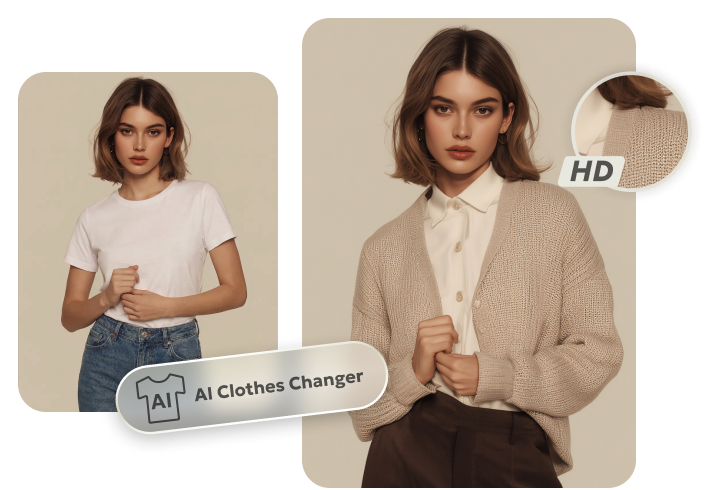
PixPretty AI Clothes Changer
- Instantly change outfits with AI in 1 click
- Realistic AI previews for every top, bottom, or dress
- Create and explore endless outfits and OOTDs without editing
Related Articles:


