


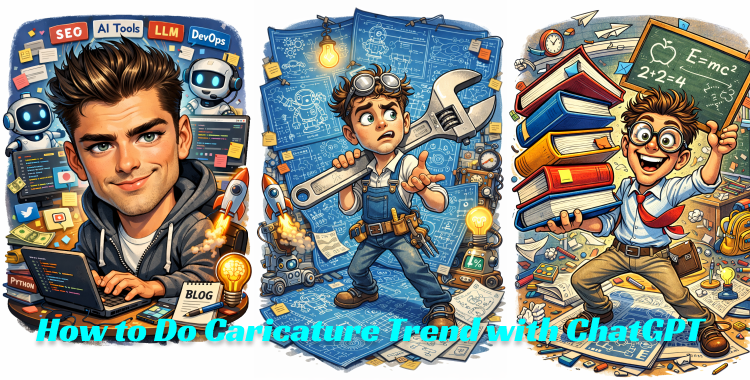
The ChatGPT caricature trend has taken over social media in early 2026, letting anyone turn a selfie into a hilarious, exaggerated cartoon that screams their job or vibe. Whether you are a chef juggling giant pans or a coder lost in pixel chaos, these 30 best prompts make it dead simple to create viral hits with zero art skills. Perfect for TikTok flexes or Instagram stories, they mix personalization with over-the-top fun to grab likes fast.
Part 1. How to Generate Viral Caricature Image on ChatGPT
Step 1: Upload Your Photo in ChatGPT
Open ChatGPT and upload a clear photo of yourself. For best results, use a front-facing image with good lighting, visible facial features, and minimal background distractions. This helps the AI capture your facial structure and expressions more accurately.
Step 2: Enter a Caricature Image Prompt
After uploading your photo, paste prompts: "Create a caricature of me and my job based on everything you know about me". You can also use the prompts listed in Part 2, Making sure the prompt clearly mentions exaggerated facial features, expressive emotions, bold outlines, and a vibrant cartoon or caricature style.

Step 3: Refine the Prompt and Regenerate
You can switch between different prompts or adjust specific details to fine-tune the result. Try modifying elements such as facial exaggeration level, color palette, background style, lighting, or artistic mood. Regenerate the image multiple times until you achieve the style you want.
Step 4: Save the Final Image
Once you're satisfied with the caricature image, save it to your device in high resolution. High-quality images tend to perform better on social media platforms and attract more engagement.
Step 5: Turn the Image into a Viral Video (Optional)
For even more reach, upload the saved caricature image to Grok and generate a short animated video. Animated caricature videos often receive significantly more attention and engagement on platforms like TikTok, Instagram Reels, and YouTube Shorts.

Part 2. Best 30 Caricature ChatGPT Prompts (Copy & Paste)
1. Caricature Portrait Prompts

- 1. Create a high-quality caricature portrait of a young man, featuring an oversized head, exaggerated facial proportions, large expressive eyes, and a playful smile. Bold outlines, vibrant colors, clean background, professional digital illustration style, studio lighting, ultra-detailed.
- 2. Turn this person into a caricature illustration with an enlarged forehead, sharp jawline, and slightly oversized nose. Emphasize personality through facial expression, smooth shading, cartoon realism style, bright color palette, high resolution.
- 3. Generate a detailed caricature portrait of a woman with exaggerated cheekbones, big sparkling eyes, and expressive eyebrows. Soft lighting, colorful background, polished digital art style, crisp linework, modern caricature illustration.
- 4. Create a professional caricature headshot with a large head-to-body ratio, stylized facial exaggeration, confident smile, bold contour lines, vibrant tones, clean white background, suitable for profile avatars.
- 5. Design a caricature portrait based on realistic facial features but with playful exaggeration. Highlight the eyes and mouth, slightly enlarged ears, smooth gradients, cartoon-style realism, high-detail digital painting.
- 6. Illustrate a caricature-style portrait with an oversized head, expressive eyes, simplified body, and strong personality. Bright lighting, colorful tones, sharp outlines, premium cartoon caricature artwork.
2. Job-Focused Prompts

- 7. Exaggerate an engineer surrounded by massive blueprints and quirky inventions, holding a giant wrench, funny puzzled expression, dynamic workshop pose, playful cartoon aesthetic, high detail.
- 8. Draw a caricature of a teacher juggling enormous books and chalkboard, wearing big round glasses, enthusiastic wide smile, classroom chaos in background, comic book style, bold outlines.
- 9. Generate a caricature of a nurse with an gigantic stethoscope around neck, caring yet playful expression, medical tools floating around, hospital setting, whimsical cartoon vibe, bright whites and reds.
- 10. Caricature a software developer typing on a colossal keyboard with code raining down, oversized coffee mug nearby, excited 'eureka' face, neon-lit desk setup, modern digital art style.
- 11. Exaggerate an artist painting on a huge canvas with rainbow splatters everywhere, beret comically askew, inspired wild expression, studio full of easels, vibrant hand-drawn caricature look.
- 12. Create a caricature of a chef wielding oversized spatulas and pots, with a comically huge hat, steaming kitchen background, exaggerated cheerful grin, cartoon style, vibrant colors, preserve facial identity.
3. Celebrity & Public Figure Caricature Prompts

- 13. Create a caricature illustration inspired by a famous movie star, featuring exaggerated facial traits, expressive eyes, bold outlines, vibrant colors, and a playful artistic style, not a realistic copy.
- 14. Design a caricature portrait inspired by a well-known singer, highlighting signature facial features with artistic exaggeration, smooth shading, colorful background, professional digital caricature style.
- 15. Generate a caricature inspired by a popular public figure, emphasizing unique facial characteristics, oversized head, expressive smile, cartoon realism, high-detail digital illustration.
- 16. Create a stylized caricature inspired by a famous actor's look, with exaggerated proportions, strong personality, bold linework, vibrant colors, and a polished cartoon finish.
- 17. Illustrate a caricature inspired by a well-known internet personality, focusing on facial exaggeration, expressive emotions, playful cartoon style, clean digital rendering.
- 18. Design a caricature portrait inspired by a celebrity's signature features, using artistic exaggeration, smooth gradients, bright colors, and professional cartoon illustration quality.
4. Couple, Family & Group Caricature Prompts
- 19. Create a caricature illustration of a couple with oversized heads, expressive facial features, warm smiles, matching cartoon style, vibrant colors, and a clean, friendly background.
- 20. Generate a family caricature portrait with exaggerated facial proportions, joyful expressions, unified cartoon style, colorful background, detailed digital illustration.
- 21. Design a caricature of two people standing together, large heads, small bodies, playful poses, bold outlines, bright colors, and a cheerful cartoon aesthetic.
- 22. Create a group caricature illustration with consistent exaggerated style, expressive faces, varied hairstyles, smooth shading, and a vibrant, cohesive color palette.
- 23. Illustrate a family caricature with oversized heads, warm expressions, simplified bodies, friendly cartoon style, clean lines, high-quality digital artwork.
- 24. Generate a cute couple caricature with a romantic cartoon style, exaggerated facial features, soft lighting, colorful background, polished digital illustration.
5. Pet & Animal Caricature Prompts
- 25. Create a caricature illustration of a dog with an oversized head, big expressive eyes, playful smile, soft fur texture, vibrant colors, cartoon-style digital art.
- 26. Generate a cat caricature with exaggerated facial features, large eyes, tiny nose, fluffy fur, bold outlines, bright color palette, cute cartoon style.
- 27. Design a pet caricature with a large head-to-body ratio, expressive emotions, smooth shading, vibrant tones, high-quality digital illustration.
- 28. Create a funny animal caricature with exaggerated proportions, playful pose, expressive eyes, bold cartoon outlines, and bright colors.
- 29. Illustrate a pet caricature with human-like expressions, oversized facial features, clean background, colorful cartoon realism style.
- 30. Generate a premium-quality animal caricature with exaggerated head size, detailed facial expression, vibrant colors, polished digital cartoon artwork.
Part 3. Tips to Create The Best Caricature Image
Score top-notch caricature images by nailing your photo setup and prompt tweaks right in ChatGPT. These quick tips deliver feed-ready results fast.
- Use a sharp, well-lit front-facing headshot in ChatGPT to lock your real features like eyes and smile for spot-on exaggeration.
- Input a job prompt like the chef one, copy ChatGPT's text output, and run it through MyEdit or Gemini for the visual magic.
- Boost with style tweaks like "neon glow" or "Pixar 3D," rerun 3-5 times, and add "preserve facial identity" to keep it hilariously you.
Part 4. Why Generate Caricature Went Viral
1. This trend took off in early 2026 by flipping daily jobs into instant cartoon gold with no hassle. It feeds straight into our meme craze.
2. ChatGPT digs your chat history for custom quirks, like a coder in code chaos, making every share feel personal and addictive.
3. Free access and zero skills spark quick wins, driving wild post volume on TikTok and Instagram coast to coast.
4. Endless tweak loops hook users, minting viral cartoon selves from regular peeps in moments.
Conclusion
Ready to make your own caricature that stops scrolls? Pick a prompt from our list, plug in your photo, and generate away until it is pure gold. For that final edge before posting, pop it into PixPretty AI to amp up sharpness and colors, turning good cartoons into absolute feed dominators that rack up shares nationwide.
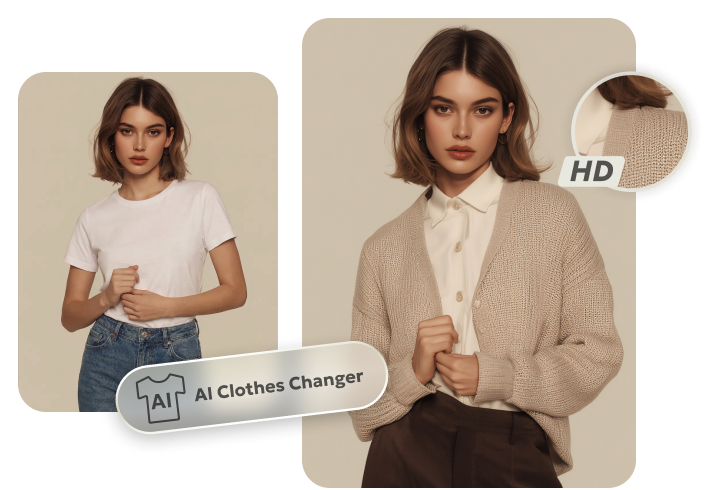
PixPretty AI Clothes Changer
- Instantly change outfits with AI in 1 click
- Realistic AI previews for every top, bottom, or dress
- Create and explore endless outfits and OOTDs without editing
Related Articles:


