


Christmas just got a tech twist!
Creators on Instagram, TikTok, and Facebook are sharing ChatGPT AI candy cane pictures. People use them for holiday profile pictures, Reels covers, digital Christmas cards, or even pet portraits in candy cane scenes.
Grab one of the 25+ copy-paste prompts below, tweak lighting or mood, and create your own festive AI masterpiece!
Table of Contents
- Part 1. AI Christmas photo trend
- Part 2. 25+ AI ChatGPT Candy Cane Picture Prompts
- 1. Ultra-Realistic Candy Cane Studio Portraits
- 2. Candy Cane Fashion & Editorial Style
- 3. Candy Cane Sitting & Posing Scenes
- 4. Candy Cane Holiday Sets & Backgrounds
- 5. Simple & Customizable Candy Cane Prompts
- 6. Candy Cane Pet Portraits
- Part 3. How to generate AI candy cane pictures with ChatGPT or Gemini
- Part 4. Best practices to Generate ChatGPT AI candy cane picture
- Part 5. Try festive outfit swaps for your AI Christmas photos FOR FREE
Part 1. AI Christmas photo trend
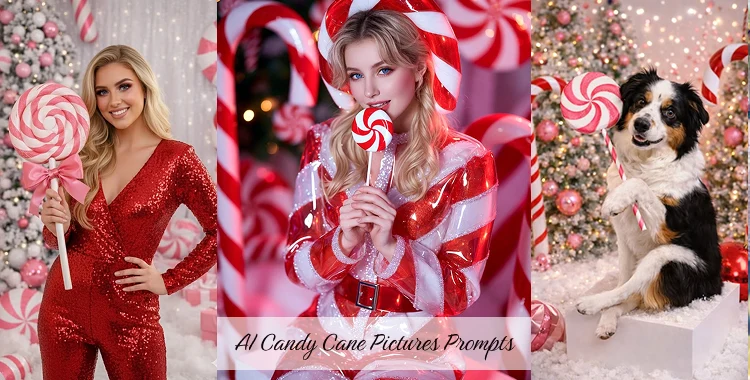
Creators on Instagram, TikTok, and Facebook now share “candy cane AI” portraits with spiral red‑and‑white outfits, peppermint backdrops, and studio‑style lighting. Many posts even share “copy and paste” prompts so others can join the trend and get similar glossy, high‑fashion Christmas photos
The style often mixes three elements:
- Ultra‑realistic or stylized portraits (people, kids, couples, or pets)
- Whimsical ChatGPT candy cane props and giant peppermint decor
- Clean Christmas studio lighting in 8K or “pro photography” look.
Brands and small creators use these AI Christmas photos for:
- Holiday profile pictures and Reels covers
- Digital Christmas cards and Etsy product displays
- Fun dog or cat portraits in ChatGPT candy cane scenes that feel like mini photo shoots.
 Related topic:
Part 2. 25+ AI ChatGPT Candy Cane Picture Prompts
Below are “copy and paste” prompts in different styles. Keep or change camera, lighting, or mood words as needed. Each prompt works for ChatGPT image, Gemini, Midjourney, DALL·E‑style tools, and more.
1. Ultra-Realistic Candy Cane Studio Portraits
Prompt 1:
Create an ultra-realistic 8K Christmas portrait using a 55mm lens with bright, playful holiday lighting.
The woman is in a whimsical candy-cane themed studio photoshoot.
Use her real facial features exactly as they are. Do NOT change or alter her face in any way.
Her hair is styled in a soft holiday updo with loose curls.
Her makeup is festive glam with winged eyeliner, warm eyeshadow, rosy cheeks, and soft pink lips.
She wears a sparkly white long-sleeve sequin jumpsuit with a scoop-back cut.
She is sitting on a white cube block, smiling confidently at the camera.
Around her are fluffy artificial snow, frosted Christmas trees, oversized red-and-white ChatGPT candy canes, and glowing string lights.
Lighting is clean and bright. Colors are red, white, and silver with a magical North Pole studio vibe.
Prompt 2:
Ultra-realistic 8K Christmas studio portrait with candy-cane decorations.
Use my real facial features exactly as they are. Do NOT modify my face.
I am seated on a white cube block, holding a giant peppermint lollipop over my shoulder.
Snowy floor, frosted trees, pink ornaments, and oversized candy canes surround me.
Festive glam makeup and bright holiday lighting.
Prompt 3:
8K Christmas portrait shot on a 55mm lens with bright, clean holiday lighting.
Candy-cane themed studio set with red-and-white peppermint props, fluffy artificial snow, and soft festive decor.
High-detail facial texture, realistic skin tones, sharp focus, and a joyful holiday expression.
Warm and cheerful Christmas atmosphere with vibrant red and white colors.
Prompt 4:
Ultra-detailed Christmas portrait in a candy-cane themed studio.
The subject is seated on a white cube block.
Snowy ground, oversized peppermint decorations, and frosted holiday elements surround the scene.
Clean studio lighting with gentle festive warmth, highlighting facial details and textures.
Prompt 5:
Photorealistic holiday portrait featuring playful candy-cane props.
Bright red and white color palette with soft silver accents.
Snowy floor, glowing holiday lights, and a whimsical North Pole Christmas studio atmosphere.
Natural facial expression with a warm and joyful holiday mood.
Prompt 6:
High-resolution Christmas portrait with playful candy-cane styling.
The subject wears a sparkling holiday outfit with subtle shimmer.
Snow textures on the ground, glowing festive lights, and oversized candy-cane elements in the background.
Overall mood is bright, joyful, and full of Christmas spirit.
2. Candy Cane Fashion & Editorial Style
Prompt 7:
Create an ultra-realistic 8K Christmas fashion editorial portrait.
The model wears a candy-cane inspired outfit in red and white with shimmering fabric.
Use her real facial features exactly as they are.
Frosted Christmas trees, oversized candy canes, and glossy ornaments in the background.
Professional editorial lighting with festive highlights.
Prompt 8:
High-fashion Christmas photoshoot with candy-cane styling.
The subject wears a sparkly sequin jumpsuit in bold red-and-white tones.
Clean studio background with subtle holiday accents.
Professional fashion lighting highlights the shimmer of the outfit and creates a polished editorial look.
Prompt 9:
8K holiday fashion portrait inspired by peppermint candy.
Elegant editorial pose with a confident expression.
Glamorous holiday lighting, soft shadows, and festive highlights.
Refined Christmas fashion aesthetic with red and white color accents.
Prompt 10:
Luxury Christmas fashion image with a candy-cane inspired color palette.
High-detail textures, polished styling, and refined holiday fashion elements.
Magazine-quality studio lighting with a premium, festive mood.
3. Candy Cane Sitting & Posing Scenes
Prompt 11:
Ultra-realistic Christmas portrait featuring a seated pose.
The subject sits on a white cube block with one leg crossed.
Use my real facial features exactly as they are.
I am holding a large candy-cane prop.
Snow-covered floor, frosted trees, oversized peppermint decorations, and warm lights.
Prompt 12:
8K Christmas image featuring a playful seated pose.
Candy-cane themed studio with fluffy snow, glowing holiday ornaments, and soft festive decor.
Bright and joyful lighting creates a cheerful Christmas mood.

Prompt 13:
Photorealistic holiday portrait with a relaxed sitting pose.
The subject sits on a white cube block surrounded by peppermint props.
Cozy Christmas lighting with warm highlights and soft shadows.
Prompt 14:
Candy-cane themed seated Christmas photoshoot.
Festive and natural pose with a soft smile.
Bright holiday atmosphere with red-and-white candy accents and gentle festive lighting.
4. Candy Cane Holiday Sets & Backgrounds
Prompt 15:
Create an ultra-realistic 8K Christmas set with a candy-cane theme.
Oversized ChatGPT candy canes frame the scene.
Snow blankets the floor.
Christmas trees are frosted and decorated with red and pink ornaments.
Bright, magical holiday lighting.
Prompt 16:
Photorealistic candy-cane themed Christmas environment.
Peppermint decorations throughout the scene, glowing holiday lights, and soft snowy textures.
Festive red-and-white colors create a cheerful and immersive Christmas atmosphere.

Prompt 17:
Whimsical North Pole candy-cane holiday background.
Dominant red-and-white tones, oversized Christmas ornaments, and soft snow covering the ground.
Magical and playful holiday setting.
Prompt 18:
High-detail Christmas background with candy-cane decorations.
Clean composition with festive props, soft snow, and warm holiday lighting.
Ideal for portraits, social media posts, or holiday cards.
5. Simple & Customizable Candy Cane Prompts
Prompt 19:
Create an ultra-realistic 8K Christmas portrait with a candy-cane theme.
Use my real facial features exactly as they are. Do NOT change my face.
Festive studio lighting, snowy background, and cheerful holiday mood.

Prompt 20:
Photorealistic candy-cane holiday image.
Bright red and white color palette with glowing Christmas lights.
Clean festive lighting and joyful seasonal atmosphere.
Prompt 21:
High-quality Christmas image with candy-cane decorations.
Clean studio lighting, festive details, and a joyful holiday vibe.
Bright, cheerful, and visually polished.
6. Candy Cane Pet Portraits
Prompt 22:
Ultra-realistic 8K Christmas portrait of a dog in a candy-cane themed studio.
The dog sits on a snowy floor surrounded by oversized red-and-white candy canes and peppermint props.
Bright, playful studio lighting highlights the fur texture and joyful expression.
Perfect for festive holiday cards or social media posts.

Prompt 23:
8K Christmas image of a cat wearing a tiny candy-cane scarf.
Snowy ground, frosted Christmas tree, and glowing string lights in the background.
High-detail fur, sharp focus on the eyes, cheerful and cozy holiday mood.
Prompt 24:
Photorealistic holiday portrait of a small dog with candy-cane accessories.
Seated on a white cube block, surrounded by oversized peppermint props and festive ornaments.
Warm, magical lighting with red, white, and silver Christmas colors.

Prompt 25:
Candy-cane themed portrait of a cat in a whimsical Christmas set.
Soft snow textures on the ground, glowing holiday lights, and playful oversized ChatGPT candy canes.
Natural pose, clear facial features, and joyful festive atmosphere.
Prompt 26:
High-resolution 8K Christmas pet portrait.
Dog or cat wearing candy-cane themed outfit, sitting or standing in a snowy studio set.
Bright, cheerful lighting with vibrant red-and-white colors and whimsical peppermint decorations.
Part 3. How to generate AI candy cane pictures with ChatGPT or Gemini
This section gives a simple workflow that works with most modern AI tools that support image generation.
Step 1: Pick your base photo or go text‑only
- Decide if you want to upload a real selfie / pet photo or let the AI create a full scene from text only.
- For portraits that “look like you,” users in forums often upload one clear, front‑facing photo with good light so the AI keeps your face consistent.
Step 2: Open ChatGPT image, Gemini, or another AI
- In ChatGPT (with image generation), start a new chat and either upload your photo or type your chosen prompt from the list above.
- In Gemini, open the image generation or “image from text” mode, then paste the prompt and adjust image size or ratio.
You can also use other tools like Midjourney, DALL·E, or dedicated “Candy Cane AI” web generators that are tuned for glossy peppermint textures.
Step 3: Paste and adapt your prompt
- Copy a prompt, then change details like gender, outfit, pet breed, or setting (indoor vs outdoor).
- Keep key structure: subject + candy cane props + lighting + mood + quality (8K, 55mm, studio, etc.) so the model understands the style.
Step 4: Generate, review, and refine
- Click generate and wait for the image. Check faces, hands, candy canes, and text (if any) for errors.
- If something is off, edit the prompt: add “sharp focus,” “clean background,” or “fix hands holding candy cane clearly” and generate again.
Step 5: Export and edit
- When you like the image, export in high resolution (PNG or high‑quality JPG) so it looks good on social platforms or prints.
- For final polish, use a dedicated photo editor to adjust color, crop for vertical Reels, and clean edges before posting.
Part 4. Best practices to Generate AI ChatGPT candy cane picture
- 1. Keep prompts short and clear
- 2. Control lighting and mood
- 3. Start from a strong base photo
- 4. Test different AI tools
- 5. Adjust composition for platform
Mention candy canes, setting, lighting, and mood in simple, direct phrases like “8K Christmas portrait, bright studio light.”
Use descriptors like “soft studio light,”“warm golden hour,” or “glossy peppermint” to create festive and realistic effects.
For portraits, use sharp, well-lit images with visible eyes. For pets, ensure the full body is visible in a clear pose.
Try the same prompt in ChatGPT, Gemini, or other generators—each handles candy cane details slightly differently.
Use vertical for TikTok/Reels, square for Instagram feed, wide for banners to match social media layouts.
Part 5. Try festive outfit swaps for your AI Christmas photos FOR FREE
After you generate your AI ChatGPT candy cane picture, you can use PixPretty AI Photo Editor’s free AI clothes changer** to instantly change outfits online.
- Upload your photo and try new holiday outfits in seconds.
- Explore different colors, styles, and fits—see your festive looks instantly.
- Perfect for Christmas portraits, Reels, or holiday cards.
- No editing skills needed, and it’s completely free online.
With PixPretty AI Photo Editor, you can mix and match outfits for all your candy cane portraits and get professional, polished results—without hours of manual editing.
Start Editing for FreeConclusion
AI ChatGPT candy cane pictures mix simple prompts, smart lighting words, and a strong base photo to create viral Christmas portraits, wallpapers, and pet images that feel both fun and polished.
Use the copy‑paste prompts above, test ChatGPT, Gemini, and other tools, then refine the final results with PixPretty AI Photo Editor so your candy cane images stand out wherever you post them online.
PixPretty AI Photo Editor
- 100% free AI Image Generator (Nano Banana 2 powered)
- 4K image quality with fast generation speed
- AI effects & filters for personal and e-commerce use

Related Articles:
- 25+ ChatGPT Christmas Photo Trend Prompt [Copy & Paste]
- 20+ Christmas Santa Claus AI Prompts Copy and Paste for Gemini & More
- 30+ AI Christmas Dress Prompt Ideas(Free AI Clothes Changer Online)
- How to do the Christmas Photo Filter Trend Free for Social Media
- 20+ ChatGPT Holiday Photo Prompts Copy & Paste 2026
- 20+ Creative AI Christmas Tree Prompts for Holiday Imagery


