


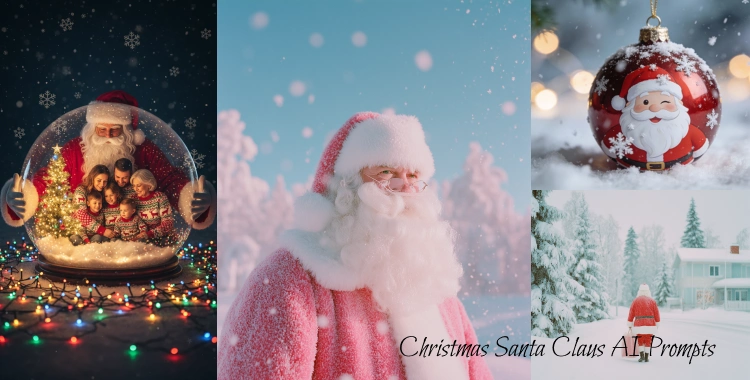
Want eye-catching Santa images this Christmas? Use clear prompts. Short prompts work. Add style words. Test and tweak.
Below you’ll find 20+ ready-to-use prompts, steps to make Santa images with Google Gemini, and simple tips to get clean results.
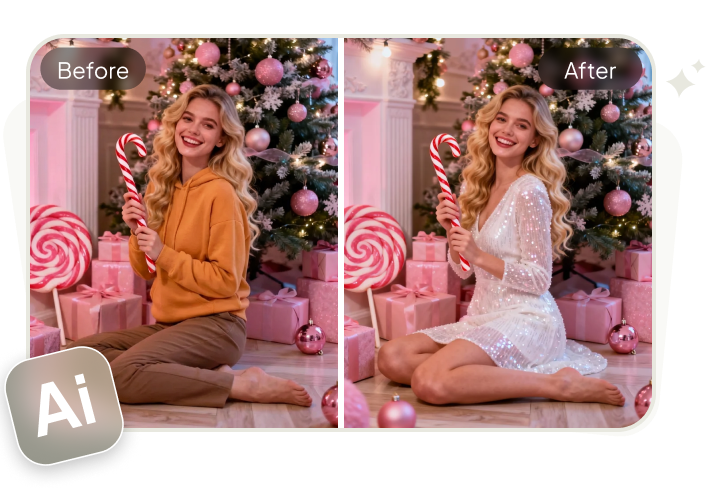
For an extra touch of festive fun, try PixPretty AI Clothes Changer to style your holiday photos and outfits in seconds—perfect for creating those unforgettable Christmas moments!
Table of Contents
Part 1. 20+ Christmas Santa Claus AI prompts
Below prompts are grouped by style. Each prompt is written to copy-paste into Gemini, Midjourney, Stable Diffusion, or other image AIs. Keep prompts short and add or remove style tags as you like.
1. Ultra‑Realistic Santa in Snowy Forest — Cinematic Winter Landscape
Prompt:
Ultra‑realistic Santa Claus walking through a dense snowy pine forest at night, holding a glowing brass lantern high, snow gently falling, cinematic 4K lighting, rich texture on deep red velvet suit, long white beard slightly blowing in cold wind, sharp depth‑of‑field, northern lights and stars in background, magical Christmas vibe, high contrast, crisp shadows.

2. Santa Delivering Gifts on Rooftop — Nostalgic Holiday Moment
Prompt:
Santa Claus standing on a snow‑covered rooftop at midnight, full sack of wrapped presents over his shoulder, soft moonlight behind him, slight fog and chimney smoke rising, glowing windows in houses below, ultra‑detailed face and rich fabric textures, cozy warm color palette, photorealistic 4K.
3. Santa with Reindeer and Sleigh — North Pole Epic Shot
Prompt:
Majestic Santa beside a golden sleigh, team of reindeer outfitted with glowing harness lights, snowy North Pole landscape with shimmering crystals, warm red‑and‑gold color tones, magic Christmas lights floating in wind, ultra‑realistic 4K photography, epic holiday movie aesthetic.
4. Cozy Santa Inside Christmas Cabin — Warm Holiday Comfort
Prompt:
Santa Claus sitting inside a sturdy wooden Christmas cabin, crackling fireplace behind him, soft warm lights and bokeh from ornaments on large tree, cookies and milk on rustic table, ultra‑realistic skin & clothing textures, peaceful winter mood, cinematic warm tones.

5. Magical Santa Throwing Sparkling Dust — Holiday Magic Close Shot
Prompt:
Santa Claus with broad grin throwing sparkling golden Christmas dust into the air, dark snowy background, glowing magic particles swirling around, fantasy Christmas vibe, detailed 4K portrait, soft rim lighting, enchanting festive atmosphere.
6. Santa with Christmas Elves in Toy Workshop — Busy Festive Scene
Prompt:
Interior of Santa’s toy workshop, Santa and cheerful elves building toys at workbenches, warm lantern glow, shelves packed with gifts and colorful ribbons, rustic wood details, ultra‑realistic characters with bright festive colors, cinematic atmosphere.
7. Heroic Santa in Heavy Snowstorm — Dramatic Winter Shot
Prompt:
Santa Claus standing strong in heavy blizzard, deep snow swirling around, bright red suit contrasting against muted blue‑grey background, wind pushing beard and coat, cinematic lighting, intense emotional scene, crisp ultra‑realistic 4K style.

8. Santa Flying Over City at Midnight — Modern Holiday Energy
Prompt:
Santa in sleigh flying above a modern city skyline at midnight, skyscrapers lit with festive lights, dynamic motion blur trailing reindeer, golden magical trails, ultra‑realistic 4K visuals, dreamy holiday excitement mood.
9. Cute Baby Santa Photography Style — Adorable Holiday Portrait
Prompt:
Adorable baby dressed as Santa, sitting in a large gift box, studio‑like soft warm lighting, delicate Christmas decorations and plush blankets, ultra‑detailed textures, shallow depth‑of‑field, photorealistic portrait with cozy holiday vibes.

10. Santa Eating Cookies and Milk — Classic Cozy Scene
Prompt:
Santa Claus pausing to enjoy cookies and milk in a warmly lit living room, fireplace in background, stockings hanging, gentle fairy lights, nostalgic film‑style lighting, ultra‑realistic 4K textures, relaxed holiday charm.
11. Fantasy Santa in Magical Winter Universe — Dreamlike Atmosphere
Prompt:
Santa floating in a soft, magical winter universe, glowing snowflakes like stars, surreal color palette of icy blue and gold, slight sparkles around his form, highly detailed textures, artistic winter fantasy style.
12. Santa and Kids in Snowy Village — Heartwarming Story Shot
Prompt:
Santa surrounded by happy children in a snow‑covered village square, wooden market stalls decked with lights, soft falling snow, warm smiles and joyful expressions, ultra‑detailed faces, heartbreaking holiday warmth, realistic storytelling scene.

13. Old‑World Santa Portrait — Vintage Style Illustration
Prompt:
Antique Victorian‑style Santa Claus portrait, textured canvas effect, warm muted colors, classic detailed beard and robe, soft vignette, traditional illustration mood.
14. Santa with North Pole Signpost — Travel Aesthetic
Prompt:
Santa standing beside a frosty North Pole wooden signpost, thick snowfall, beautifully detailed clothing fabrics, snowflakes glistening, neutral winter light, ultra‑realistic photography style with crisp focus.
15. Santa Reading a Letter by Candlelight — Intimate Warm Mood
Prompt:
Santa Claus reading a child’s Christmas letter by warm candlelight, soft shadows over expressive face, cozy indoor background, subtle depth‑of‑field, cinematic intimate portrait realism.
16. Street Santa in Urban Winter Parade — Festive City Feel
Prompt:
Santa walking in a cheerful winter parade, city street lined with lights and banners, crowds wearing scarves and hats, confetti in the air, joyful energy, ultra‑realistic 4K city photography style.

17. Classic Red Santa Product Portrait — Commercial Quality
Prompt:
Studio photo of Santa Claus holding a beautifully wrapped gift box with elegant ribbon, clean background, professional lighting setup, ultra‑detailed red suit texture, perfect for ads and banners.
18. Snow Globe Santa Magic — Miniature Fantasy Shot
Prompt:
Santa inside a snow globe surrounded by swirling snow, tiny enchanted lights, reflective glass details, crisp high‑resolution fantasy microcosm look, artistic depth.
19. Festive Santa Street Performer — Warm Urban Vibes
Prompt:
Santa Claus singing carols on a snowy city sidewalk with vintage street lamps, festive crowd gathered, glowing wreaths, acoustic holiday feel, ultra‑detailed winter textures.
20. Santa’s Sleigh Dust Trail — Motion Magic Scene
Prompt:
Santa’s sleigh mid‑flight at dawn, glittering snow dust trailing in sunlight, warm pastel sky, dynamic motion blur on reindeer legs, ultra‑realistic 4K action shot.

21. Modern Tech Santa in Neon Town — Futuristic Christmas
Prompt:
Futuristic Santa Claus in sleek red mech suit, delivering gifts with floating drone companion, neon‑lit snowy city nightscape, cinematic cyberpunk holiday vibe.

Pro Tip:
For best results, always include lighting style (e.g., “cinematic lighting”, “studio portrait”), camera detail (like “4K”, “high resolution”, “depth‑of‑field”), and scene mood (e.g., “cozy”, “heroic”, “magical”). These help AI tools produce cleaner, higher‑fidelity images that rank better on Google and social media.
Part 2. How to make Christmas Santa Claus images with Gemini
1. Pick the right Gemini model or tool.
For quick images use Google Gemini’s fast image model (Gemini 2.5 Flash / Nano Banana). For higher detail use advanced image models (Gemini 3 Pro or Imagen via the API).
2. Use a clear prompt.
Copy and paste any of the prompts above, or you can create entirely new prompts by adding new content.
Send the prompt. Look at the image. Note what to change.
3. Use edit or image+text mode to refine.
Upload the image and ask Gemini to change color, hat, or background. Gemini supports image + text edits and multi-image composition.
4. Export and polish.
Download the best outputs. If you need clean backgrounds or batch file tasks, use an image polish tool like Pixpretty (background removal, batch renaming) before publishing.
Part 3. Tips to make better Santa AI images
- Keep prompts short and clear. Use one idea per line if you want.
- Use style anchors. Add one art style word: photorealistic or storybook.
- Specify color and light. Words like warm glow, golden hour, soft shadows help a lot.
- Choose aspect ratio. Add --ar 4:5 or square if the tool supports it.
- Use reference images when needed. Upload a photo and ask the model to match the pose or color. Gemini and many tools support image+text edits.
Part 4. Enhance Your Holiday Photos with Pixpretty AI for Free
Looking to make your Christmas images stand out this season? Pixpretty's Free AI Clothes Changer is here to take your festive photos to the next level! Whether you're snapping a picture of Santa or a holiday family portrait, Pixpretty makes it easy to switch up outfits in your images with just a few clicks.
Imagine adding a perfect Santa outfit, holiday sweaters, or even festive accessories to your photos—without the need for a wardrobe change! It’s quick, fun, and totally free to use.
Plus, Pixpretty’s AI tools offer much more than just clothing changes. With PixPretty AI Photo Editor, you can easily remove backgrounds, batch edit multiple images, and even polish your photos for a professional look—all for free!
Conclusion
Use clear, short prompts. Pick a style, then tweak. Gemini and other image AIs let you make or edit Santa images fast. Try portrait, cozy, or epic styles from the prompt list above.
After you generate, use PixPretty AI Photo Editor to retouch portraits, remove backgrounds, and batch edit for a polished look. That helps you publish faster with professional-quality results.
PixPretty AI Clothes Changer
- Create charming Christmas looks with ease
- Turn everyday photos into festive holiday scenes
- Perfect for Christmas photos and family moments
Related Articles:
- 100+ Merry Christmas and Happy New Year Wishes and Quotes for 2026
- 9 Christmas Picture Ideas: Fun Shots for Family, Couples, Moms & Kids
- Facebook Christmas AI Trend: How to Make Viral Posts 2026
- 20+ Christmas AI Prompts for Men Copy Paste 2026 Trending
- 20+ Christmas AI Prompts for Women Copy Paste - 2026 Trending
- 20+ Creative AI Christmas Tree Prompts for Holiday Imagery


