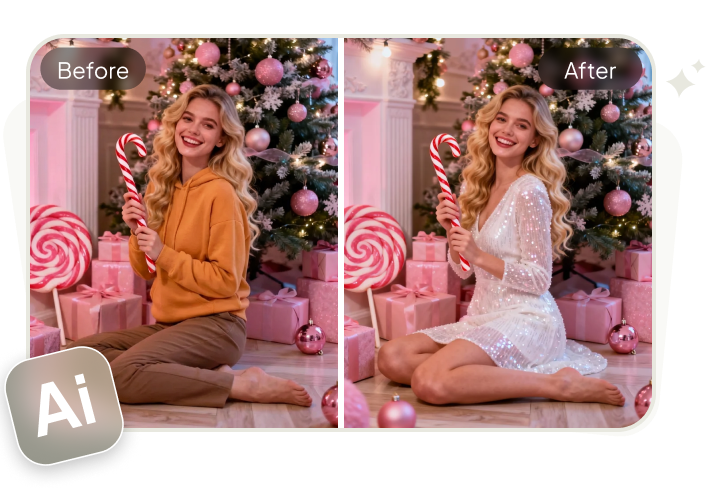
Every holiday season brings new photo trends, but the Christmas photo filter trend is standing out in 2025. Scroll through Instagram, TikTok, or Snapchat, and you will see festive selfies, cozy family photos, and playful holiday edits everywhere.
With AI powered Christmas photo filters, anyone can turn a simple picture into a holiday ready image in seconds. This complete guide share how to do the Christmas photo filter trend for free.
Table of Contents
Part 1. What Is the Christmas Photo Filter Trend in 2025?
In 2025, Christmas photo filters are no longer simple holiday stickers. Powered by AI, these filters can change lighting, style, and even entire scenes, turning everyday photos into festive visuals that feel polished and immersive. Social media users are focusing more on mood, storytelling, and shareability than ever before.
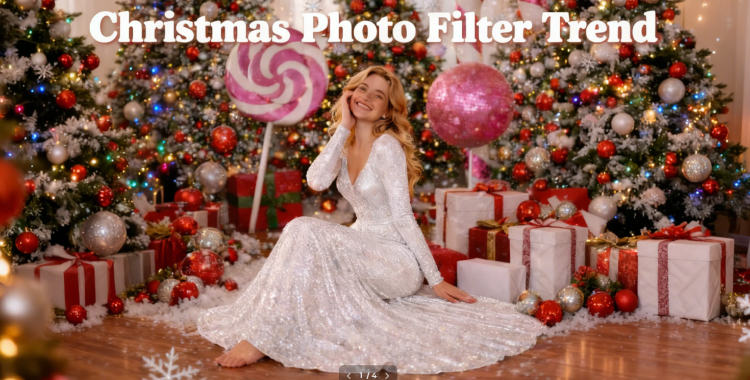
1. Christmas Portrait with Playful Candy-Land Theme
This quirky yet fun Candy-Land themed Christmas portrait filter is one of the hottest trends right now. Imagine vibrant Christmas trees, oversized candy canes, and a sparkling white sequin backless jumpsuit. It’s beautiful, elegant, and playful all at once.
Trust me, this filter will definitely make your social media pop and catch everyone’s attention!

2. Cinematic AI Holiday Scenes
Instead of basic filters, users place themselves into fully generated Christmas settings. Popular looks include classic holiday movies, snowy town squares, and elegant winter interiors that feel cinematic and high end.

3. 90s Nostalgia Holiday Look
Inspired by old family albums, this trend recreates the warm, slightly grainy feel of 1990s holiday photos. Bright camera flash, cozy indoor lighting, and colorful Christmas lights give images an authentic throwback vibe.

4. Cozy Grandmacore Aesthetic
For a more natural feel, many users prefer soft lighting and rustic textures. These filters highlight warm tones, home kitchens, handmade desserts, and classic holiday comfort.

5. Snow Globe Photo Effects
Snow globe filters use depth effects to surround people with falling snow. They are especially popular for profile photos, couples shots, and digital Christmas cards.

Part 2. How to Create Best Christmas Photo Filter Trend Look
1. Create Best Christmas Photo Filter Trend in PixPretty AI
You can create eye catching Christmas photo filter trend images with PixPretty AI for free. There is no cost to start, so anyone can easily join the holiday trend.
- 1. Open PixPretty AI and go to the AI Clothes Changer feature. Upload your selfie and the outfit you want to wear, using a trendy outfit as an example. Then, click Generate.
- 2. Wait for a few seconds, and PixPretty AI will seamlessly change your outfit. Once done, you can download the image and share it on your social media.
- 3. If you're not satisfied with the result, you can click the "Regenerate" button to create a new version. You can repeat this process until you get the perfect Christmas photo you love.


2. Create Best Christmas Photo Filter Trend in Instagram
On Instagram, Christmas photo filters are mainly used in Stories and Reels through the Effects Gallery. Many creators release seasonal AR effects and color filters in December to match the holiday aesthetic.
Popular styles include funny Christmas photo filters, cozy holiday lighting filters, snowy winter overlays, cartoon and animated Christmas effects, and vintage christmas photo filter that give photos a warm, festive feel.
Steps:
- 1. Open Instagram and swipe right from the home feed to open the Stories camera.
- 2. At the bottom, swipe through the effects until you see the Browse effects button and tap it.
- 3. Use the search bar and type Christmas, Holiday, Xmas, or similar keywords to find festive filters.
- 4. Tap any effect to see a preview, then tap Try it to use it on a photo or video.
- 5. You can also upload a photo from your gallery, then tap the Restyle or effects icon to apply a Christmas style or color filter on top.
- 6. Add text, music, or stickers, then share it to Stories, Reels, or your feed to match the 2025 Christmas filter trend.


3. Create Best Christmas Photo Filter Trend in Snapchat
There is free Christmas filters for photos on Snapchat, you mainly use the built in holiday lenses. Snapchat rolls out many Christmas themed lenses every December, including Santa hats, snow effects, and cozy lighting looks.
Steps:
- 1. Open Snapchat and go to the main camera screen.
- 2. Tap the screen once to bring up the filters carousel.
- 3. Tap the search icon at the top and type Christmas or Holiday. This shows all current Christmas photo filter.
- 4. Scroll through the filters section and tap a filter to preview it on your face or photo.
- 5. Take a snap or load a photo from Memories, then adjust stickers, text, or music if you want to make it more on trend.
- 6. Save the snap or post it directly to your Story or send it to friends to join the trend.


4. Create Best Christmas Photo Filter Trend in ChatGPT
ChatGPT lets you easily create festive Christmas photos, whether from your own portrait or a fully AI generated character. With simple prompts, you can add decorated trees, fairy lights, snow, and cozy lighting to make your images look ready for social media.
- 1. Open Google ChatGPT in your browser or app and sign in with your Google account.
- 2. Start a new chat and go to the image or photo editing section, or choose the Create image option if available.
- 3. Upload a clear, well lit portrait you want to turn into a Christmas photo, or skip upload if you want a fully AI generated character.
- 4. In the prompt box, type a detailed Christmas prompt, for example:
- 5. If there is a Keep face or use this photo as reference option, turn it on so ChatGPT does not change your identity.
- 6. Click Generate and wait a few seconds for ChatGPT to create your Christmas image. If the style is not perfect, tweak a few words in the prompt, such as changing indoor scene to snowy outdoor market, and regenerate.
- 7. Download the final image to your phone or computer and post it on Instagram, Snapchat, or other platforms to join the 2025 Christmas photo filter trend.

"Create an ultra-realistic 8K Christmas portrait, shot on a 55mm lens, with bright, playful holiday studio lighting. The person from the attached image is featured in a whimsical candy-cane themed photoshoot, surrounded by giant pink peppermint props, snowy ground, festive Christmas trees...."
(Check this for more for ChatGPT trending Christmas prompts.)

Part 3. Tips to Make Your Christmas Filter Photos Go Viral
Creating a beautiful photo is only half the battle. If you want your holiday content to actually stop the scroll and rack up likes, you need to understand how the 2025 algorithms work. Use these strategic tips to give your festive posts the best chance of going viral.
1. Master the "Hook" in the First Second
On platforms like TikTok and Instagram Reels, the first second of your video determines its success.
- The Transition: Start with a "low-effort" pajamas look and use a snap or a clap to transition into your high-end AI Christmas transformation.
- The Movement: If you are using a static photo, add a subtle "photo zoom" or "3D bounce" effect to make it feel dynamic rather than a still image.
2. Use Trending "Slowed + Reverb" Audio
In 2025, audio is just as important as the filter. The "90s Nostalgia" trend is currently paired with specific sounds.
- The Music Choice: Look for slowed-down versions of classic carols or Lo-Fi holiday beats.
- The Strategy: Check the "Trending" tab on TikTok and look for the small rising arrow next to the song name. If a sound has under 50,000 uses but is rising fast, that is your sweet spot.
3. Optimize for High-Quality Export
The best AI filter won't save a blurry upload. Social media platforms often compress your files, making them look cheap.
- Camera Settings: Always film or shoot in 4K at 60fps.
- App Settings: Before uploading to Instagram or TikTok, go to your "Advanced Settings" and ensure "Upload at Highest Quality" is toggled on.
- Lighting: Even with an AI filter, good natural lighting on your face makes the AI integration look much more seamless and "real."
4. Engagement-Bait Your Captions
The algorithm rewards comments, so give your audience a reason to type something.
- Ask a Question: Instead of saying "Merry Christmas," try "Is it too early for the 90s vibes?" or "Rate this AI transformation 1 to 10."
- The "Hidden Detail" Trick: Mention something small in the background of your photo. People will zoom in to find it and spend more "watch time" on your post, which signals the algorithm to show it to more people.
5. Use the 2025 "Power Hashtags"
Broad hashtags like #Christmas are too competitive. To go viral, you need to be specific.
- Niche Tags: Use a mix of broad and specific tags like #AIGrinch, #90sAesthetic, #Christmas2025, and #HolidayVibes.
- The Limit: Stick to 3 to 5 highly relevant hashtags. Overloading your caption with 30 tags can actually hurt your reach this year.
FAQs on Christmas Photo Filter Trend
Q1. Which tool is best for Christmas photo filters?
AI photo editors and social apps are the most popular choices. Tools like PixPretty AI and built in filters on Instagram, TikTok, and Snapchat are widely used because they are easy and fast.
Q2. How to put Christmas photo filters on photos in TikTok?
To add filters in TikTok, tap the Add Post (+) button at the bottom, then select Filters on the side panel. Choose a filter, adjust its strength using the slider, and tap anywhere to return to the camera screen. From there, you can record your video with the chosen filter applied.
Q3. How can I make my pictures look more Christmassy?
Use warm color tones, add Christmas themed filters, include holiday elements like lights or snow, and choose cozy backgrounds such as fireplaces or decorated rooms.
Q4. Are there any free apps for Christmas photo filters?
Yes, there are several free apps for Christmas photo filters. Popular options include Instagram, Snapchat, and PixPretty AI. These apps offer a variety of holiday-themed filters, such as snow effects, Christmas decorations, and festive frames, all available at no cost.
Conclusion
The Christmas photo filter trend continues to grow in 2025 because it makes holiday creativity easy and accessible for everyone. With just one photo, you can capture the festive mood and share it instantly on Instagram, TikTok, Snapchat, or Facebook.
Tools like PixPretty AI make it even simpler by offering ready to use Christmas filters alongside quick photo editing features. Use the right filter to help your Christmas photos feel polished without extra effort.
PixPretty AI Clothes Changer
- Create charming Christmas looks with ease
- Turn everyday photos into festive holiday scenes
- Perfect for Christmas photos and family moments