Gemini AI images often come with watermarks that can make them less usable. Whether for personal projects or professional work, knowing how to remove Gemini watermarks safely is essential.
In this guide, we’ll show you the best methods to remove gemini watermark without losing image quality. From AI-powered online tools to manual editing, you’ll learn step-by-step techniques that are easy to follow. By the end, you can get clean, high-quality images ready for use in minutes.

Table of Contents
Part 1: Is It Legal to Remove the Gemini Watermark?
Watermarks on Gemini AI images exist to protect content and intellectual property. A Gemini watermark remover can help clean images, but removing watermarks without permission may violate copyright laws or the platform’s terms of service.
For personal projects, educational purposes, or images you own, a Gemini watermark remover is safe to use. Always follow copyright guidelines to ensure images can be reused without legal issues, while still maintaining high quality.
Part 2: How to Remove Gemini Watermark: Best Methods for Clean Image
Removing Gemini watermarks can seem tricky, but with the right tools, it’s fast, safe, and preserves image quality. Below are the best methods, including official options and AI-powered removers that work instantly online.
Method 1 – Official Way: Using Gemini Pro
The official way to remove Gemini watermarks is through Gemini Pro. This is the safest and legal method, ensuring high-quality results without violating copyright.
Steps to use Gemini Pro:
-
1.Subscribe to Gemini Pro and sign up for the Pro plan to unlock watermark-free downloads.
2.Create your image as usual within the Gemini AI interface.
-
3.Download the clean image and with a Pro subscription, images are automatically free of watermarks and ready to use.
Method 2 – Automatic Watermark Removal with Dedicated Software
For users who do not have Gemini Pro or prefer free alternatives, AI-powered watermark removers are the easiest and most efficient solution. These tools automatically detect and remove watermarks while preserving image quality, making them ideal for beginners and professionals alike.
Some of the best AI-based watermark removers include Nano Banana, NoteGPT, and Monica AI. Each has unique features and advantages.
1. Pixpretty ai Object Remover
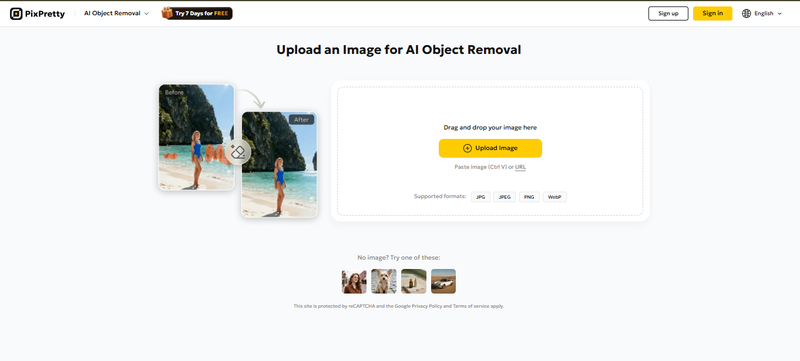
Removing watermarks from Gemini AI images is simple with PixPretty AI Object Remover, a smart Gemini watermark remover online. This tool automatically detects and removes watermarks, logos, text, or unwanted objects from your photos in just a few clicks.
You don’t need any advanced editing skills. PixPretty AI Object Remover keeps your images sharp and high-quality while saving time. It also offers manual editing for precise control and bulk removal for multiple images at once.
With features like one-click removal, automatic detection, and support for multiple formats, using an AI tool is the fastest way to get clean.

Key Features:
-
The software instantly identifies watermarks and unwanted objects for one-click removal.
-
Erased areas blend seamlessly into the background, maintaining the image’s original clarity and sharpness.
-
Manual Editing Tools Brush, rectangle, and lasso tools allow precise removal for more control.
-
Remove watermarks from multiple images at once, perfect for e-commerce or batch projects.
-
Works with JPG, PNG, JPEG, WEBP, and other common image types.
-
Most online tools process images in the browser or securely, ensuring your photos remain private.
-
Some tools also act as AI retouch solutions for portraits, removing blemishes, smoothing wrinkles, or cleaning background clutter.
How it Works to remove gemini watermark:
-
1.Choose your Gemini-generated photo (supports PNG, JPG, JPEG, WEBP).
-
2.The AI automatically detects and removes watermarks, or use manual tools to refine edits.

-
3.Save your watermark-free image instantly, ready for professional use.


2. Nano Banana
Nano Banana uses reverse alpha blending technology for watermark removal. It is a browser-based solution, meaning all processing happens on your device keeping your images private and secure.

Key Features:
Supports JPG, PNG, and WebP images
Fast processing with millisecond response
Completely free, no registration required
Lossless image quality (no blurring or artifacts)
Images never leave your device for privacy protection
How to remove gemini watermark using Nano Banana:
1. Select Original Image
Drag and drop your Gemini AI image into the Nano Banana browser tool.
2. Auto Processing
Nano Banana automatically detects the watermark using its AI algorithm and removes it in seconds.
3. Save Clean Image
Once the process is complete, download the clean, watermark-free image.
3. NoteGPT
NoteGPT is a popular free online AI watermark remover designed for quick and simple removal. Its AI automatically detects and erases watermarks in one click.

Key Features:
-
Works directly in the browser, no software installation needed
Free and beginner-friendly
Supports JPG, PNG, WebP, and other formats
Rated 4.9+ by millions of users
Handles logos, text watermarks, and small stains
Step-by-step guide how to remove gemini watermark with NoteGPT:
1. Upload Your Image
Click the “Upload” button and select your Gemini AI image.
2. Remove Watermarks Automatically
The AI detects any watermarks, logos, or text and removes them instantly.
3. Download the Clean Image
After processing, download your watermark-free image immediately.

Tip:
NoteGPT is trusted by schools, teams, and millions of users, making it reliable for both personal and professional projects.
4. Monica AI
Monica AI is an advanced AI-powered watermark remover that works with complex watermarks, logos, and stains. It is suitable for professional photographers and anyone looking for high-quality, precise results.

Key Features:
Supports JPG, JPEG, PNG (max 10 MB)
Free daily credits to test watermark removal
-
Makes sure high-quality output without blurring or distortion
Images are processed securely; no data is stored on servers
Can handle text watermarks, logos, stains, or other marks
Step-by-step guide for Monica AI:
1. Upload Your Image
Drag your Gemini AI image into the Monica AI tool.
2. AI Automatic Detection
The tool identifies and removes watermarks efficiently.
3. Download and Adjust
Download the clean image instantly. Optionally, use the “Upscale” feature to improve resolution for professional use.
Method 3 – Gemini Watermark Remover Extensions
For a fast and convenient way to remove watermarks, browser extensions are a great option. The Gemini Watermark Remover Extension allows you to clean your AI-generated images instantly, without needing software or subscriptions. It is perfect for designers, content creators, and social media managers who want high-quality, watermark-free images in just a few clicks.
Why use a Gemini watermark remover extension?
Upload, click, and download no editing skills required.
-
Uses reverse alpha blending to maintain original image fidelity.
Works directly in your browser, so it’s fast and private.
PNG, JPG, and other common image types.
-
All processing happens locally; your images never leave your computer.
How to Use Gemini Watermark Remover Extension
1. Install the Extension
Go to the browser store or visit the official website: Gemini Watermark Remover Extension. Click “Add to Browser” and wait for installation.
2. Open the Extension
Click the extension icon in your browser toolbar to launch it.
3. Upload Your Gemini Image
Drag and drop your Gemini-generated image into the extension window, or click “Browse” to select it from your files.
4. Remove the Watermark
Click the “Remove Watermark” button. The extension’s AI automatically detects and removes the watermark while preserving the original image quality.
5. Download the Clean Image
Once processed, the cleaned, watermark-free image is downloaded automatically to your computer.
FAQ – Remove Gemini Watermark
Q1: Can you remove the Gemini watermark?
Yes, you can remove the Gemini watermark using tools like PixPretty AI Object Remover, online watermark removers, browser extensions, or manual editing software. These methods clean your images while keeping quality intact.
Q2: How to get rid of AI watermark?
AI watermarks can be removed with automatic AI watermark removal tools, dedicated software, or browser extensions. Simply upload your image, let the tool detect the watermark, and download the clean image.
Q3: Does Gemini leave watermarks in text?
Yes, Gemini may add watermarks to AI-generated text or images. For text-based watermarks, you can use text cleanup tools or export the content from the platform’s paid versions to get watermark-free results.
Conclusion:
Removing watermarks from Gemini AI images is now simple, fast, and effective with the right tools. Whether you use official methods, AI-powered software, or browser extensions, you can get clean, professional images without losing quality. For the easiest and most reliable solution, we recommend PixPretty AI Object Remover. It is a powerful Gemini watermark remover online that delivers precise, high-quality results in just a few clicks, saving time and effort for all users.
PixPretty AI Object Remover
- Remove unwanted objects in 1 click with AI detection
- Deliver natural, high-definition results
- Clean up photos fast for e-commerce, portraits, and daily editing