


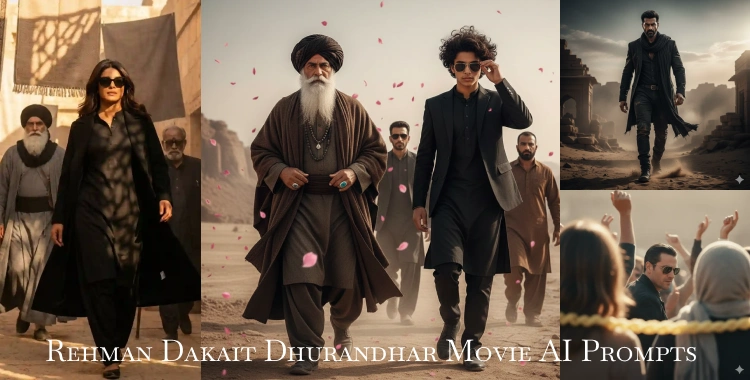
AI image editing is now one of the biggest trends online. Many users want to make cool Dhurandhar AI photos using simple text prompts. One style that is going viral involves the Rehman Dakait AI prompt.
Here is the complete guide, including 20 Rehman Dakait Dhurandhar Movie AI Photo prompts for you! Anyone can use these prompts in tools like Google Gemini to turn a normal photo into an epic movie scene.
Table of Contents
- Part 1: What Is Rehman Dakait Photo Editing?
- Part 2. 20+ Trending Rehman Dakait – Dhurandhar Movie AI Prompts
- A. Cinematic Hero & Entry Scene Prompts
- B. Portrait & Dramatic Close-Up Prompts
- C. BTS & Group Scene Prompts
- D. Creative & Poster‑Style Prompts
- Part 3: How To Create Dhurandhar Movie Scene Photos
- Part 4: Tips to Make Better AI Prompts
Part 1: What Is Rehman Dakait Photo Editing?
Rehman Dakait photo editing means using AI to turn a regular photo into a dramatic, cinematic portrait. This trend has grown fast on Instagram, YouTube, and Telegram channels where creators share prompts to get ultra-realistic photos that look like scenes from Dhurandhar.
- The style usually features a rugged look with intense eyes, a strong jawline, and bold lighting.
- Clothes are dark and dramatic — like a black kurta or long coat.
- The background is often desert or dusty landscapes with shadows and sun rays.
Creators use this for social media posts, reels, thumbnails, or profile art. These prompts are becoming part of daily trends in AI art communities.
Part 2. 20+ Trending Rehman Dakait – Dhurandhar Movie AI Prompts
A. Cinematic Hero & Entry Scene Prompts
1. Main Dhurandhar Hero Entry — Epic Desert Walk
Create an ultra-realistic full-body cinematic portrait of the uploaded face reference standing in the center of a dusty desert street. The subject wears a long flowing black coat over a classic black kurta-pajama and a loosely draped black scarf. Dark rectangular aviator sunglasses reflect warm golden sunlight. Slight breeze lifts dust around the feet. Ancient sandstone market buildings line the background. Add dramatic high-contrast shadows, dusty atmosphere, cinematic warm color grading, and subtle motion blur to suggest slow-motion hero entry. 8K detail, shallow depth of field, dramatic composition. Preserve my face identity exactly.
2. Hero Arrival with SUV and Haze
Generate a photorealistic mid-shot of the uploaded face walking away from a sleek white SUV parked on a dusty desert road. Outfit: tailored black blazer layered over traditional black kurta, matching black trousers, gold-rim aviators. Soft desert haze and distant mountains. Warm golden hour sun with deep shadows, cinematic color tones, gritty realistic textures, dramatic film mood. 4K ultra realism, shallow depth of field, wide cinema lens feel. Face 100% identical.
3. Dhurandhar Hero Slow-Motion Entrance
Ultra cinematic wide shot with subject mid-stride toward camera. The uploaded face looks calm, eyes forward, jawline sharp. Black outfit: long coat, tunic, and boots with subtle dust trail. Two supporting men follow 5–10 steps behind in blurred focus. Golden dust particles float in the warm backlight. Strong cinematic shadows, film grain texture, high contrast grading. 8K ultra-realistic details. Face identity retained.
4. Golden Oasis Ambush Feel
Photorealistic frame at sandy oasis crossroads. Main character in center with intense gaze. Outfit: black kurta, heavy black overcoat, aviators. A few henchmen silhouettes behind him with blurred motion. Warm golden light breaks through palm trees, dramatic shadows on sand, dusty glowing particles in the air, cinematic texture. 8K ultra-detailed. Keep face consistent with uploaded photo.
5. Night Alley Hero Walk
Cinematic low-light scene in a narrow desert alley at night. Neon and torchlight reflect off wet ground. Subject in black trench coat and sunglasses, walking forward with confident posture and slight grin. Warm and cool tone contrast, deep shadows, dust and light particles visible. 8K photorealism, dramatic composition. Preserve face identity strictly.
B. Portrait & Dramatic Close-Up Prompts
6. Cinematic Hero Close-Up
Extreme close-up of the uploaded face reference with intense expression and sharp jawline. Warm golden rim lighting hitting side of face, subtle dust particles visible. Background slightly blurred desert tones. High texture detail, film-grade color grading, deep shadows, crisp highlights. 8K ultra-realistic portrait.
7. Hero Expression With Smoke & Light Rays
Photorealistic close-up portrait with fine smoke around shoulders and drifting dust. Outfit visible at edges: black coat and scarf. Golden light rays from above, high contrast shadows, cinematic color tones, sharp facial features, intense eyes, rugged mood. 8K detail.
8. Sandstorm Silhouette Portrait
Silhouette close-up with strong backlight from a setting sun behind sandstorm. Black outfit edges glow warmly, dramatic dust shapes in air, cinematic high contrast, story-rich frame, ultra-realistic texture and shadow detail.
9. Hero Profile Against Sunset
Profile portrait of your face turned slightly right, warm orange sunset behind distant dunes. Black coat collar visible, detailed skin texture, sharp shadows, cinematic lens effect, rich cinematic color grading, 8K clarity.
10. High Detail Half-Body Portrait
Half-body photorealistic portrait with confident expression, black kurta, long coat swinging naturally. Neutral dusty backdrop with hints of architecture. Cinematic warm shadows, sharp textures, 8K photo-quality detail.
C. BTS & Group Scene Prompts
11. Film Set BTS Selfie
Candid 4K selfie scene of user next to a famous actor on a real desert film set. Natural daylight, large film lights and crew equipment in background, a few DSLR cameras visible. Authentic shadows and highlights, dust and wind-blown sand around wheels of parked vehicles, genuine smartphone capture feel. Preserve faces 100%.
12. Dhurandhar Group Portrait
Hyper-realistic 8K group photo: center person (uploaded face), left actor in black kurta and sunglasses, right actor in brown traditional attire with distinctive boots. Outdoor desert film set, natural sun, shallow depth of field, cinematic color tones. All outfits and hairstyles must match the reference images exactly.
13. Hero With Tribal Dance Troupe
Full-body portrait of uploaded face center with lively traditional dancers in white Balochi outfits around. Bright daytime desert light, vibrant energy, detailed dust grain, shallow depth, cinematic shading, polished textures. Highly detailed character motion portrayal.
14. Desert Rally Leader Photo
Epic hero rally shot with uploaded face centered above a crowd of followers. Warm sun rays through dust, dramatic shadows, black outfit details pop, cinematic color grading, ultra-detailed textures, motion vibes.
15. Villain Squad Motion
Cinematic wide frame of main subject leading two blurred background figures across a desert plain. Muted but warm tones, high contrast shadows, dusty particles, flowing fabrics visible, intense expression, 8K detail, movie feel.
D. Creative & Poster‑Style Prompts
16. Dhurandhar Movie Poster Layout — Hero Centerpiece
Create an ultra‑realistic cinematic movie poster of the uploaded face at center. Scene: wide desert with faint mountains, warm golden hour light casting long shadows. The hero stands tall in a long black coat over traditional black kurta‑pajama, dark aviator sunglasses reflecting sun flares. A rugged white SUV is parked angled behind him, half covered with swirling dust. Add dramatic dust particles in the air, gritty ground textures, and a subtle lens flare. Use bold poster typography space at top, photorealistic lighting, deep contrast, matte color grading, 8K ultra‑detailed. Keep face identity exact for a powerful block‑buster feel.
17. Rustic Canyon Noir Frame — Desert Western Vibe
Generate a detailed cinematic scene with the uploaded face framed by tall sandstone canyon walls. Warm earthy tones, dramatic light shafts through dust, and wind‑blown sand particles. Subject wears a long flowing black coat, black kurta, and dark sunglasses, standing confidently with slight head turn. Two blurred henchmen silhouettes stand behind at mid‑distance. Use low camera angle for epic effect, layered shadows on canyon rock faces, film‑grain texture, 8K photorealistic color grading. Keep face identical and expression intense.
18. Wide Desert March Scene — Narrative Journey
Ultra‑realistic wide cinematic shot of the uploaded face leading two figures through a sunlit desert plain at golden hour. Long shadows stretch toward camera, layered dust haze in midground. The hero’s black coat and scarf ripple in breeze, confident forward stride. The two followers are in rugged ethnic attire slightly behind, gradual blur for depth. Background shows faint hills and hazy sky. Warm cinematic color palette, shallow depth of field, 8K ultra detail, dramatic atmosphere, photorealistic texture, rich shadow play. Preserve face identity clearly.
19. Neon‑Dust Contrast City Edge — Cyber‑Noir Desert Mix
Create an ultra‑realistic cinematic night scene at the edge of a desert town. The uploaded face stands in a black trench coat and black turtleneck under neon lights reflecting on sandy ground with light rain reflections. Dust particles catch neon glows, creating a gritty yet stylish cyber‑noir atmosphere. Deep, dramatic shadows and warm highlights contrast with cool neon colors. Shallow depth of field, 8K detail, intense mood lighting, photorealistic textures, strong focal contrast. Keep face identity exact.
20. SUV Dust Cloud Power Shot — Dynamic Hero Motion
Generate an ultra‑realistic full‑body cinematic portrait with the uploaded face near a white rugged SUV. Huge dust plume rises behind, tiny sand particles lit by golden sunlight. The subject wears an all‑black ensemble — long black coat, traditional kurta, black trousers, and dark aviator sunglasses. Crisp light flare from sun, deep contrasting shadows on ground, layered dust textures, dramatic warm color tones, 8K clarity. Capture dynamic motion lines and strong hero posture with confident gaze forward. Preserve face identity unchanged.
Part 3: How To Create Dhurandhar Movie Scene Photos
Here’s a simple step-by-step way to generate your own Dhurandhar photo:
- 1. Choose a clear face photo. Best if it’s front-facing with good lighting.
- 2. Open your AI tool (such as Google Gemini’s image generator).
- 3. Paste one of the prompts above. Modify only the basic parts like outfit or backdrop if you want.
- 4. Upload your photo. Some tools let you preserve the exact face in output.
- 5. Generate and save. Try a few variations to get the best.
This method works with many tools, not just Gemini — including Midjourney, Leonardo AI, or Runway.
Part 4: Tips to Make Better AI Prompts
Here are key tips editors use:
- Keep descriptors clear. “Cinematic,” “photorealistic,” “ultra-detailed” help guide better results.
- Use real lighting words. “Warm sunlight,” “deep shadows” make scenes feel real.
- Match the face. Adding “preserve face 100%” keeps identity accurate.
- Try different angles. Full-body, mid-shot, and close-up give variety.
- Upload good reference photos. Clear photos yield cleaner output.

Tip:
Using a tool like PixPretty AI Photo Editor can help polish your AI photos after creation for FREE. It can remove backgrounds, adjust colors, and enhance sharpness with batch editing. This makes your Dhurandhar AI edits look even more professional.
Conclusion
The Rehman Dakait AI prompt and Dhurandhar prompts are trending styles that help users create cinema-style AI photos quickly. With ready-to-use prompts, clear steps, and smart tips, anyone can make powerful images for social media or content portfolios.
And remember, tools like PixPretty AI Photo Editor can help you improve and fine-tune your best AI edits for a polished final result.
PixPretty AI Photo Editor
- 100% free AI Image Generator (Nano Banana 2 powered)
- 4K image quality with fast generation speed
- AI effects & filters for personal and e-commerce use

Related Articles:
- Full Guide: 20+ Selfie with Lionel Messi at Hyderabad Stadium AI Prompts
- Happy Birthday Thalaiva AI Prompts | 20+ Ideas to Celebrate
- Gemini Prompts for Oil Painting — 20 Best Prompts & Full Guide
- 20+ Christmas Santa Claus AI Prompts Copy and Paste for Gemini & More
- 20+ Creative AI Prompts to Generate Hand‑Drawn Portrait Illustration
- 20+ AI Prompts for Madhuri Dixit Look Copy Paste & Easy guide


