


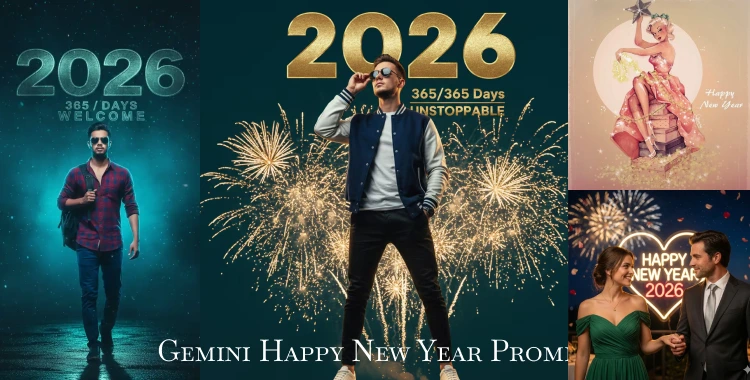
New Year 2026 is almost here, and social media is already full of festive energy. From cinematic portraits to creative New Year scenes, people are using Google Gemini to transform simple photos into eye-catching New Year images.
With the right Gemini prompts, you don’t need any editing skills. In this guide, you will find 20+ Gemini Happy New Year prompts, and step-by-step guide to generate New Year images
Part 1. 20+ Gemini Happy New Year Prompts
1. Cinematic Walking Portraits
Prompt 1:
A photorealistic New Year-themed image of a young man walking from left to right with a soft blurred foreground. He wears a button-down shirt, blue cargo pants, sneakers, and carries a black backpack in his left hand. Background shows dreamy teal–gray mist with cinematic lighting. Highly detailed, ultra-realistic, 8K quality. Overlay text: large distressed teal “2026”, with “365/DAYS” below and “The Souvik” above. –ar 4:5 –style raw. No face change.
Prompt 2:
Ultra-realistic New Year portrait of a stylish young woman walking confidently toward the camera from a left-side angle. She wears sunglasses, a white–light blue top, blue cargo pants, and a backpack. Soft blurred foreground. Misty teal and blue cinematic background. Overlay text “2026” in bold distressed teal font, with “365/DAYS” below. Cinematic lighting, dreamy mood, 8K detail. Keep face exactly same.
Prompt 3:
Cinematic editorial-style New Year portrait of a fashionable young man walking calmly, hands relaxed, confident expression. Foreground softly blurred like slow motion. Background filled with teal-gray haze and soft light rays. Outfit includes modern jacket, T-shirt, cargo pants, and sneakers. Text overlay: “HELLO 2026” in bold modern font. Ultra-detailed, realistic skin texture, 8K quality. No face change.

Prompt 4:
Photorealistic New Year street portrait of a stylish man walking on an empty road. Soft cinematic lighting, muted teal and gray tones, shallow depth of field. He wears sunglasses, a casual shirt, cargo pants, and carries a backpack. Overlay text: large “2026”, small text “NEW START”. Instagram aesthetic, high realism, 8K. Same face as reference.
Prompt 5:
Ultra-detailed New Year portrait of a young man walking through a winter street scene. Cool blue and teal tones, soft fog, subtle snow particles. Warm light on the subject’s face. Text overlay “2026” with “NEW CHAPTER” below. Cinematic photography style, shallow depth of field, realistic textures, 8K quality. Face unchanged.
Prompt 6:
Clean cinematic New Year portrait of a man walking confidently with minimal background. Soft studio-style lighting, smooth shadows, modern outfit. Bold text “2026” above, no extra elements. Luxury editorial look, ultra-realistic, 8K resolution. Keep face exactly same.
2. Sunset Beach & 2026 Balloon Concepts
Prompt 7:
Ultra-detailed 8K portrait of a fashionable young man sitting confidently on giant 3D “2026” numbers at a beach during sunset. Teal–pink sky gradient, glowing warm light, and soft sparkles in the background. “Happy New Year” text appears above with the line “MAY THE NEW YEAR SEE YOU LOVING, GIVING AND LIVING” below. He wears a white–blue trendy outfit, modern hairstyle, sneakers, and holds a party popper. Light confetti drifts through the air. Shallow depth of field, cinematic digital art, Instagram aesthetic. Use same face as reference.
Prompt 8:
Ultra-realistic sunset beach scene of a stylish young man leaning on a green dustbin. Golden foil balloons spelling “2026” float above him. Inside the dustbin are balloons forming “202”, with a single “5” balloon lying on the sand. Teal–pink sky, cinematic warm lighting, falling confetti. Modern outfit, sunglasses, sneakers. Shallow depth of field, Instagram viral look, 8K quality. No face change.
Prompt 9:
Photorealistic New Year beach portrait of a man standing barefoot near the shore during sunset. Large glowing “2026” balloon floating above. Soft waves, warm golden light, pastel sky. He wears a light casual outfit and smiles confidently. Text “Happy New Year 2026” above. Cinematic photography style, ultra-realistic, 8K. Same face.
Prompt 10:
Cinematic New Year beach scene with a stylish man looking toward the horizon. Floating text “3 2 1 2026” above the sky. Soft sparkles, warm sunset glow, teal–pink tones. Shallow depth of field, clean skin texture, Instagram aesthetic, 8K resolution. Face unchanged.
Prompt 11:
High-end New Year portrait of a fashionable man on a sunset beach. Gold confetti in the air, glowing “2026” text behind him. Elegant outfit, confident pose. Cinematic lighting, luxury editorial style, ultra-detailed, 8K. Same face as uploaded.
 Related topic:
Also read: Happy New Year Prompt for Gemini Boy
3. Sitting & Pose-Based Cinematic Portraits(5 Prompts)
Prompt 12:
Ultra-realistic New Year portrait of a stylish man sitting confidently on giant black-outlined “2026” numbers. Soft cinematic lighting, teal-gray background, shallow depth of field. Modern outfit and sneakers. High detail, 8K quality. Face must stay the same.
Prompt 13:
Ultra-detailed New Year portrait of a young man sitting on a large stone with one hand touching his hair. Sunglasses, modern outfit, confident expression. Misty teal cinematic background. Bold distressed text “2026” above. Soft lighting, shallow depth of field, 8K. Perfect face match.

Prompt 14:
Photorealistic New Year portrait of a man sitting casually on a quiet road. Background shows trees and soft lights. Calm festive mood. Text “Happy New Year 2026” above. Cinematic lighting, ultra-realistic, 8K quality. No face change.
Prompt 15:
Clean studio-style New Year portrait of a man sitting on a chair. Soft shadows, minimal background, elegant posture. Text “WELCOME 2026” above. Luxury editorial look, realistic skin tones, 8K detail. Same face.
Prompt 16:
Cinematic New Year portrait of a stylish man sitting with a backpack beside him. Misty teal-gray background, soft lighting. Text “2026” with “NEW JOURNEY” below. Shallow depth of field, ultra-realistic, Instagram aesthetic. Face unchanged.
4. Couple Happy New Year Prompts
Prompt 17:
Romantic New Year couple portrait using the exact same faces as the uploaded photos. Boy and girl wearing matching white–blue outfits, standing together on a sunset beach. White “2026” balloon floating above. Confetti in the air. Cinematic lighting, shallow depth of field, Instagram couple aesthetic, 8K quality.
Prompt 18:
Photorealistic New Year couple portrait of a boy and girl walking confidently toward the camera. Soft blurred foreground, misty teal background. Overlay text “2026” with “365/DAYS” below and “Always Together” above. Cinematic photography style, ultra-realistic. No face change.
Prompt 19:
Close-up cinematic New Year portrait of a couple smiling softly. Warm light on faces, soft bokeh background. Subtle “Happy New Year 2026” text. Natural skin texture, emotional mood, 8K quality. Same faces.
Prompt 20:
High-detail New Year portrait of a fashionable couple posing confidently. Modern outfits, clean background, luxury editorial lighting. Bold “2026” text behind them. Instagram aesthetic, ultra-realistic, 8K resolution.
Related topic:
Also read: Happy New Year Prompt for Gemini Girls
5. Party, Fireworks & Celebration Scenes
Prompt 21:
Lively New Year’s Eve party scene inside a nightclub. A stylish young man opening a bottle at the center. Friends cheering behind him. Neon lights, disco ball reflections, confetti in the air. Glowing “Happy New Year 2026” sign above. Energetic festive mood, cinematic lighting, high realism.
Prompt 22:
Photorealistic New Year portrait of a young man standing under colorful fireworks. Warm light on face, soft bokeh background. Text “Welcome 2026” above. Cinematic photography style, ultra-detailed, 8K quality. Face unchanged.
Prompt 23:
Ultra-realistic New Year portrait with golden confetti raining down. Clean background, soft cinematic lighting. Stylish outfit, confident pose. Bold “2026” text above. Instagram viral style, shallow depth of field, 8K resolution. Same face as reference.
Related topic:
Also Read: 20+ ChatGPT Prompts for New Year Photo 2026
Part 2. How to generate Happy New Year images
Follow these steps. They work with Gemini and other image AIs.
-
1.Pick the right model.
Use Gemini, Midjourney, Stable Diffusion, or web tools that integrate Gemini-style models. Filmora and similar tools publish Gemini-ready prompt lists.
-
2.Choose image type.
Decide: photoreal, illustration, GIF, or edit a real photo.
-
3.Start with a clear prompt.
Put the subject first, then style, then camera and mood. Example: Couple kissing at midnight — cinematic, warm light, 50mm, soft grain.
-
4.Use reference images for edits.
Upload a portrait when you want the AI to preserve a face or pose. Many apps support face-preserve and multi-turn edits. Google’s Gemini now offers more advanced photo editing and step-by-step edits.
-
5.Pick settings.
Resolution, aspect ratio (square for Instagram, vertical for reels), and style strength. Raise detail for close-ups.
-
6.Run and refine.
Create several variations. Keep or remix the best results.
-
7.Post-process.
Use an editor to adjust color, remove artifacts, or remove backgrounds. Tools like PixPretty make quick edits and batch fixes.
Part 3. Tips for generating Happy New Year images
-
Be specific. Say exact lighting, mood, and camera when you want realism.
-
Use short clean sentences. A few clear clauses beat one long line.
-
Try multiple seeds. Small wording changes make big visual shifts.
-
Respect people and laws. Avoid prompts that misrepresent real people or create fake public figures.
-
Keep aspect ratios in mind. Square = Instagram. Vertical = reels. Wide = banners.
-
Save prompt templates. Reuse and tweak them for fast results.
-
Label AI images when needed. Some platforms now add marks to show content is AI-made. This keeps trust and follows rules.

Tip:
If you need fast cleanups, background removal, or batch edits for many New Year images, try PixPretty AI Photo Editor. It can remove backgrounds and edit image fast and process many files at once. This saves time for social posts and shops.
Conclusion
Gemini and other image AI tools make it easy to create eye-catching New Year images in minutes. With a clear prompt, the right style, and the correct image size, even a simple photo can turn into something special.
After generation, a little polishing always helps. For quick background removal and batch edits, PixPretty AI Photo Editor can be a simple and practical option in your workflow.
PixPretty AI Photo Editor
- 100% free AI Image Generator (Nano Banana 2 powered)
- 4K image quality with fast generation speed
- AI effects & filters for personal and e-commerce use



