


A video call face changer helps you look clean and bright on live calls by fixing lighting, softening skin, and balancing colors. People use these tools for work meetings, online classes, interviews, and live streams. This guide explains how face changers work, why people rely on them, and which tools offer the best results.
In Part 3, you will find the top 5 face changer tools, each with a detailed explanation. I also recommend PixPretty AI at the end because it helps improve photos, even though it is not a live video tool. This article helps you choose the right tool for your needs.
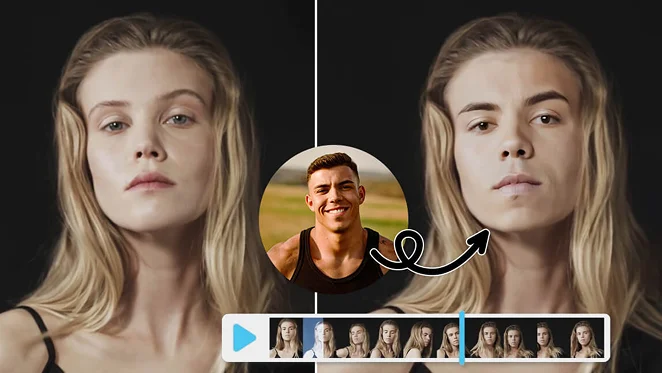
Table of Contents
Part 1: What a Video Call Face Changer Does
A video call face changer improves your on-screen look by fixing skin, light, shadows, and color during a live call. These tools help you appear fresh and ready even when your webcam quality is average. Below are the main things a face changer can do during online meetings.

Real-Time Skin Smoothening
A video call face changer reduces marks, softens rough skin, and gives your face a cleaner look. It works instantly while you talk, so you do not need extra makeup or filters. These tools detect your skin and apply smooth changes that stay natural.
Lighting and Shadow Fixing
Webcams often show uneven lighting, which makes your face look dull. A video call face changer fixes shadows, brightens your face, and balances color so your skin looks clear. This helps when you sit in low light or direct sunlight. These tools adjust your face automatically, so you do not need to change your room setup. Better lighting helps your expression and gestures appear more natural during calls.
Natural Style Improvements
Some video call face changer tools add small style features to keep you camera-ready without looking edited. These improvements stay light and simple. Examples include:
- Soft sharpening that improves facial detail
- Light color balance for smoother skin tone
- Gentle contouring without changing your real look
These changes help you appear organized and neat without looking overly filtered.
Part 2: Why People Use a Video Call Face Changer
People use a video call face changer because webcams highlight marks, dull light, and tired features. These tools reduce stress, improve confidence, and help you look camera-ready at any time. Below are the most common reasons people depend on them during online work and classes.
Better Appearance in Work Meetings
A video call face changer helps you appear clean and focused during meetings with clients or teams. It reduces marks, balances tone, and fixes rough lighting. This makes you look more organized without extra preparation. It is useful for early meetings, quick calls, and days when your skin looks tired.
Higher Confidence on Camera
Many people feel nervous when webcams show too much detail. A video call face changer reduces this stress. It gives you a cleaner look and helps you stay relaxed. Confidence improves because:
- Skin looks smooth and balanced
- Lighting becomes even
- Facial details appear clearer
- You look fresh even on busy days
These improvements help users speak freely without worrying about appearance.
Support for Streamers and Creators
Streamers and content creators depend on face changers because cameras often show noise, dull color, and uneven textures. A video call face changer keeps their look stable across all content. It also helps during long recording sessions because the tool adjusts to different lighting conditions. These saves editing time later and helps creators maintain a clean and steady appearance.
Part 3: Top 5 Video Call Face Changer Tools (100 Words Each)
There are many tools that offer video call face changer features, but only a few give natural results. Below are the top 5 tools with full 100-word introductions to help you choose the right one. These tools work for meetings, classes, and streaming.
1. YouCam Video
YouCam Video is one of the most popular tools for live face editing. It smooths skin, adjusts lighting, and improves color during video calls. It works with Zoom, Google Meet, Microsoft Teams, and streaming platforms. The tool supports features like shine removal, face reshaping, eye brightening, and virtual makeup. YouCam Video stays light on your system, so your call remains stable. People choose it because it offers both beauty filters and professional-level corrections.

2. Nvidia Broadcast
Nvidia Broadcast is designed for users who want clean, natural video quality. It does not add beauty filters, but it improves lighting, removes noise, and smooths background blur. It requires an Nvidia RTX GPU, so it is more suitable for gamers and PC users with strong hardware. Nvidia Broadcast can adjust your appearance by fixing sharpness, exposure, and color. It also stabilizes your camera and removes distractions behind you.

3. Snap Camera
Snap Camera offers fun filters, face changes, and creative effects for live calls. It is often used by streamers and casual users who want playful options. It also provides light beauty effects that improve skin tone and brightness. Snap Camera connects easily with Zoom, OBS, and other video apps. The filters can be simple or animated, giving users a wide range of choices.

4. Banuba Video Effects SDK
Banuba provides advanced beauty filters used by many video apps. It offers skin smoothing, eye enhancement, color balance, and real-time lighting adjustments. Banuba focuses on natural changes rather than heavy editing. This SDK is designed mainly for developers, but some apps use this technology to deliver clean live video results. It works well on low-light webcams and mid-range devices.

5. PerfectCam by CyberLink
PerfectCam gives real-time makeup, skin smoothing, and brightness control during live calls. It works with many video meeting apps and offers simple tools for a clean look. You can adjust softness, eye brightness, and tone correction with quick controls. PerfectCam helps you maintain a steady appearance on camera even on long workdays. It is used widely by office workers, online trainers, and teachers who want a neat and bright look.

Bonus Tip: Tool to Elevate Your Photos: PixPretty AI Photo Editor
PixPretty is a smart and easy AI photo editor that helps beginners and creators enhance their images without learning complex tools. It focuses on natural-looking improvements, clean retouching, and aesthetic upgrades that keep your photos real. Whether you want smoother skin, better lighting, or sharper details, PixPretty handles it with one click.
The tool works fast, keeps your image quality high, and avoids artificial or unrealistic edits. If you need a free and reliable AI tool to polish your portraits, product shots, or social media posts, PixPretty is a great option to add to your workflow.
Key Features of PixPretty
- Smart AI-powered retouching that cleans up skin, lighting, and tones while keeping the image natural, realistic, and true to original details.
- One-tap enhancement tools that improve clarity, brightness, and sharpness without requiring manual adjustments or complicated editing skills.
- Precise background cleanup that removes noise, distractions, and unwanted objects for a cleaner and more polished final photo.
- High-quality exports that keep your image resolution intact, ensuring your photos are ready for Instagram, eCommerce, or portfolio use.
- Beginner-friendly interface that guides you through edits smoothly, making the tool accessible for students, creators, and business owners alike.
FAQs
Q1: Are video call face changers safe?
Yes, most tools edit your video locally on your device. They do not store your personal data or upload your calls.
Q2: Can I use these tools with Zoom?
Yes, most video call face changer tools work with Zoom by acting as a virtual camera that filters your video.
Q3: Will these tools slow my computer?
Light tools run smoothly, but heavy filters can slow older devices. Choose settings that keep your video stable.
Q4: Do face changers look natural?
Light filters look natural. Heavy filters can look fake. Choose soft settings for the best appearance.
Q5: Do they work on low-quality webcams?
Yes, face changers improve brightness, sharpen details, and reduce noise even on basic webcams.
Conclusion
A video call face changer helps you look clean, balanced, and confident on live calls. It fixes lighting, skin texture, shadows, and tone with simple controls. This makes your video output more steady whether you work, study, stream, or attend online events. The tools listed in Part 3 offer real-time improvements for different needs.
If you want to improve photos outside video calls, you can also try PixPretty AI, which gives natural corrections for pictures. Test different settings until you find what fits your face and lighting. A good setup makes online communication easier and more comfortable.
PixPretty AI Photo Editor
- 100% free AI Image Generator (Nano Banana 2 powered)
- 4K image quality with fast generation speed
- AI effects & filters for personal and e-commerce use

Related Articles:
- Best Roblox Horror Game Guide for 2025
- Which is Faster and Smarter: Grok 4.1 or Nano Banana Pro?
- How to Make Infographic with Nano Banana Pro in Gemini 3 (Step-by-Step)
- BindWeave AI: Create Stunning, Consistent Videos from Text and Images
- 7 Face Similarity Checkers Online Free: Compare & Find Look-Alikes


