


Celebrating Children's Day with AI-generated art is a huge trend, but let's be honest: without the right text instructions, AI generators can easily turn a cute idea into a nightmare with creepy, distorted faces or six-fingered hands. You don't need to be a prompt engineer to fix this! To save you from those weird mishaps, I've put together a curated list of 15+ reliable Children's Day ai prompt templates for everything from magical portraits to beautiful real scenes. Plus, we'll show you how to use these formulas with a game-changing tool powered by multiple image generators to guarantee stunning, flawless details every single time. Let's dive in and create some magic!
Table of Contents
- Part 1: 15+ Free Children’s Day AI Image Generation Prompts HOT
- Theme 1: Magic and Fairy Tale Style
- Theme 2: Premium Cinematic Lifestyle (Photorealistic)
- Theme 3: Future Dream Jobs
- Part 2: Prompt Formulas for LLMs (ChatGPT & Gemini)
- Part 3: The Best AI Generator for Children's Day HOT
- Part 4: Combine 3 AI Tools for Ultra-Personalized Portraits
- Conclusion
- FAQs
Part 1: 15+ Free Children’s Day AI Image Generation Prompts
Here are 15+ highly optimized prompts categorized by style. Use these children's day ai image generation prompts for your social media posts, printed posters, or personal family projects.
Theme 1: Magic and Fairy Tale Style
These are perfect if you are looking for an ai prompt for cute child portrait generation that transforms an everyday idea into a magical wonderland.
Prompt 1: The Forest FairyA magical portrait of a cute 4-year-old girl wearing a glowing flower crown, gently touching a luminous butterfly in an enchanted forest. Pixar 3D animation style, vibrant colors, cinematic lighting, 8k resolution.

An adorable toddler boy wearing an oversized wizard hat, holding a glowing wand, surrounded by floating sparkling stars and old spell books. Warm cozy lighting, highly detailed, whimsical concept art.
Prompt 3: Candy WonderlandA happy 5-year-old kid running through a giant candy wonderland with lollipop trees and cotton candy clouds. Bright pastel colors, cute anime style, masterpiece.
Prompt 4: Dragon RiderA brave little girl riding on the back of a friendly, fluffy baby dragon, flying above the clouds. Soft sunlight, Ghibli studio style, highly detailed.
Prompt 5: Star CatcherA cute child sitting on a crescent moon holding a glowing jar full of captured stars. Dreamy night sky background, soft and magical atmosphere, ultra-realistic portrait.

Theme 2: Premium Cinematic Lifestyle (Photorealistic)
These children's day ai greeting card prompts use shallow depth of field (blurred backgrounds) and premium lighting, making them the perfect elegant backdrop for your custom holiday text.
Prompt 6: The Golden Hour BeachA cinematic, ultra-realistic photograph of a joyful [5-year-old girl] running on a pristine beach at golden hour, holding a giant transparent bubble balloon. Warm sunlight, flying water droplets, shot on 85mm lens, blurred ocean background with negative space for text, breathtaking masterpiece.
Prompt 7: High-End Garden PartyEditorial photography of a cute [toddler boy] wearing a premium linen suit, laughing under a canopy of warm floating fairy lights in a lush green garden. Soft bokeh effect, rich natural colors, highly detailed facial features, Vogue Enfants style.

A photorealistic, high-definition shot of a happy [child] riding a beautifully detailed vintage carnival carousel. Warm cinematic lighting, shallow depth of field blurring the background lights, nostalgic and premium atmosphere, perfect for a greeting card cover.

A high-end lifestyle photo of an adorable [little girl] reading a glowing book inside a cozy indoor blanket fort. Soft warm string lights, intimate and heartwarming atmosphere, incredibly realistic skin texture, soft shadows.
Prompt 10: The Studio Confetti ShotA premium studio portrait of a laughing [boy] throwing shiny golden confetti into the air. Clean, neutral beige background, professional softbox lighting, ultra-sharp focus on the child's joyful expression, modern minimalist greeting card design.
Theme 3: Future Dream Jobs
Children’s Day is the perfect time to celebrate big dreams. This category focuses on "Little Professionals"—creating high-end portraits of children imagining their future careers.
Prompt 11: The Rocket Propulsion ScientistYoung girl assembling a toy rocket with colorful parts on a blue background, showcasing creativity and concentration.

Child joyfully sprinkles flour over dough in a cozy kitchen, capturing a playful and creative moment.

Children in a classroom wearing silver foil hats, engaged in a space-themed activity. Their serious expressions add to the whimsical scene.

A young girl paints colorful planet models on a vibrant red background, showcasing creativity and learning.

Joyful children playing soccer on a sandy beach, with a vibrant seaside town in the background.

Joyful children playing drums on a sunny beach, surrounded by palm trees and ocean waves, capturing a lively and carefree moment.

Part 2: Prompt Formulas for LLMs (ChatGPT & Gemini)
Here is a highly effective ChatGPT children's day prompt formula. Simply copy the text below and paste it into ChatGPT. You can also use this exact same Gemini children's day prompt in Google's Gemini to get endless, creative variations.
Prompt 17: The Ultimate LLM FormulaAct as an expert AI image prompt engineer. I want to generate a beautiful Children's Day image featuring a [insert age and gender, e.g., 5-year-old girl]doing [insert activity, e.g., playing with a dinosaur]. Please write 3 highly detailed, descriptive prompts for an AI image generator. Make the visual style [insert style, e.g., Pixar 3D / watercolor]. Ensure the prompts describe the lighting, background, and emotional atmosphere clearly.
I will show Gemini as an example for you:

Step 1
Paste this prompt and insert different content as you like.

Step 2
ChatGPT or Gemini would show you some detailed prompts.

Step 3
You can pick one of them, then paste and send it to the message bar.


Part 3: The Best AI Generator for Children's Day
Now that you have your list of prompts, where is the best place to use them?
PixPretty Online is the perfect companion to test these Children's Day AI prompt template ideas. What makes it a game-changer is that it’s now powered by both the advanced GPT image 2.0 model and the Nano Banana 2 model. This dual-model power ensures that your output—whether it’s a portrait or a poster—is packed with stunning, photorealistic details without you having to mess with complex settings.

How to Generate Your Child's Portrait in 3 Steps
You don't need a degree in AI engineering to get started. Just follow these simple steps to bring your vision to life:

Step 1
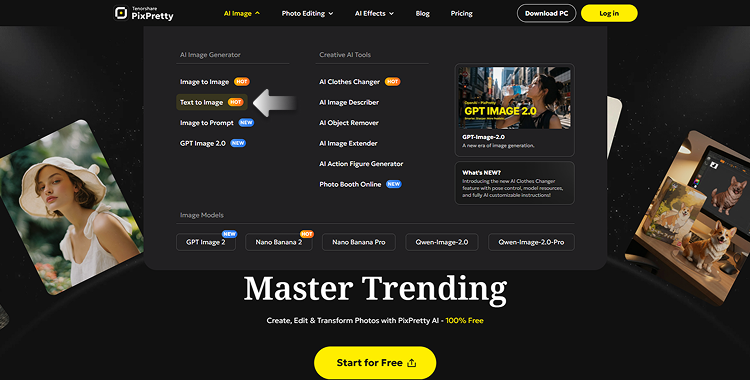
Open PixPretty Online and navigate to the AI Image > Text to Image section.
Step 2
Copy any of the children's day ai image generation prompts from above and paste it directly into the prompt box.

Step 3
Hit "Generate" and download your high-quality result powered by these Image engines you choose in just a few seconds.

Tip: If you want to take your creativity further, PixPretty Online also offers a fun AI Clothes Swapping feature. It’s perfect for ai prompt for kids photo editing when you want to use your child’s real-life photos to create something truly unique. Whether you are looking for text-to-image magic or specialized photo retouching, PixPretty has you covered.

Part 4: Combine 3 AI Tools for Ultra-Personalized Portraits
While text prompts are a great start, what if you have a specific reference picture in mind, or want to transform a candid photo of your child into a masterpiece? PixPretty Online isn't just a basic generator; it’s a complete AI creative suite.
Tool 1: Text-to-Image (AI Image Generator): The foundation powered by GPT Image 2.0 and Nano Banana 2 model. Just paste your Children's Day ai prompt template and watch the magic happen.
Tool 2: Image-to-Image (AI Image Generator): Want to keep a specific pose or composition? Upload a base photo (like a quick snap of your kid) and let the AI reimagine it in a Pixar or watercolor style using your prompts. Insert keyword: ai prompt for kids photo editing.
Tool 3: AI Image Describer (Image-to-Prompt): Found a stunning Children's day photo on Pinterest but don't know the prompt? Upload it to the Image Describer, and it will reverse-engineer the exact prompt for you to use or tweak!
The Ultimate WorkflowUpload a reference image -> Use Image Describer to get the prompt -> Tweak the text slightly -> Use Image-to-Image with your kid's photo.
Boom! A 100% custom masterpiece.

Conclusion
Creating magical memories for your kids shouldn't be a frustrating battle with complex AI tools. With the right Children's Day ai prompt, you can instantly generate beautiful fairy tale portraits, fun sci-fi adventures, or heartwarming greeting cards. Don't let these ideas just sit here! Grab your favorite text prompts from our list and head over to PixPretty Online . It's completely free to try, and you'll be amazed at how easily you can turn your imagination—or your child's real photo—into a masterpiece.
Happy creating, and Happy Children's Day!
FAQs
Q1: Is it safe to upload my child's photo to an AI editor?Yes, but safety depends on the tool you choose. For maximum privacy, always use trusted platforms like Pixpretty Online that strictly protect user data and do not store or share your personal images. Always review a tool's privacy policy before uploading real photos of your kids.
Q2: Why do AI-generated children often look creepy or have extra fingers?Standard AI models often struggle with complex human anatomy, especially hands and facial symmetry. To fix this, you must use highly descriptive text instructions.
Q3: Do I need advanced tech skills to use AI prompt templates?Not at all! A good Children's Day ai prompt template works just like a simple fill-in-the-blank form. Just replace the bracketed details with your child's age, gender, or favorite theme, and paste it directly into a beginner-friendly web tool to get instant results.


