


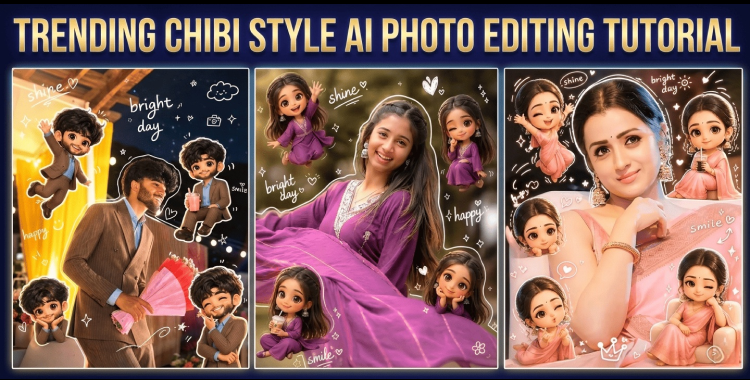
The word "chibi" originates from Japanese slang, meaning something small, short, or cute, and it has evolved into a popular visual style characterized by exaggerated proportions such as large heads, tiny bodies, and expressive features. Recently, chibi aesthetics have become widely popular on Instagram, Tiktok and Youtube. This guide brings together a complete collection of chibi style AI photo editing prompts across different themes, helping you easily create eye-catching and highly shareable AI portraits with a consistent and creative visual style.
Table of Contents
Part 1. How to Create Chibi Style AI Photos Easily
Creating chibi-style AI photos is simple and only takes a few steps. With the right AI tool and a good prompt, you can turn your photo into a cute chibi edit in minutes.
-
Choose an AI image tool such as ChatGPT, Gemini, or PixPretty AI, and upload your own picture if you want a personalized result. Clear portrait photos usually work best because they help the AI preserve facial features more accurately.
-
Copy and paste one of the popular chibi prompts below, then select the version that best matches your gender or style preference. If the result is not perfect, adjust the prompt and generate again until you get the look you want.

| For Female | Prompts | Copy Now |
| Prompts |
Create a high-resolution (4K) portrait edit with a vertical 2:3
aspect ratio, blending ultra-realistic photography with cute 3D
chibi and doodle elements in a clean, aesthetic style.
FACE & BODY (STRICT IDENTITY LOCK --- CRITICAL)
• Use the uploaded image as the ONLY identity reference
• Keep the main subject's face, body shape, proportions, hairstyle, and
outfit 100% unchanged
• No reshaping, beautification, or smoothing
• Maintain natural skin texture and realism
MAIN SUBJECT
• Realistic human subject in sharp focus
• Natural posture and expression
• Add a subtle white sticker-style outline around the subject
CHIBI MINIATURES (3D STYLE)
• Surround the subject with multiple cute 3D chibi versions of the same
person
• Maintain recognizable facial features and hairstyle
• Slightly exaggerated cute proportions (chibi style), but consistent
identity
Chibi Placement & Interaction:
• Naturally distributed around the subject
• Interacting playfully (sitting, waving, leaning, posing, etc.)
• Balanced layout --- avoid clutter or overlap with face
DOODLE OVERLAY ELEMENTS
Add vibrant, hand-drawn doodles:
• Soft white outline accents
• Sparkles
• Hearts
• Tiny flowers
• Smiley icons
Text Elements (Handwritten Style):
• "Life"
• "Positivity"
• "Travel"
• Casual, playful handwritten font
• Light and aesthetic placement
COLOR & STYLE
• Soft, colorful tones with a clean aesthetic
• Harmonious blend of realism + cartoon elements
• Slight pastel vibe (not overly saturated)
LIGHTING & FINISH
• Natural, soft lighting on main subject
• Gentle highlights and smooth shadows
• Subtle glow on chibi elements
• Clean, Instagram-ready finish
DETAILING
• High-detail glossy 3D chibi rendering
• Sharp focus on main subject
• Smooth blending between realistic and illustrated elements
STYLE
Hybrid realistic + chibi + doodle aesthetic, cute, modern, and
Instagram-friendly
NEGATIVE PROMPT
face alteration, identity mismatch, distorted proportions, cluttered layout,
harsh lighting, low-quality chibi, oversaturation
|
COPY
|
| For Man | Prompts | Copy Now |
| Prompts |
Create a vibrant aesthetic portrait edit in 4K resolution with a
vertical 4:5 aspect ratio, styled as a cute Korean
Instagram-inspired artwork combining realism with playful 3D
chibi elements.
FACE & BACKGROUND (STRICT PRESERVATION --- CRITICAL)
• Use the uploaded image as the ONLY facial reference
• Face must remain 100% identical --- no reshaping, no beautification, no
smoothing
• Preserve exact facial features, skin tone, and expression
• Keep the background exactly the same as the original image
MAIN SUBJECT
• Realistic subject in sharp focus
• Natural pose and expression
• Add a subtle white sticker-style outline around the subject
LIGHTING & COLOR
• Bright, soft lighting with candy-colored highlights
• Pastel tones (pink, peach, mint, lavender)
• Soft glow and smooth shadows
CHIBI MINI CHARACTERS (3D STYLE)
• Add multiple mini 3D chibi versions of the same person
• Maintain recognizable face and hairstyle
• Glossy, high-detail chibi rendering
Chibi Actions:
• Holding lollipops
• Carrying candies
• Holding drinks
• Playful poses (jumping, waving, sitting, cheering)
• Arrange naturally around the subject without clutter
DOODLE ELEMENTS
Add playful hand-drawn overlays:
• Candy shapes
• Stars
• Swirls
• Cute icons and sparkles
• Keep doodles light, fun, and well-balanced
TEXT (HANDWRITTEN STYLE)
Include playful words:
• "Sweet"
• "Fun"
• "Yay"
• "Cute Mood"
• Casual handwritten doodle font
• Subtle placement around composition
DETAILING & FINISH
• Clean, balanced layout
• Glossy finish on chibi characters
• Slight glow/bloom for aesthetic appeal
• Sharp subject + soft decorative elements
STYLE
Cute candy-themed Korean Instagram aesthetic, colorful, playful, and trendy
NEGATIVE PROMPT
face alteration, identity mismatch, cluttered layout, oversaturation, dull
colors, low-detail chibi, harsh lighting
|
COPY
|
- Download and save the final image, or post it on social media platforms like TikTok and Instagram. Adding relevant hashtags such as #chibi, #chibiart, and #chibiartstyle can help the post reach more people.
 Related topic:
For more information, also read: Instagram Trending Collage AI Photo Editing: Tutorial
Part 2. Best 30 Chibi Style AI Photo Editing Prompts
Looking for the best chibi style AI photo editing prompts? Below are 30 viral prompts designed for different aesthetics, including cartoon, cute, cool, couple, fashion, and fairy tale styles. Simply copy and paste the prompts into your favorite AI image generator to create eye catching chibi AI photos for free.
1. Cute Chibi Style AI Photo Editing Prompts

-
Create a high resolution 4K portrait in a cute Korean Instagram aesthetic. Keep the uploaded face and outfit completely unchanged with realistic skin texture. Add several glossy 3D mini chibi versions of the same person around the composition in playful poses like waving, smiling, and holding flowers. Include soft pastel hearts, stars, sparkles, and handwritten doodle text with warm lighting and a clean pink pastel tone.
-
Generate a dreamy chibi collage portrait with realistic photography and cute 3D miniatures. Preserve the exact identity and facial features from the uploaded image. Add tiny chibi characters sitting around the subject with playful expressions and oversized glossy eyes. Decorate the image with doodle clouds, hearts, smiley icons, and handwritten typography in a soft pastel aesthetic.
-
Create a kawaii style AI portrait with a clean vertical composition and soft natural lighting. Keep the subject completely realistic while surrounding them with mini chibi versions wearing matching outfits. Add white sticker outlines, sparkles, stars, and tiny flowers with a gentle pastel overlay and balanced spacing.
-
Generate a cute scrapbook inspired AI portrait with realistic facial details and glossy 3D chibi decorations. Preserve the background and natural expression exactly as the uploaded image. Add cheerful mini chibi figures around the frame with doodle hearts, stars, handwritten notes, and soft creamy lighting.
-
Create a playful social media style portrait with realistic photography and adorable chibi miniatures. Keep the uploaded face unchanged while adding tiny 3D chibi characters jumping, waving, and sitting around the composition. Use soft pastel tones, aesthetic doodles, and subtle glow effects for a trendy Instagram style finish.
-
Generate a soft and adorable AI portrait with realistic details blended with cute 3D chibi elements. Preserve the subject's natural skin texture and facial proportions. Add glossy miniature chibi characters with cute expressions and decorate the image with pastel doodles, sparkles, handwritten text, and sticker style outlines.
2. Sweet and Cool Chibi Style AI Photo Editing Prompts

-
Create a stylish chibi portrait with a cool Korean street fashion aesthetic. Preserve the uploaded face and outfit exactly as the original image. Add glossy 3D mini chibi versions wearing oversized hoodies and sneakers around the composition. Include doodle flames, stars, and handwritten text with soft purple and blue cinematic lighting.
-
Generate a sweet and cool AI portrait with realistic photography and glossy 3D chibi characters. Keep the subject completely unchanged with natural skin texture and realistic lighting. Add mini chibi figures with headphones, coffee cups, and playful poses surrounded by sparkles and aesthetic doodles.
-
Create a modern Instagram style AI portrait with realistic details and stylish mini chibi decorations. Preserve the uploaded image exactly while adding tiny chibi versions in trendy outfits around the frame. Use soft neon glow effects, doodle hearts, stars, and handwritten typography with a balanced clean layout.
-
Generate a dreamy cool tone chibi portrait with realistic photography and playful 3D miniatures. Keep the facial features and hairstyle identical to the uploaded image. Add confident looking chibi characters posing casually around the subject with cinematic pastel lighting and subtle doodle overlays.
-
Create a fashionable and sweet AI portrait with realistic skin texture and glossy chibi miniatures. Preserve the subject's identity perfectly while adding trendy chibi characters with stylish accessories like sunglasses and headphones. Include sparkles, smiley doodles, and aesthetic handwritten text in soft pastel tones.
-
Generate a trendy social media inspired portrait with realistic photography blended with cute chibi aesthetics. Keep the uploaded face and body proportions unchanged while surrounding the subject with fashionable mini chibi figures. Add doodle lightning icons, stars, and handwritten notes with warm cinematic lighting.
3. Couple Chibi Style AI Photo Editing Prompts

-
Create a romantic couple portrait with realistic photography and glossy 3D chibi miniatures. Preserve both faces exactly as the uploaded image with natural skin texture and expressions. Add tiny chibi versions of the couple holding hands and smiling around the frame. Include pastel hearts, sparkles, and handwritten love themed doodles with warm lighting.
-
Generate a cute couple collage portrait in a Korean Instagram aesthetic. Keep both subjects completely unchanged while adding mini chibi figures hugging, waving, and sitting together. Decorate the image with soft pink doodles, stars, flowers, and handwritten romantic text with dreamy pastel lighting.
-
Create a cozy couple AI portrait with realistic details and adorable chibi characters. Preserve the uploaded identities exactly while surrounding the composition with tiny glossy chibi versions wearing matching outfits. Use warm glow lighting, sticker style outlines, and cute handwritten doodles for a soft romantic atmosphere.
-
Generate a stylish couple chibi portrait with realistic photography and playful miniatures. Keep the facial features and natural expressions perfectly unchanged. Add fashionable chibi characters sitting together around the frame with soft sparkles, tiny hearts, and aesthetic doodle decorations.
-
Create a dreamy fairy light inspired couple portrait with realistic photography and cute 3D chibi elements. Preserve the uploaded image naturally while adding miniature chibi versions holding flowers and smiling playfully. Include warm pastel overlays, stars, hearts, and subtle handwritten typography.
-
Generate a sweet anniversary style AI portrait with realistic details and glossy chibi miniatures. Keep the original identities unchanged while adding tiny chibi characters around the image with romantic poses and playful interactions. Use soft lighting, pastel doodles, and clean Instagram inspired composition.
4. Fashion Chibi Style AI Photo Editing Prompts

-
Create a luxury fashion inspired AI portrait with realistic photography and glossy 3D chibi miniatures. Preserve the uploaded face, hairstyle, and outfit perfectly while adding fashionable mini chibi versions around the frame. Use cinematic lighting, stylish doodles, and elegant handwritten typography.
-
Generate a magazine cover style portrait with realistic details and trendy chibi elements. Keep the subject completely unchanged with natural skin texture and sharp focus. Add mini chibi characters wearing luxury fashion outfits with soft glow lighting and clean editorial composition.
-
Create a modern runway inspired AI portrait with realistic photography and detailed 3D chibi figures. Preserve the uploaded identity perfectly while surrounding the subject with miniature fashion styled chibi characters. Include subtle doodle sparkles, stars, and premium pastel tones.
-
Generate a stylish urban fashion portrait with realistic details and cool chibi aesthetics. Keep the original outfit and facial features unchanged while adding glossy mini chibi versions carrying shopping bags and posing confidently. Use cinematic shadows and soft neon lighting.
-
Create a chic Korean fashion style AI portrait with realistic photography and adorable chibi miniatures. Preserve the exact facial proportions and expression while adding stylish tiny chibi figures around the composition. Include elegant doodles, handwritten notes, and warm pastel glow effects.
-
Generate a high fashion Instagram inspired portrait with realistic details and cute glossy chibi characters. Keep the uploaded image unchanged while surrounding the frame with fashionable miniature chibi figures in trendy poses. Use clean lighting, premium aesthetic tones, and subtle doodle overlays.
5. Fairy Tale Chibi Style AI Photo Editing Prompts

-
Create a magical fairy tale portrait with realistic photography and glossy 3D chibi miniatures. Preserve the uploaded face and expression perfectly while surrounding the subject with tiny fairy inspired chibi characters. Add glowing sparkles, stars, flowers, and dreamy pastel lighting.
-
Generate an enchanted forest inspired AI portrait with realistic details and cute fantasy chibi miniatures. Keep the original identity completely unchanged while adding tiny chibi figures holding lanterns and flowers around the composition. Use warm cinematic glow and magical doodle effects.
-
Create a princess inspired chibi portrait with realistic photography and dreamy fantasy aesthetics. Preserve the facial features and natural skin texture exactly while surrounding the subject with glossy chibi miniatures wearing fairy tale outfits. Include sparkles, butterflies, and handwritten magical text.
-
Generate a moonlight fairy tale AI portrait with realistic photography and glowing chibi decorations. Keep the uploaded image natural and unchanged while adding tiny chibi figures floating around the frame with stars and glowing doodles. Use cool pastel blue lighting and soft dreamy shadows.
-
Create a whimsical fantasy portrait with realistic details and adorable 3D chibi characters. Preserve the subject perfectly while adding miniature fairy style chibi figures around the composition. Include magical sparkles, floating flowers, and aesthetic handwritten notes with cinematic glow lighting.
-
Generate a dreamy storybook inspired AI portrait with realistic photography and glossy chibi miniatures. Keep the uploaded identity completely unchanged while surrounding the subject with cute fantasy themed chibi characters. Use glowing pastel colors, doodle stars, butterflies, and soft magical lighting for an enchanted fairy tale atmosphere.
Part 3. Create Viral Chibi Style AI Photos with PixPretty AI
PixPretty AI makes it incredibly easy to create viral chibi style AI photos with just a few clicks. It now supports the latest AI image generation models, including GPT Image 2, Nano Banana 2, Qwen, and more, allowing you to generate highly detailed and aesthetic chibi portraits in seconds. You can freely switch between different models to achieve various styles, from cute Korean Instagram aesthetics to glossy 3D chibi edits and cinematic fantasy looks.

With 4K image generation, fast rendering speed, and high quality results, PixPretty AI is perfect for creating trendy AI portraits for both women and men. Simply upload your photo, copy and paste a prompt, and instantly turn your selfies into eye catching viral chibi AI art.
Part 4. Tips to Get Better Chibi Style AI Photo
Creating high quality chibi style AI photos is not just about using a good prompt. Small adjustments in your input, structure, and style instructions can significantly improve the final result.

-
Always use a clear identity lock instruction to preserve facial features. Specify that the face, hairstyle, and expression must remain exactly the same to avoid unwanted AI changes or beautification.
-
Add explicit composition guidance such as vertical 4 to 5 or 3 to 4 aspect ratio. This helps optimize the image for TikTok, Instagram, and Pinterest formats and improves visual balance.
-
Clearly define the number and behavior of chibi characters. Instead of just saying chibi versions, describe actions like sitting, waving, interacting, or surrounding the main subject to create a more dynamic scene.
-
Use consistent style keywords such as cute Korean aesthetic, glossy 3D rendering, pastel tones, or cinematic lighting. This helps the AI maintain a unified visual direction across all elements.
-
Keep background instructions simple and controlled. Avoid overly complex scenes and instead focus on clean, aesthetic environments that highlight the main subject and chibi elements.
-
Add decorative elements strategically such as sparkles, hearts, doodles, and handwritten text. These should enhance the composition but not overwhelm the main subject or chibi characters.
Conclusion
With the right prompts, anyone can transform simple portraits into expressive and highly stylized AI artwork that performs well on social media. Platforms like PixPretty AI make this process even more efficient by combining advanced generation models with powerful editing tools, allowing users to create high-quality chibi style images quickly and effortlessly.
PixPretty AI Photo Editor
- 100% free AI Image Generator (Nano Banana 2 powered)
- 4K image quality with fast generation speed
- AI effects & filters for personal and e-commerce use



