


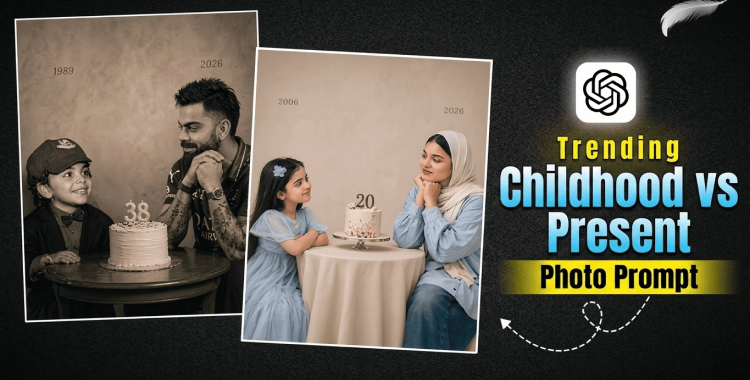
The Childhood vs Present AI photo trend has taken Instagram and TikTok by storm, turning nostalgic memories into emotional side-by-side portraits that celebrate personal growth. This guide walks you through creating your own trending photos with step-by-step instructions, 21 ready-to-use prompts, pro tips for realistic results, and how to make the process even smoother.
Table of Contents
- Part 1. How to Create Trending Childhood vs Present Birthday AI Photo
- Part 2. Best 20+ Trending Childhood vs Present Birthday AI Photo Editing Prompts
- Part 3. Create Viral Childhood vs Present Birthday AI Photos with PixPretty AI
- Part 4. Tips to Get Better Childhood vs Present Birthday AI Photo Results
Part 1. How to Create Trending Childhood vs Present Birthday AI Photo
This simple 3-step process makes it easy to create the viral "Childhood vs Present" birthday AI photo that's trending on Instagram and TikTok. The goal is a side-by-side comparison of your younger self and current self, with birthday elements and an emotional, nostalgic feel.
-
Choose a tool and upload your photos. Open an AI image generator like ChatGPT, Gemini or PixPretty AI. Upload your childhood photo and a recent photo of yourself. This helps the AI match your facial features accurately across ages.
-
Copy and paste the prompts below to generate the image. Hit generate, review the result, and if it's not quite right, tweak details like lighting, pose, or birthday props and try again.
| Theme | Prompts | Copy Now |
| Prompt |
On the left: a child version of me (from a childhood photo)
looking with an innocent smile to the right, with "YEAR" written
above it. On the right: A present version of me (from a recent
photo) sits with her hands under her chin and looks at the child
with a calm smile, with"2026" written above her. In the middle:
a table with a simple, elegant birthday cake with number "AGE"
on top. Studio background: plain and soft (studio background)
The lighting: Soft, cinematic, warm (even a black-and- white
photo). Style: Professional, minimal, emotional photography,
focusing on feelings and visual communication between the two
versions. Make the picture look so real like a real photoshoot.
Keep my original features without changing. photo size 4:5
|
COPY
|

- Download and share on social media. Save the final image, then post it on TikTok, Instagram, or other platforms with hashtags like #ChildhoodVsPresent #BirthdayAITrend #AIPhotoEdit.

 Related topic:
For more information, also read: Instagram Trending Collage AI Photo Editing: Tutorial and 20+ Prompts
Part 2. Best 20+ Trending Childhood vs Present Birthday AI Photo Editing Prompts
These 21 prompts are designed to create emotional "Childhood vs Present" birthday photo edits that match the current Instagram trend. They focus on side-by-side comparisons of your younger self and current self, with birthday elements like cakes, balloons, or candles, soft lighting, and storytelling composition. Upload your childhood and recent photos for the best results, and customize the years or ages as needed.

-
On the left: a child version of me from a childhood photo, smiling innocently to the right with "2000" above it. On the right: my present adult self from a recent photo, sitting with hands under chin, looking warmly at the child with "2026" above. Emotional birthday portrait, soft studio lighting, realistic faces, warm tones.
-
Create a cinematic childhood vs present birthday portrait: left side shows young child me blowing birthday candles with a joyful smile, labeled "Age 5". Right side: adult me celebrating birthday with cake slice, calm expression, labeled "Age 26". Minimal composition, natural skin, emotional connection.
-
Emotional then-vs-now birthday edit: childhood photo on left looking right with "1998" text. Adult version on right resting chin on hands, gazing left with "2026". Add subtle birthday balloons in background, soft golden hour lighting, photorealistic.
-
Birthday trend portrait: left - innocent child me from photo holding birthday gift, "2002" above. Right - current me toasting with champagne glass, smiling reflectively, "2026". Clean studio style, warm ambient light, high detail faces.
-
Side-by-side childhood vs present: child on left with birthday cake and big smile, "Age 7". Adult on right cutting cake, gentle expression, "Age 28". Soft shadows, realistic textures, heartfelt Instagram birthday vibe.

-
Create a tender birthday memory: left side child version blowing out candles, "1995" label. Right side adult me with party hat, looking nostalgic, "2026". Pastel tones, dreamy lighting, consistent facial features.
-
Then vs now birthday photo: childhood me on left opening presents excitedly, "2001". Present me on right surrounded by balloons, calm smile, "2026". Photorealistic, soft focus background, emotional storytelling.
-
Cinematic age contrast for birthday: young child left gazing right at birthday cake, "Age 6". Adult right with hands clasped, reflective pose, "Age 27". Minimalist, high-contrast lighting, ultra-realistic.
-
Heartwarming childhood vs adult birthday: left - kid me with frosting on face, laughing, "1999". Right - me now sipping birthday drink, warm gaze, "2026". Natural skin tones, cozy indoor light.
-
Birthday evolution portrait: child version left holding candle, innocent eyes, "2003". Adult right extinguishing candle, mature smile, "2026". Soft bokeh, emotional depth, professional photo style.

-
Emotional side-by-side: childhood photo left smiling at viewer with cake, "Age 8". Present self right looking back warmly, party confetti, "Age 25". Realistic details, golden lighting.
-
Trending birthday then-now: left kid me in party dress blowing bubbles, "2000". Right adult me with elegant pose and wine glass, "2026". Soft pastel palette, film-like grain.
-
Nostalgic birthday contrast: child on left clapping at birthday song, "1997". Adult on right leading toast, confident smile, "2026". Warm family lighting, photorealistic faces.
-
Childhood vs present celebration: left - young me with birthday crown, excited, "Age 4". Right - me now with crown remake, serene, "Age 29". Playful yet emotional, bright tones.
-
Reflective birthday duo: kid version left reaching for cake slice, "2004". Adult right savoring slice thoughtfully, "2026". Subtle aging details, soft window light.

-
Birthday timeline portrait: left childhood me singing happy birthday, "1996". Right present me finishing song, joyful eyes, "2026". Dynamic expressions, realistic motion blur.
-
Then vs now milestone: child left with first birthday smash cake, messy fun, "Age 1". Adult right with neat cake plate, elegant, "Age 30". Contrasting styles, cohesive composition.
-
Emotional growth birthday: left innocent child gaze at candles, "2002". Right mature reflective gaze, "2026". Minimal background, focus on eyes and connection.
-
Birthday memory split: childhood photo left dancing at party, "Age 10". Adult right slow dancing pose, nostalgic, "Age 31". Warm sepia tones fading to color.
-
Cinematic childhood reunion: kid me left waving at birthday piñata, "1998". Adult me right holding piñata candy, smiling back, "2026". Dramatic lighting, high detail.
-
Heartfelt birthday bridge: left young self hugging teddy at birthday, "2005". Right adult self hugging same-style bear, tender smile, "2026". Soft focus, emotional realism.
Part 3. Create Viral Childhood vs Present Birthday AI Photos with PixPretty AI
PixPretty AI now supports GPT Image 2, making it easier to create perfect viral "Childhood vs Present" birthday AI photos with realistic age comparisons and emotional details. It also supports the latest image generation models like Nano Banana 2 and Qwen, so you can switch freely between models to get the exact look you want. With 4K generation and fast output, PixPretty AI is built for quick, high-quality results that are ready for Instagram or TikTok.

Beyond generation, PixPretty AI brings everything together in one workflow with powerful editing tools like AI outfit changing, Image to Prompt, AI Effects, background removal, and more. This means you can upload your childhood and recent photos, generate the side-by-side birthday portrait, then refine the lighting, remove distractions, or add subtle effects --- all without switching apps.
Part 4. Tips to Get Better Childhood vs Present Birthday AI Photo Results
A better AI photo usually comes from clear facial consistency, emotional connection between the two versions, and subtle birthday details that feel personal rather than generic. The strongest results balance nostalgia with realism, so the viewer feels the growth story without it looking too staged.
-
Use high-quality reference photos. Upload clear, well-lit childhood and recent photos with similar angles or expressions to help the AI match facial features accurately.
-
Specify exact ages and years. Add labels like "Age 5, 2000" and "Age 26, 2026" to make the timeline clear and add emotional weight.
-
Describe matching poses or gazes. Have the child look right and the adult look left, or both resting chins on hands, to create a natural connection between them.
-
Choose soft, warm lighting. Words like "golden hour," "studio soft light," or "cozy indoor glow" make the photo feel intimate and birthday-appropriate.
-
Add minimal birthday props. Mention one or two elements like "birthday cake," "candles," or "balloons" without overcrowding the composition.
-
Keep skin and details realistic. Include "photorealistic faces," "natural skin texture," and "subtle aging signs" to avoid cartoonish results.
-
Balance the composition. Use side-by-side layout with equal space, clean backgrounds, and subtle shadows for a professional Instagram-ready look.
-
Test model variations. Try different AI models like GPT Image 2 for structure or Nano Banana 2 for speed, and generate 2-3 versions before finalizing.
-
Refine with editing tools. After generation, use background removal or color correction to polish the final image.
-
Match the emotional tone. Words like "nostalgic," "heartwarming," or "reflective" guide the AI to capture the right mood for birthday sharing.
Conclusion
Now, you can capture heartfelt bridge between who you were and who you are. And PixPretty AI takes it further by combining powerful generation models with editing tools, so you can perfect your viral birthday post in one place.
PixPretty AI Photo Editor
- 100% free AI Image Generator (Nano Banana 2 powered)
- 4K image quality with fast generation speed
- AI effects & filters for personal and e-commerce use



