


Imagine having a tool that instantly transforms your ideas into stunning images. An AI image prompt generator lets anyone from content creators to marketers produce professional visuals in seconds. No design skills are required, yet the results look polished and eye-catching. Perfect for social media posts, product visuals, or digital art, these tools simplify the process and save time.
In this guide, we'll explore the best free and top AI image prompt generator tools to help you craft impressive visuals from simple text effortlessly.
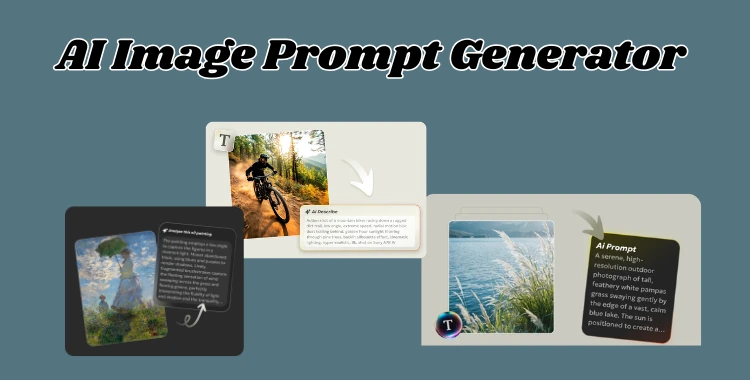
Table of Contents
Part 1: Benefits of Using AI Image Prompt Generators
AI image prompt generators make creating visuals faster, easier, and more professional. They take your ideas and turn them into detailed prompts.
AI tools like DALL·E, MidJourney, or Stable Diffusion can then transform these prompts into stunning images instantly. These tools are perfect for creators, marketers, entrepreneurs, and social media enthusiasts.
-
Save Time: Instead of experimenting with multiple trial-and-error prompts, AI prompt generators create accurate, ready-to-use prompts in seconds. You can go from idea to image faster than ever.
-
High-Quality Results: These tools capture important details such as color, style, composition, and lighting, producing professional-looking visuals that match your vision.
-
Beginner-Friendly: Even without prior knowledge of AI or design, anyone can generate effective prompts. The tools guide you to create clear instructions for AI, making professional image creation accessible.
-
Boost Creativity: AI prompt generators let you explore multiple styles, artistic approaches, or variations of the same concept. You can experiment freely and discover new visual ideas.
-
Multi-Purpose Use: Whether it's for social media posts, marketing campaigns, product visuals, website graphics, or digital art, AI prompt generators provide versatile outputs that suit a variety of needs.
-
Consistency Across Projects: Using structured AI prompts makes sure your images maintain a consistent style, theme, or branding, which is crucial for professional portfolios or social media feeds.
Part 2: Top Free AI Image Prompt Generators
1. PixPretty AI Image Describer
PixPretty AI Image Describer is one of the most effective image to prompt generator tools available online. It instantly turns any photo into detailed, natural language text that can be used as a prompt for AI art, content creation, or marketing copy.
Whether you upload product photos, artwork, lifestyle shots, or social media visuals, the tool analyzes every visual detail. It produces human-like descriptions for each image. The tool also offers specialized templates to generate prompts for platforms like MidJourney, Flux, and ChatGPT. This makes prompt creation fast and accurate for creators of all levels.


Features:
-
Turn any image into a highly detailed, ready-to-use AI prompt in seconds
-
Generate platform-specific prompts (ChatGPT, Midjourney, Stable Diffusion, Flux)
-
Choose prompt tone: cinematic, realistic, artistic, minimal, or marketing-focused
-
Deep scene understanding (objects, people, lighting, mood, composition)
-
Accurate color grading and style breakdown for better AI results
-
Detect background details, textures, and visual depth automatically
-
Convert images into structured prompts with clear formatting
-
Add custom instructions to refine output exactly how you want
-
Multi-language support for wider usability
2. Image to Prompt (imagetoprompt.org)
Image to Prompt is a clean and focused image to prompt AI tool designed for quick results. It analyzes any uploaded image and turns it into a structured, ready-to-use prompt. The tool is perfect for users who want to recreate visuals in AI tools without guessing the right words. Its simple interface makes the process smooth, even for beginners.

Features:
-
Converts images into clear, structured prompts instantly
-
Detects style, objects, colors, and composition
-
Beginner-friendly interface with no setup needed
-
Fast processing with accurate output
-
Copy-ready prompts for tools like Midjourney or Flux
3. Picsart Image to Prompt
Picsart provides a creative and user-friendly text to image prompt generator that helps turn visuals into aesthetic prompts. It is especially useful for content creators who want visually appealing results for social media or design work. The tool blends simplicity with creativity, making prompt generation feel effortless.

Features:
-
Converts images into stylish and engaging prompts
-
Great for social media, branding, and visuals
-
Built-in editing to refine prompts easily
-
Clean and modern interface
-
Quick output with creative tone
4. Vheer Image-to-Prompt Tool
Vheer is a more advanced AI image prompt generator from text built for users who need detailed and accurate prompts. It deeply analyzes each image and includes important elements like lighting, mood, and angles. This makes it ideal for designers and AI artists who want high-quality outputs.

Features:
-
Generates detailed prompts with scene understanding
-
Includes lighting, depth, mood, and composition
-
Structured output for better AI results
-
Suitable for advanced users and professionals
-
Helps improve prompt precision
5. Zemith Image Analyzer & Prompt Generator
Zemith Image Analyzer & Prompt Generator is one of the best image to prompt generators. It breaks images into detailed visual elements. This includes lighting, style, objects, and depth. It creates structured prompts that give better results in AI art tools. Designers, advanced AI artists, and creators prefer it. It makes sure high-quality and professional outputs.

Features:
-
Deep image analysis with accurate prompt creation
-
Breaks down objects, textures, and visual styles
-
Helpful for learning and improving prompts
-
Consistent and high-quality results
-
Suitable for both beginners and professionals
Part 3: How to Use an AI Image Prompt Generator
Creating accurate AI prompts from images has never been easier. With a free tool like PixPretty AI Image Describer, you can turn any photo into clear, natural text. These prompts can be used for AI art, social media captions, product descriptions, or creative projects. The AI analyzes objects, colors, text, and scene details to give you meaningful results in seconds.
Step 1: Upload Your Image
Drag and drop your image or upload it from your device. You can also paste an image URL. Supported formats include JPG, JPEG, PNG, WebP, and JFIF. This works for product photos, artwork, lifestyle shots, or everyday scenes.

Step 2: Set Your Intent
Choose what you want the AI to do. Use a template or type your custom instructions. Options include:
-
Describe in detail
-
Describe briefly
-
Recognize people or objects
-
Write marketing copy
-
Describe outfit & fashion
-
Analyze art style
-
Generate a prompt for Midjourney, ChatGPT, Flux, or Nano Banana

Step 3: Generate Your Description
Click Describe Image and get instant text. You can copy it,
download it, or use it as a structured
image to prompt AI for creative workflows. The generated
text is accurate, natural, and ready for reuse.

FAQ About AI Image Prompt Generators:
1. What are common mistakes when writing prompts for AI image generators?
Many users make the mistake of being vague, like saying "draw a cat" without details. Others give too many conflicting instructions at once, which confuses the AI. Missing important details such as color, style, or perspective also leads to results that don't match expectations.
2. How can I write proper prompts to generate images?
To get better results, be clear and specific. Include details like the subject, colors, lighting, style (e.g., realistic, cartoon, digital art), and perspective.
3. What are the limitations of AI image generators?
AI tools can't perfectly match your imagination. They may create faces or objects that look unnatural, struggle with very complex scenes, or misinterpret abstract ideas. Text in images is often inaccurate, and they can sometimes introduce unintended errors in details.
Final Words:
Amazing images start with clear and detailed prompts in any AI image prompt generator. Include colors, style, mood, and perspective to bring your ideas to life. AI can make mistakes, but PixPretty AI Image Describer helps you craft accurate, creative, and stunning prompts every time, making the process fast and effortless.
PixPretty AI Photo Editor
- 100% free AI Image Generator (Nano Banana 2 powered)
- 4K image quality with fast generation speed
- AI effects & filters for personal and e-commerce use

Related Articles:


