Screenshot Instagram story features can be confusing, especially with Instagram’s changing privacy rules. In 2025, users want to know if Instagram sends alerts when someone screenshots a story, post, highlight, DM, or close friends update. This guide explains exactly what Instagram notifies and what it doesn’t, so you can screenshot confidently and understand how privacy works on the platform.
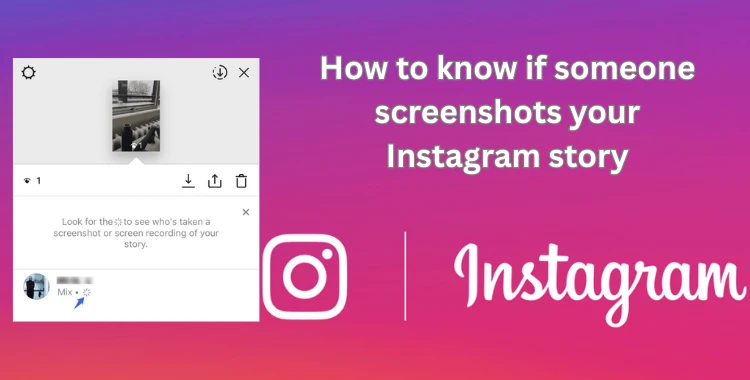
Table of Contents
- Part 1: Can You Screenshot an Instagram Story in 2025?
- Part 2: How to Screenshot an Instagram Story (iPhone & Android) HOT
- Part 3: How to Know if Someone Screenshots Your Instagram Story
- Part 4: Does Instagram Notify When You Screenshot a Story in 2025? (Updated Policy)
- Part 5: Does Instagram Notify When You Screenshot a Close Friends Story?
- Bonus Tip: Achieve Perfect Portraits with PixPretty AI
- Part 6: FAQ About Screenshot Instagram Story
- Conclusion
Part 1: Can You Screenshot an Instagram Story in 2025?
Yes, you can screenshot an Instagram Story in 2025 without any restrictions. Instagram does not block screenshots, and there is no built-in protection that stops users from capturing what appears on their screen. Whether you are using an iPhone or an Android device, a normal screenshot works the same as any other app.
The important thing to know is that Instagram does not notify the person when you screenshot their story. This means you can view and capture stories freely without triggering any alerts.
Part 2: How to Screenshot an Instagram Story (iPhone & Android)
Taking a screenshot of an Instagram Story is very simple on both iPhone and Android. The steps may differ depending on your phone model, but the process stays easy. Just remember that built-in editing tools on both devices are basic, so you can only crop, draw, or add simple text.
1. Screenshot on iPhone
For iPhones Without a Home Button
(Example: iPhone 11–iPhone 16 series)
Step 1: Open Instagram and display the story you want to capture on your screen.
Step 2: Press the Side button and Volume Up button at the same moment. Your phone will take a screenshot instantly.
Step 3: A small preview image will appear in the bottom-left corner. Tap it to edit or ignore it to save automatically.

iPhones With a Home Button
Older iPhones include a physical Home button. Follow these steps:
Step 1: Open Instagram and display the story you want to capture.
Step 2: Press the Home button + Side button together. If your model uses a Home button + Top button, press those two instead.
Step 3: A screenshot preview will appear in the lower-left corner. Tap to view or swipe to remove it.

Screenshot on Android
Most Android phones follow the same button combination, whether they are old or new.
Step 1: Open Instagram and view the story you want to screenshot.
Step 2: Press the Power button and Volume Down button at the same time. If your phone still includes a Home button, press Power + Home instead.

Step 3: Once your screen briefly flashes, your screenshot is saved. You can find it in your Notifications or inside your phone’s Photos/Gallery app.
Part 3: How to Know if Someone Screenshots Your Instagram Story
Instagram no longer notifies users when someone takes a screenshot of their story. In the past, Instagram briefly experimented with sending alerts, but that feature was removed years ago. As of 2025, you cannot see who saved your story through a screenshot.
However, there are still a few ways to track engagement:
-
View Counts: Instagram shows who has viewed your story, but this does not include screenshot activity.

-
Interactions: Likes, replies, or shares will notify you of engagement, but a screenshot itself remains private.


Fact:
Third-party apps claiming to reveal who screenshots your story are unreliable and often violate Instagram’s privacy rules. They may also put your account at risk.
Part 4: Does Instagram Notify When You Screenshot a Story in 2025? (Updated Policy)
As of 2025, Instagram does not notify users when someone takes a screenshot of a story. This applies to all types of stories public stories, private stories, and even close friends stories.
Here’s what you should know:
-
Stories: No alerts are sent when someone captures your story.
-
Posts & Highlights: Screenshots of posts, carousel images, or story highlights are also not tracked.
-
Direct Messages: There is one exception Instagram does notify users if someone screenshots a disappearing photo or video in a private DM. Normal DMs are safe and untracked.
-
Policy Updates: Instagram has updated its policies multiple times, but for stories in 2025, screenshot notifications remain disabled, prioritizing user privacy and ease of sharing content.
Fact:
The original screenshot alert feature was removed in 2018 after user feedback showed it caused stress and reduced engagement. Instagram now focuses on other privacy tools like story expiration, close friends, and disappearing content.
Part 5: Does Instagram Notify When You Screenshot a Close Friends Story?
No, Instagram does not alert users if you screenshot a Close Friends story. Whether it’s a private story shared with a few people or a normal story, taking a screenshot is completely private.
Bonus Tip: Achieve Perfect Portraits with PixPretty AI
PixPretty AI Photo Editor is a powerful, 100% free tool that helps you create professional-quality portraits in seconds. With AI-powered features, you can remove backgrounds, retouch portraits, resize images, and enhance your photos effortlessly. Trusted by millions worldwide, PixPretty saves time, boosts creativity, and delivers high-quality results with minimal effort.
Key Features of PixPretty AI
-
AI Background Remover: Automatically remove complex backgrounds from products, people, animals, cars, or graphics.
-
Portrait Retouching: Smooth skin, remove blemishes, and enhance facial details naturally.
-
Object Remover: Erase unwanted items from your photos with one click.
-
Smart Image Resizer: Resize images for different platforms up to 10x faster than manual methods.
-
AI Creative Tools: Generate action figures, change clothing, or add special effects with AI.
-
Photo Enhancer: Improve colors, lighting, and clarity automatically for professional results.
Part 6: FAQ About Screenshot Instagram Story
1. How can you tell if someone screenshotted your story?
You can’t. Instagram no longer notifies users when someone takes a screenshot of a story.
2. How to take a screenshot of an Instagram story without them knowing?
All normal screenshots are already private Instagram does not alert users for regular stories, posts, or highlights.
3. Can Instagram detect if you take a screenshot?
Only for disappearing photos or videos in DMs. Otherwise, screenshots of stories, posts, and highlights are not detected.
Conclusion
You can screenshot Instagram Story without worryingInstagram does not notify users for regular stories, posts, highlights, or close friends stories. Only disappearing DMs send alerts. For a natural, professional touch, tryPixPretty AI. It makes editing screenshots easy, from skin retouching to background removal, giving you perfect results in seconds.
PixPretty AI Photo Editor
- 100% free AI Image Generator (Nano Banana 2 powered)
- 4K image quality with fast generation speed
- AI effects & filters for personal and e-commerce use

Related Articles:


PixPretty Free Online Photo Editor
Clean, edit, and polish photos instantly — free and easy to use.