


This year's Gemini Holi photo trend has exploded across social media.People simply upload a portrait and paste a Holi AI photo editing prompt to generate realistic gulal powder on clothing and skin.
Table of Contents
- Part 1. How to Use a Holi Gemini AI Prompt (Step-by-Step)
-
Part 2. Holi Gemini AI Prompt Library (Copy-Paste)HOT
- 1) Ultra-Realistic Holi Portrait (Most Viral Look)
- 2) Cinematic Street Holi Action Shot (Rangwali Style)
- 3) Minimal "One Smear of Gulal" Close-Up (Best for Face Preservation)
- 4) Holi Prompt Gemini Love (Couple / Romantic Holi AI Photo)
- 5) Family & Friends Group Holi (Courtyard Celebration)
- 6) Holika Dahan Night Scene (Bonfire Mood)
- 7) Posters / Instagram Story Templates (Text-to-Image)
- Part 3. Use"AI Describe Image" to Generate Better Holi Prompts
Part 1. How to Use a Holi Gemini AI Prompt (Step-by-Step)
Join the Gemini Holi photo trend with a simple workflow: upload a clear photo, then paste a Holi Gemini AI prompt to add realistic gulal powder, water splashes, or a Rangwali Holi street vibe. With the right Holi AI photo editing prompt, you can keep your face recognizable while upgrading the scene to a cinematic Holi look.
• Step 1 --- Choose your photo: Use a sharp, well-lit selfie (front or 3/4 angle). Avoid heavy filters and face cover.
• Step 2 --- Upload to Gemini: Open Gemini, attach the photo, and start a new chat thread for best consistency.

• Step 3 --- Paste the prompt: Use a Holi prompt that says keep my face unchanged and describes gulal powder texture (powder particles, light dust haze).

• Step 4 --- Refine once or twice: If the face shifts, repeat "preserve identity." If powder looks like paint, ask for "granular powder particles" and "natural daylight."


Note:
Some Gemini-generated images may include a visible label/watermark. You can use PixPretty's editing tools to quickly tidy edges, crop, or remove unwanted elements you have rights to.
Part 2. Holi Gemini AI Prompt Library (Copy-Paste)
1) Ultra-Realistic Holi Portrait (Most Viral Look)
Best for: selfies, headshots, clean portraits
Goal: cinematic realism + powder texture + identity preserved
Prompt 1 --- Editorial close-up (safest + premium):
Transform my uploaded photo into an ultra-realistic Holi portrait. Keep my face, facial proportions, skin texture, skin tone, and hairstyle unchanged. Add subtle gulal powder on my cheeks and forehead with visible powder particles and natural smudging. Use soft natural daylight, shallow depth of field, and a clean background with faint color haze. Do not beautify, do not change my facial features, do not change the camera angle.
Prompt 2 --- Golden-hour cinematic (high impact):
Edit my photo into a cinematic Holi festival portrait at golden hour. Preserve my identity exactly (same face, same features, same hair). Add multi-color gulal powder (pink, yellow, blue) on my white outfit and lightly on my face. Include realistic powder dust floating in the air with volumetric sunlight rays behind me. Keep the image sharp on my face and add gentle background bokeh. No face swap, no heavy makeup, no skin smoothing.
Prompt 3 --- High-contrast street portrait (trend look):
Turn my uploaded image into a realistic Rangwali Holi street portrait. Keep my face unchanged. Add vibrant gulal powder stains on my clothes and a few powder streaks on my cheekbones. Add a realistic festival street background with strong blur (crowd shapes only, no distinct faces). Use high-contrast cinematic color grading and a crisp, documentary-style look.
Prompt 4 --- "Powder burst behind subject" (clean but dramatic):
Using my uploaded photo, create a hyper-realistic Holi portrait where a colorful gulal powder cloud explodes softly behind me (not covering my face). Preserve my identity and facial details exactly. Add powder particles in the air, but keep my eyes and facial features perfectly clear. Use studio-like sharpness, shallow depth of field, and natural skin texture.
Prompt 5 --- Minimalist luxury Holi (brand-friendly):
Edit my photo into a luxury Holi portrait: clean background, elegant lighting, realistic gulal powder lightly dusted on my shoulders and cheek. Keep my face unchanged and realistic (no retouching). Use subtle pastel powder tones and a high-end fashion editorial style.
2) Cinematic Street Holi Action Shot (Rangwali Style)
Best for: half-body photos, dynamic poses, photos with space around the subject
Goal: motion + powder particles + "festival chaos" without ruining the face
Prompt 1 --- Throwing gulal toward camera (classic):
Convert my uploaded photo into a cinematic Holi action shot. Keep my face and identity unchanged. Make it look like I'm throwing gulal powder toward the camera: powder particles frozen mid-air with high shutter speed realism. Add mild motion energy but keep my face perfectly sharp. Background: blurred street celebration with color haze and bokeh.
Prompt 2 --- Water splash + powder haze (high energy):
Edit my photo into a realistic Holi celebration scene with a splash of colored water and fine powder haze in the air. Preserve my face exactly. Add realistic water droplets catching sunlight, and keep my outfit lightly stained with gulal. Cinematic grading, strong backlight, no distortion of hands or face.
Prompt 3 --- Crowd vibe but controlled:
Make my uploaded photo look like a real Holi street festival moment. Keep my face unchanged. Add colorful powder clouds and festive ambience, but keep background people as soft silhouettes only (no detailed faces). Use shallow depth of field, cinematic lighting, and realistic powder texture.
Prompt 4 --- Palace arch "street-to-heritage" hybrid:
Edit my photo into a cinematic Holi scene under an Indian palace archway. Preserve my identity and facial features exactly. Add gulal powder dust in the air and light powder stains on my clothing. Use dramatic sunlight beams through the arch, and keep my face sharp with natural skin texture.
3) Minimal "One Smear of Gulal" Close-Up (Best for Face Preservation)
Best for: close-up selfies; when you want the safest "keep face" result
Goal: minimal change + maximum realism
Prompt 1 --- Single-color cheek smear:
Keep my uploaded photo exactly the same, but add a single realistic smear of gulal powder on my right cheek (pink). Preserve my face, facial proportions, and skin texture perfectly. The powder should look granular and natural, not like paint. No other changes.
Prompt 2 --- Forehead tilak + micro powder:
Edit my photo subtly: add a small Holi-style color mark on my forehead and a light dusting of powder near my hairline. Keep everything else identical---same face, same expression, same lighting, same background.
Prompt 3 --- Clean studio background + subtle color haze:
4) Holi Prompt Gemini Love (Couple / Romantic Holi AI Photo)
Best for: couple portraits, pre-wedding shots, Valentine-adjacent creatives
Goal: romance + Holi cues + both identities preserved
Prompt 1 --- Soft romantic Holi couple (warm daylight):
Edit our uploaded couple photo into a soft romantic Holi scene. Keep both faces unchanged and realistic (no face swap, no beautify). Add gentle pastel gulal powder on our cheeks and on our white outfits. Use warm sunlight, soft bokeh background, and a calm, intimate mood.
Prompt 2 --- Forehead-to-forehead intimate pose (cinematic):
Turn our uploaded photo into a cinematic Holi love portrait: we are close, smiling naturally, with subtle gulal powder on cheeks and forehead. Preserve both identities exactly. Add light powder dust in the air with golden rim light. Keep skin texture realistic and avoid heavy makeup changes.
Prompt 3 --- Bold neon Holi "date night" (stylized but realistic):
Edit our photo into a bold Holi night celebration look: deep background blur, colorful powder haze, and neon-like festival lighting. Keep both faces unchanged and realistic. Add gulal powder stains to clothing and tiny powder specks on cheeks. No distortion, no new facial features.
Prompt 4 --- Proposal / love-story poster style (photo edit):
Keep our faces exactly the same, but transform the background into a romantic Holi courtyard with soft string lights and floating powder haze. Add subtle gulal on our outfits. Keep the composition and our pose unchanged.
Prompt 5 --- Minimal love (safest, most consistent):
Make minimal Holi edits to our uploaded couple photo: add a small gulal smear on each of our cheeks and a little powder on shoulders. Preserve both faces perfectly. Do not change background, lighting, or skin tone.
5) Family & Friends Group Holi (Courtyard Celebration)
Best for: group photos, family albums, friend gatherings
Goal: consistent skin tones + controlled background + realistic powder on clothing
Prompt 1 --- Courtyard group celebration:
Edit our uploaded group photo into a realistic Holi courtyard celebration. Keep every person's face unchanged and recognizable. Add gulal powder stains on clothing and a light dusting on cheeks. Background should be bright and festive but not crowded. Keep natural skin tones and realistic lighting.
Prompt 2 --- Water balloon moment (action + realism):
Transform our group photo into a Holi action moment with colored water balloons bursting nearby. Preserve all faces unchanged. Add realistic water droplets and subtle powder haze. Keep the group sharp and the background softly blurred.
Prompt 3 --- "Festival candid" documentary style:
Make our uploaded photo look like a real Holi candid street photo. Keep everyone's identity unchanged. Add natural gulal marks, powder dust in air, and slight color staining on outfits. Documentary lighting, realistic texture, no cartoon effects.
6) Holika Dahan Night Scene (Bonfire Mood)
Best for: night portraits; dramatic, cinematic Holi storytelling
Goal: firelight realism + embers + low-noise cinematic vibe
Prompt 1 --- Bonfire rim-light portrait:
Edit my uploaded photo into a realistic Holika Dahan night scene. Preserve my face and identity exactly. Add warm firelight illumination on my face, subtle embers in the air, and faint powder stains on clothing. Keep it cinematic, low-noise, and realistic.
Prompt 2 --- Crowd silhouettes + bonfire glow (controlled background):
Transform my photo into a Holika Dahan night festival setting with a bonfire in the background and crowd silhouettes only (no detailed faces). Keep my face unchanged and sharp. Add gentle smoke and ember particles, cinematic color grading.
7) Posters / Instagram Story Templates (Text-to-Image)
Best for: social banners, hero images, story backgrounds (no photo upload)
Goal: clean layout + Holi color burst + safe text area
Prompt 1 --- Clean "Happy Holi" background (no text):
Create a vertical 9:16 Holi poster background with a vibrant gulal powder explosion in the center (pink, yellow, blue, green). White space at the top and bottom for text overlay. Ultra-clean, high-resolution, realistic powder particles, no words, no logos.
Prompt 2 --- Cinematic palace arch banner (16:9):
Generate a 16:9 cinematic Holi scene under a heritage palace archway with sunlight beams and colorful powder haze. Keep the center slightly uncluttered for headline text. Ultra-realistic textures, no visible text.
Prompt 3 --- Minimal gradient powder cloud (brand-safe):
Create a minimal Holi background: soft pastel gulal cloud gradient on a clean white canvas, subtle powder texture, high-end editorial aesthetic, lots of negative space, no text, no people.
Part 3. Use"AI Describe Image" to Generate Better Holi Prompts
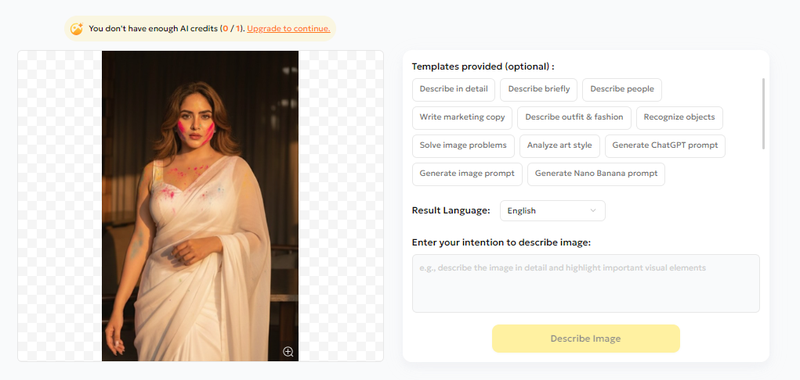
If you want more stable, high-quality Holi Gemini results, a shortcut is to reverse-engineer any reference image (your best Gemini output, a viral Holi photo, or a sample look) into structured text first, then refine it into a "Holi Gemini ai prompt."
-
1.Upload a Holi reference image to PixPretty AI Image Describer.
-
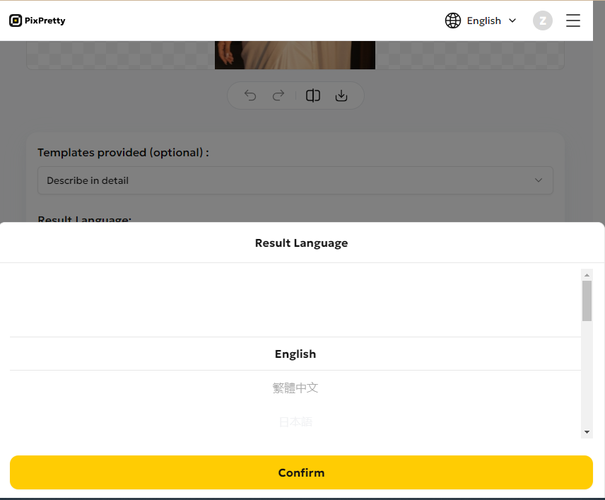
2.Choose your language and the level of detail you want.
-
3.Click Confirm, then copy the result and paste it into your Holi Gemini AI prompt workflow.


PixPretty's AI Image Describer turns an image into clear, natural text in 3 steps (Upload → Set your intent → Generate description), supports custom instructions + templates, and can output in multiple languages---useful for localized Holi captions and prompt localization.
Final thoughts:
The Holi Gemini AI photo trend is easy to join, but the best results come from treating prompts like a repeatable recipe.
Start with the prompt templates above, and if you're trying to match a specific viral look, use PixPretty's AI Image Describer to turn any Holi reference image into a clean, structured description you can paste into Gemini and refine in seconds (Upload → choose language/detail → Confirm & copy).


