



Table of Contents
TeraBox makes cloud storage easy, but downloading shared files is not always smooth. Slow speeds, login prompts, and link errors can get in the way when you just want to save a video, photo, or document. That is why many users look for simple online TeraBox downloader tools that turn shared links into direct downloads.
This guide helps you understand what these tools do, when they are useful, and how to choose the safest and most reliable options available today.
Part 1. What Is a TeraBox Downloader?
A TeraBox downloader is a tool — either web-based, browser-extension, or software — that helps you download files from a TeraBox cloud storage link more easily and often more reliably than using the official site or app. Instead of navigating through TeraBox's interface, you can paste a shared link into the downloader, and it generates a direct download link for videos, documents, photos, or archives. This means faster downloads and a simpler workflow, especially when dealing with large files or multiple items. Tools advertised as terabox downloader for PC, terabox downloader mac, or terabox downloader online free make this process convenient on different devices without needing TeraBox's native client.
Using a downloader can save time when you need to grab shared content quickly, or when you want a backup copy stored locally. It can also be helpful if the official download process is slow or limited by file-size restrictions.
Part 2. Is It Safe to Use a TeraBox Downloader?
Using the official TeraBox website or app is generally safe because your data stays encrypted. Third-party downloaders vary. Some are legitimate and simply convert a shared link into a direct download. Others may track data, show intrusive ads, or bundle unwanted software.
To stay safe, use tools that run over HTTPS, ask for no extra permissions, and do not claim to bypass security. Avoid unverified sources such as modified apps or unknown terabox-downloader github projects. If you choose trusted tools and avoid sensitive files, using a TeraBox downloader is usually low-risk.
Part 3. Best 6 TeraBox Downloader Tools
1. Tera Downloader
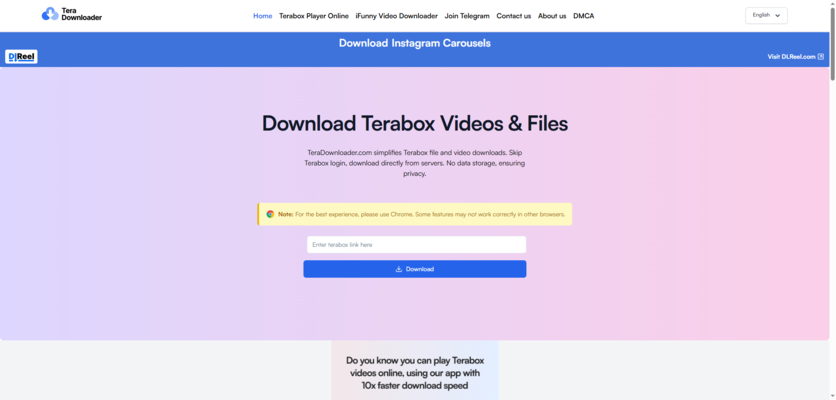
Tera Downloader is one of the most popular TeraBox downloader online tools thanks to its clean layout and fast setup. You paste your TeraBox link into the box, tap download, and the tool generates a direct link for videos or files. It works smoothly on both PC and mobile browsers, so you don't need extra apps.
Pros:

Cons:

Very easy for beginners
Speed may slow down when the site is crowded
Works for both videos and regular files
No batch download feature
No installation needed
May struggle with very large file sizes
2. TeraBoxDL

TeraBoxDL is a simple and dependable TeraBox downloader that supports both small and large file downloads. The site layout is minimal and easy to follow. You paste your share link, generate a download button, and save your file immediately. It is completely free, making it ideal for occasional use.
Pros:
Cons:
Free with no paywalls
Ads may appear
Supports large file downloads
No customization options
Clean and straightforward interface
Support resources are limited
3. iTeraPlay

iTeraPlay is an online TeraBox video player and downloader that lets you preview and save videos or files directly from a shared TeraBox link. It requires no login, no installation, and works on any browser. You paste the share link, and the tool generates a playable preview along with a download option. It also provides a Chrome extension for users who want faster access.
Pros:
Cons:
Plays and downloads TeraBox videos online
New website with limited trust history
No account needed
May not handle very large files well
Has a Chrome extension for quick access
Stability varies depending on link and region
Works on desktop and mobile browsers
4. TeraDownloadr

TeraDownloadr is a simple TeraBox direct download link generator that converts TeraBox share links into downloadable files. The website focuses on a clean interface and minimal steps, so users can save videos or documents quickly. It claims not to store user files and works entirely in-browser.
Pros:
Cons:
Very easy to use
New domain with limited reputation
No signup or installation
No advanced features like batch downloads
Generates direct download links quickly
May struggle with high-resolution or large files
Works for videos and standard files
5. TeraBoxDownloader.PRO

TeraBoxDownloader.PRO offers stable downloads for videos, documents, and other file types. It works across Windows, Mac, Android, and iOS browsers, which makes it a versatile choice. The interface is simple enough for first-time users but still consistent during repeated downloads.
Pros:
Cons:
Works on PC, Mac, and mobile browsers
May struggle with very large files
Stable performance for file and video downloads
No batch download mode
Beginner friendly
Interface is very minimal
6. PlayTeraBox

PlayTeraBox is another fast TeraBox downloader online tool that focuses on quick video and file saving. It is lightweight, easy to open on any browser, and requires no installations. The tool is a good fit for users who want simple, fast downloads without extra settings.
Pros:
Cons:
Quick saving for videos and files
Limited features beyond downloading
Works across different devices and browsers
Some links may need refreshing
Free with no account needed
No batch download capabilities
Part 4. Optimize TeraBox Images With PixPretty AI
TeraBox images often lose clarity after compression, especially when they are shared through public links. If your downloaded photos look blurry, pixelated, or too small, PixPretty AI can upgrade them in seconds. This online AI enhancer improves sharpness, restores details, and boosts resolution to HD or 4K without requiring any software.
Simply upload your TeraBox image to PixPretty AI, choose the enhancement level, and download a cleaner, sharper version. It is an easy way to turn low-quality TeraBox photos into professional-looking images for social media, projects, or work.
Start Optimize for FreePart 5. FAQs on TeraBox Downloader
Q1. Can TeraBox downloaders cause copyright issues?
Yes. Downloading or re-sharing files you do not own may violate copyright laws, even if the link is public.
Q2. Why do some TeraBox downloaders fail to fetch large files?
Many tools have server limits. Very large videos or raw files may exceed their processing capacity, which causes the download to fail.
Q3. Can a downloader get a file if the TeraBox link has expired or been deleted?
No. Once the shared link is invalid, the file cannot be downloaded through any tool.
Conclusion
TeraBox downloader tools are helpful when you need a quick and direct way to save files without dealing with slow speeds or restrictions. Just make sure you choose tools that are safe, stable, and easy to use. And if your downloaded images look compressed or blurry, PixPretty AI can enhance them with clearer details and higher resolution, giving you cleaner photos with almost no effort.
PixPretty AI Photo Editor
- 100% free AI Image Generator (Nano Banana 2 powered)
- 4K image quality with fast generation speed
- AI effects & filters for personal and e-commerce use



