Tracking down the hottest Gemini AI prompts isn’t easy. Trends come and go in a flash, and all the good prompts seem hidden across different platforms. Besides, if your prompt isn’t on point, even the smartest AI won’t wow you. That’s why we pulled together 10+ viral Gemini prompts you can grab and use right away. Moreover, we’ll point you to all trending Gemini AI prompts in single website, so you can skip the endless scrolling.

Table of Contents
-
Part 1: 10+ Viral Prompts to Generate Images In 2026HOT
- 1. Social Media Frame
- 2. Get Ready With Me (GRWM)
- 3. Perfect Selfie Landmark
- 4. Niche Community Aesthetic (#BookTok, etc.)
- 5. Visual ASMR/Oddly Satisfying
- 6. Delulu Trend Scenarios
- 7. Before & After Glow-Up
- 8. POV (Point of View)
- 9. Chibi Character Capsule
- 10. Golden Hour Aesthetic
- 11. Anime-to-Real-Life Cosplay
- 12. Viral Nano Banana Edits
- Part 2: Top Websites with Popular Prompts to Generate Video/Images In 2026
- [Bonus Tip] Dress However You Like With An AI Clothes Changer
Part 1: 10+ Viral Prompts to Generate Images In 2026
Here are the 10+ most trending viral Gemini prompts in 2026 you can use to generate images:
1. Social Media Frame
Use a copy-paste prompt to create a cute chibi character inside a giant Instagram frame. Great for profile pictures or announcements.

Example prompt:
“Create a cute, kawaii-style chibi avatar that looks like a stylized cartoon version of me. Place it inside a giant, ornate, photorealistic Instagram post frame that is floating against a soft pastel background. The overall style is bright, clean, and digital art.”

2. Get Ready With Me (GRWM)
Upload a selfie and prompt an aesthetic flat-lay scene (skincare, makeup, soft light). Ideal for polished, lifestyle product content.
Example prompt:
“A highly aesthetic flat-lay photograph for Instagram. On a pristine marble bathroom countertop, arrange a [serum bottle], a [jade roller], and a small potted succulent. Soft, diffused morning light from a window, shallow depth of field, lifestyle photography.”
3. Perfect Selfie Landmark
Upload a clear selfie and prompt a hyper-realistic photo of you in front of a famous place (e.g., Mt. Fuji). Works well for travel-style posts.
Example prompt:
“Hyper-realistic digital photograph of a person taking a selfie with a smartphone. They are standing on the observation deck with the entire majestic peak of Mount Fuji in the background on a clear day. Sharp focus on the person, slightly blurred background, bright natural lighting.”

4. Niche Community Aesthetic (#BookTok, etc.)
Describe a cozy, niche scene (books, tea, warm light). Helps connect with specific online communities.
Example prompt:
“Cozy and warm aesthetic photograph. A person’s hands are holding an open hardcover fantasy book with ornate edges. Next to it on a knitted wool blanket are a steaming mug of tea and a pair of round glasses. Soft, golden-hour window light creates a gentle shadow and shallow depth of field.”
5. Visual ASMR/Oddly Satisfying
Prompt close-up shots of smooth textures and patterns (e.g., paint in milk). Best for calming Reels or Shorts.
Example prompt:
“Extreme macro close-up, 8K resolution. Captures the exact moment vibrant blue and magenta acrylic paint drops into a bowl of pure white milk, creating slow, smooth, swirling color gradients. Hypnotic, visually satisfying, clean white background.”

6. Delulu Trend Scenarios
Create playful, unrealistic scenes (e.g., being crowned while riding a giant pigeon). Popular with Gen Z humor and fantasy content.
Example prompt:
“Whimsical and surreal digital art. A smiling person in casual jeans and a t-shirt is being crowned with a glittering crown while riding on the back of a giant, friendly-looking pigeon with iridescent feathers. They are flying over a sunny, picturesque suburban neighborhood. Bright, dreamlike, optimistic aesthetic.”
7. Before & After Glow-Up
Use two photos and improve the “after” with realistic beauty edits (smooth skin, bright eyes, and pro lighting). Creates strong transformation content.
Example prompt:
“(Use on the ‘After’ photo) Professional beauty retouch. Smooth skin texture minimally, remove minor blemishes, brighten the whites of the eyes naturally, and enhance lip color slightly. Apply soft, professional three-point portrait lighting. Keep all facial features and structure completely natural and recognizable. Photorealistic.”

8. POV (Point of View)
Prompt first-person scenes like exploring an abandoned hospital at night. Produces immersive, cinematic visuals.
Example prompt:
“First-person point of view (POV) photograph, handheld camera feel. Looking down a long, decaying, abandoned hospital corridor at night. A single beam from a flashlight cuts through the dust-filled air, illuminating peeling green paint and a broken gurney. Photorealistic, gritty textures, high contrast.”
9. Chibi Character Capsule
Upload a portrait and turn it into a chibi figure inside a gashapon capsule. Popular for personalized digital collectibles.
Example prompt:
“Transform my uploaded portrait into a cute, super-deformed chibi character. Style the figure with a simplified version of my clothing and key facial features. Place the finished chibi figure inside a clear, spherical gashapon capsule that is sitting on a yellow plastic base. Soft studio lighting, photorealistic render.”

10. Golden Hour Aesthetic
Describe warm sunset lighting, lens flare, and soft shadows. Produces timeless, cinematic portraits.
Example prompt:
“Cinematic golden hour portrait photography. A person stands in a vast field of tall, golden grass at sunset. The warm, low sun creates beautiful lens flares and backlighting, making their hair glow. Wind gently blows through their hair and the grass. Dreamy, soft shadows, and pastel orange and purple tones in the sky.”
11. Anime-to-Real-Life Cosplay
Combine an anime reference and a real photo to create a realistic cosplay image. Blends fan art with photography.
Example prompt:
“Hyper-realistic photography of a cosplayer. The person is perfectly posed and dressed as the uploaded anime character [Character Name]. Render the costume, wig, and props with photorealistic fabric, hair, and material textures. Use dynamic studio lighting that matches a cinematic poster. Keep the person's face recognizable.”

12. Viral Nano Banana Edits
Upload any photo and use trending prompts like “3D figurine,” “apply makeup,” or “Polaroid merge.” Gemini’s Nano Banana model functions especially well for these viral styles.
Example prompt 1:
“Transform my uploaded photo into a high-quality 3D animated figurine. Style should be like a collectible statue with a matte finish, standing on a small circular base.”
Example prompt 2:
“Using the uploaded photo of my face and the uploaded reference image of the [e.g., smokey eye] makeup look, apply that exact eyeshadow and lip color to my photo. Blend seamlessly and keep my skin texture realistic.”
Part 2: Top Websites with Popular Prompts to Generate Video/Images In 2026
Many websites also offer ready-made prompt templates you can copy-paste into Gemini to generate great visuals. Here are the most popular ones in 2026:
1. Media.io
You can find all trending Gemini AI prompts in single website like Media.io, such as cinematic 8K portraits, fashion, and urban/street style. For instance, you can use the Gemini AI photo prompt and copy-paste it, e.g, “trending boy 2026,” in Gemini and get different looks like noir, K-drama, executive, etc. You can also generate images in different styles, and create short videos from scene descriptions.
The website also allows you to make music based on mood or genre, add motion to images, and edit photos by telling the AI what to change. However, Media.io is only best for quick, simple content like basic marketing visuals, short videos, or audio. It’s not good with realistic faces and detailed accuracy.

2. CyberLink
CyberLink is another top website offering prompts for fireworks, festive scenes, celebration portraits, etc. For instance, it offers 45+ ready-to-copy-and-paste viral couple romantic prompts for Gemini AI, and also offers prompts for portraits, and families. The website can also generate portraits, group photos, themed images like fantasy scenes or 3D figurines, and Polaroid-style pictures from prompts.
It offers editing tools that allow users to replace objects, restore old photos, transfer styles, or adjust poses and expressions while keeping the original look. However, expert reviews say the results are often poor with CyberLink. Images can look unrealistic, low quality, or visibly edited, making them unsuitable for professional use.

3. Skylum
Skylum offers prompt guides for Google Gemini. For example, it provides the top 10 Gemini prompts that focus on clear, detailed instructions for photo editing and creative image generation. They can improve portraits, adjust lighting, or create imaginative scenes.
Skylum’s Luminar Neo also offers tools like GenSwap and GenExpand that let users replace objects or extend images using text prompts. But results can be inconsistent and depend heavily on how clear the prompt is. GenExpand is best for simple backgrounds like skies, while object removal can leave visible flaws.

4. AceCloud
The AceCloud is a blog guide that shares ready-to-use prompts for Gemini’s Nano Banana Pro image generator. For instance, AceCloud offers 30+ copy-paste Nano Banana prompts for work, clients, and social media. The guide focuses on professional, client-ready results and is based on real project work. Its prompts are very detailed, often specifying image size, colors, layouts, and elements that must stay the same.
These prompts are mainly used for marketing and design tasks like product images, branding visuals, menus, diagrams, team photos, and 3D characters. Ace Cloud also publishes general articles explaining Gemini models and comparing their technical features.

[Bonus Tip] Dress However You Like With An AI Clothes Changer
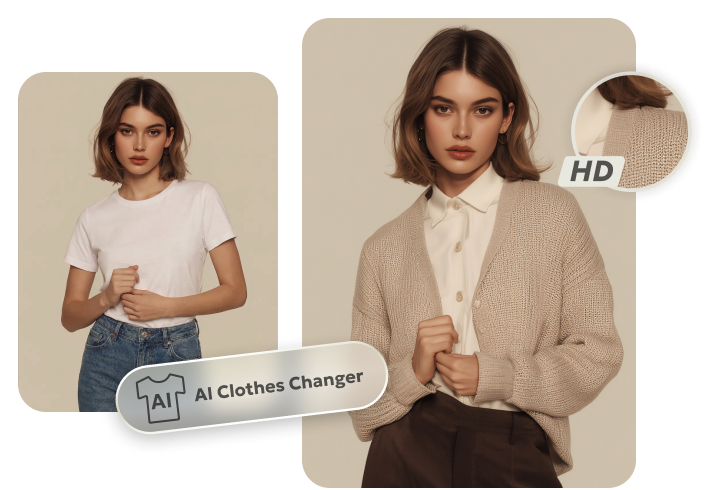
If you want to change clothes in photos or see how different outfits would look on you, Tenorshare PixPretty AI offers a free Online Clothes Changer. It gives fast, realistic HD results and automatically matches the clothing to your body shape, pose, and lighting, with no technical skills needed. PixPretty also offers advanced photo editing, offering numerous filters, effects, and presets, especially useful for improving pictures if you’re using images to generate pictures or videos.
In addition, it can resize, compress, and convert images, and remove backgrounds or watermarks. The tool can also retouch faces, hair, and skin, and replace or extend even complex backgrounds. Tenorshare PixPretty also offers many viral, ready-made Gemini prompts for different categories. For instance, you can copy-paste the 2026 Dhurandhar Rahman Dakait, hot girl bikini, couple photo, bodybuilding, or GTA-style prompts to generate striking visuals.
Conclusion
Gemini AI prompts are driving viral content across social media, from chibi avatars and GRWM flat lays to cinematic POV scenes and Nano Banana edits. You can find all trending Gemini AI prompts in single website, like Media.io, CyberLink, Skylum, and AceCloud, for images, videos, and edits.
If you want to see how different clothes look on you in your pictures, or improve images for fashion and personal content, try a free tool like Tenorshare PixPretty AI. It offers a free AI Clothes Changer to try new outfits and editing tools to retouch portraits, and create polished visuals fast.
PixPretty AI Clothes Changer
- Instantly change outfits with AI in 1 click
- Realistic AI previews for every top, bottom, or dress
- Create and explore endless outfits and OOTDs without editing