


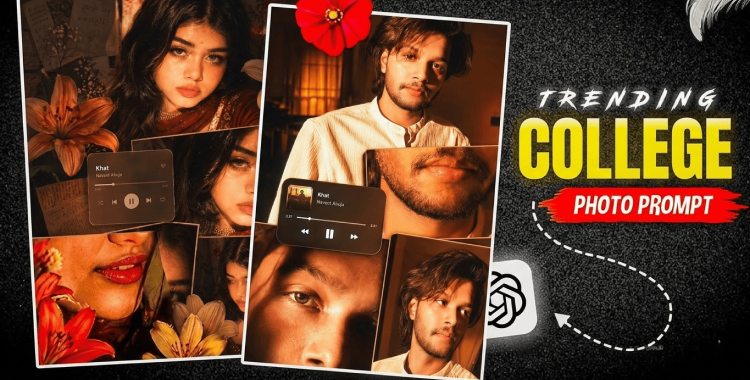
Collage AI photos have become viral recently. In this article, you'll learn how to create trending collage AI photos, get inspired by 20+ prompts, and discover practical tips to make your results look more natural.
Table of Contents
Part 1. How to Create a Trending Collage AI Photo
Creating a trending collage AI photo is straightforward with the right steps. It combines multiple images or elements into a stylish, layered composition that's perfect for Instagram, Tiktok and Youtube.
-
Open the ChatGPT or PixPretty AI and upload your photo if needed.
-
Copy and paste the prompts below to generate the image. If the result is not satisfying, you can keep adjusting the prompt until you get the look you want.
| Theme | Prompts | Copy Now |
| Prompts |
rich amber, burnt orange, and
golden tones with high saturation glowing highlights and slightly crushed
blacks Styling messy tied back hair, loose strands, glossy lips, subtle
eyeliner dewy skin delicate necklace, white top
Panels Top -serious direct gaze Middle: lips + necklace close-up Bottom
left: eye closeup with shadow split Bottom riaht: analed soft gaze
Add lily stickers orange, cream, red around the collage. Include a rounded
music player Ul centerleft Khat - Navzot Ahuja Finish with glow/bloom
highlights, subtle vignette, and flash night
|
COPY
|

- Download and save the image, or share it on social media platforms like Instagram or TikTok.

 Related topic:
For more information, also read: Trending Childhood vs Present Birthday AI Photo Editing Tutorial & 20+ Prompts
Part 2. Best 20+ Trending Collage AI Photo Editing Prompts
These prompts cover popular collage styles like retro film, magazine layouts, travel moodboards, and dreamy aesthetics, designed to generate the best results, just copy and paste them.

-
Create a trendy aesthetic collage photo of a stylish young woman, with layered polaroid frames, torn paper textures, handwritten notes, soft beige tones, warm lighting, subtle film grain, and a dreamy Pinterest-style composition.
-
Generate a viral Instagram collage edit of a couple, featuring overlapping photo strips, scrapbook stickers, vintage stamps, soft pastel colors, romantic shadows, and a clean editorial layout.
-
Design a trendy travel collage photo with multiple snapshots, map cutouts, passport stamps, torn paper edges, ocean-blue accents, glossy magazine styling, and a story-driven vacation mood.
-
Create a retro film-inspired collage portrait with flash photography, grainy texture, faded colors, contact-sheet panels, paper tape, and a nostalgic 2000s social media vibe.
-
Generate a luxurious magazine-style collage featuring a fashionable girl, bold typography, black and gold accents, layered image blocks, clean white space, and a high-end editorial look.

-
Make a dreamy romantic collage photo with soft pink tones, flowers, lace textures, handwritten captions, overlapping portraits, and a delicate scrapbook aesthetic.
-
Create a cool street-style collage of a boy, with urban textures, ripped paper layers, polaroid frames, monochrome tones, graffiti elements, and a confident social-media trend look.
-
Generate a birthday celebration collage with balloons, confetti, party stickers, layered snapshots, glitter details, bright colors, and a fun Instagram-ready composition.
-
Design a best-friend collage edit with candid photos, playful sticker elements, handwritten phrases, film frames, soft pastel lighting, and a warm memory-board style.
-
Create a cinematic collage portrait with moody lighting, deep shadows, muted tones, layered scenes, film borders, and a dramatic storytelling atmosphere.

-
Generate a summer beach collage with sandy textures, ocean blues, shell details, polaroid photos, torn paper edges, and a fresh vacation scrapbook feel.
-
Make a floral aesthetic collage with pink and white flowers, soft glow lighting, layered frames, delicate paper textures, and a feminine dreamy moodboard look.
-
Create a Korean-style aesthetic collage photo with clean composition, soft skin tones, minimal stickers, subtle grain, pastel palette, and a gentle dreamy social-media vibe.
-
Generate a night neon collage with city lights, glowing reflections, dark blue tones, flash photos, glossy typography, and a modern energetic street aesthetic.
-
Design a minimal luxury collage with neutral colors, elegant spacing, simple frames, soft shadows, clean typography, and a polished premium lifestyle feel.

-
Create a youth school-life collage with notebook paper textures, doodles, class snapshots, polaroid frames, pastel highlights, and a nostalgic look.
-
Generate a lifestyle collage with coffee, books, fashion details, daily snapshots, muted warm tones, paper cutouts, and a casual but stylish social-media layout.
-
Make a scrapbook-style collage with tape strips, paper textures, stickers, memo notes, overlapping photos, and a cozy handmade memory aesthetic.
-
Create a fashion editorial collage with bold poses, sharp composition, monochrome accents, layered panels, magazine text, and a high-impact trend look.
-
Generate a soft glow portrait collage with golden-hour lighting, creamy tones, delicate paper layers, subtle grain, and a romantic Pinterest-inspired atmosphere.
-
Design a storytelling memory collage with multiple candid shots, date labels, Polaroid borders, torn paper, warm tones, and a heartfelt visual diary style.
Part 3. Create Trending Collage AI Photos with PixPretty AI
PixPretty AI now supports GPT Image 2, making it easier than ever to create perfect Instagram-style Trending Collage AI Photos. It also supports the latest image generation models like Nano Banana 2 and Qwen, so you can freely switch between models depending on the look you want. With 4K generation and fast output, PixPretty AI is built for creators who want high-quality results without waiting too long.

Beyond image generation, PixPretty AI also brings together a full set of editing tools in one workflow. You can use AI outfit changing, Image to Prompt, AI Effects, background removal, and other smart editing features to refine your collage photo and make it look more polished. In other words, it gives you an all-in-one AI image creation and editing experience, from generating your collage idea to finishing the final Instagram-ready result.
Part 4. Tips to Get Better Collage AI Photo Results
A better collage AI result usually comes from being specific about the subject, layout, lighting, and color palette, while keeping the design simple enough to read well on mobile. The strongest prompts usually mention the frame style, paper textures, shadows, and mood, because those details help the AI build a more intentional and polished composition.
-
Use a clear subject description, and keep the face or main person consistent across all frames if you want a realistic collage.
-
Specify the collage layout, such as Polaroid frames, contact-sheet style, 3-grid, 9-grid, or overlapping scrapbook layers.
-
Add a color palette, like warm beige, pastel pink, muted brown, or black-and-gold, so the whole collage feels cohesive.
-
Mention lighting clearly, such as golden hour, soft window light, flash photography, or neon night lighting, because lighting strongly changes the final mood.
-
Include texture and material details like torn paper, tape, film grain, glossy magazine cutouts, or sticker elements to make the collage feel more authentic.
-
Keep the composition balanced and avoid overcrowding; on Instagram, clean spacing and readable visual hierarchy usually work better than too many layers.
-
If you want a more realistic result, start from an uploaded image and use image-to-image editing instead of generating everything from scratch.
-
Generate a few variations, then adjust one or two prompt terms, such as lighting or layout density, to refine the result efficiently.
-
For text-heavy collage styles, keep typography minimal and readable, since overly complex text often weakens the final image.
-
Match the prompt to the intended vibe, such as romantic, travel, Y2K, editorial, vintage, or dreamy aesthetic, so the AI stays consistent with the trend.
Conclusion
A simple portrait or casual snapshot can become a stylish collage that feels current, expressive, and built for social media. The key is to keep your prompts clear, your style consistent, and your composition balanced. And if you want a faster workflow for creating and editing these looks, PixPretty AI is a great option to try.
PixPretty AI Photo Editor
- 100% free AI Image Generator (Nano Banana 2 powered)
- 4K image quality with fast generation speed
- AI effects & filters for personal and e-commerce use

Related Articles:


