


Scroll through Instagram, TikTok or Pinterest and you'll see a pattern: people love movie-like photos. The good news is you no longer need a cinema camera or a Hollywood crew to create that look. With today's AI tools, anyone can turn simple images into film-inspired art.
The key is learning to write a strong AI Prompt for Cinematic Photo, clear instruction that tell the AI exactly what kind of "movie still" you want.
Table of Contents
- Part 1: What is an Example Prompt for Creating Cinematic Photo?
- Part 2: AI Prompts for Different Cinematic Photo ScenariosHOT
- 1. Cinematic Photo Prompts for Men, Women and Couples
- 2. Cinematic Photo Prompts for Landscapes
- 3. Cinematic Photo Prompts for Urban Night Cinematic Shots
- 4. Cinematic Photo Prompts for Still Life
- Part 3: How to Use These AI Prompts for Creating Cinematic Photos?
Part 1: What is an Example Prompt for Generating Cinematic Photo?
Cinematic photo prompt guides the AI model to replicate movie fundamentals like shallow depth of field, shot composition, dramatic contrast and color grading styles.
These are the aesthetic building blocks cinematographers use, but now you can call them into existence with following prompt like this:
| Theme | Prompts | Copy Now |
| Example Cinematic Prompts |
Generate a hyper-realistic 4K image using the uploaded photo, preserve the subject’s exact skin tone and facial features 100% with no alteration.The person wears a high neck, tight fitting black long sleeve dress, standing beside an old newsstand with a small cluster of withered wood and orange pink flowers placed nearby, use warm toned low saturation color grading with muted blacks, soft browns, dusty oranges, and pale skin highlights, apply vintage film grain texture across the frame with subtle noise and halation, use soft natural backlighting from behind the subject to create a gentle rim light around hair and shoulders, allow long hair to catch the light and glow softly with loose strands crossing the jawline, include a double image ghosting effect for a dreamy surreal mood in the newsstand mirror, camera at eye level, medium close up framing from the side, cinematic composition, calm yet mysterious atmosphere, balanced between softness and tension, editorial fashion photography style, Instagram aesthetic with subtle movement and storytelling. Shot on 85mm lens, aspect ratio 2.39:1.
|
COPY
|

That single prompt tells the AI what to show (subject & action), how to show it (camera and lens) and how it should feel (lighting, mood, palette).
Of course, the way you write prompts changes depending on what you're creating.So let's outline the best prompt styles for different cinematic photo categories.
Part 2: AI Prompts for Different Cinematic Photo Scenarios
Cinematic Photo Prompts for Men, Women and Couples
1. City Night Gaze
A cinematic black and white medium shot photograph of a ruggedly handsome man in his 30s with dark curly hair and a short beard, looking intensely at the camera. He is standing still amidst a bustling city crowd at night. The photograph uses a long exposure technique, creating dramatic motion blur and light streaks in the background and foreground, while the man's face remains in hyper-sharp focus. High contrast, dramatic lighting, shallow depth of field. Photorealistic, professional fashion editorial style.

2. Golden Hour Time
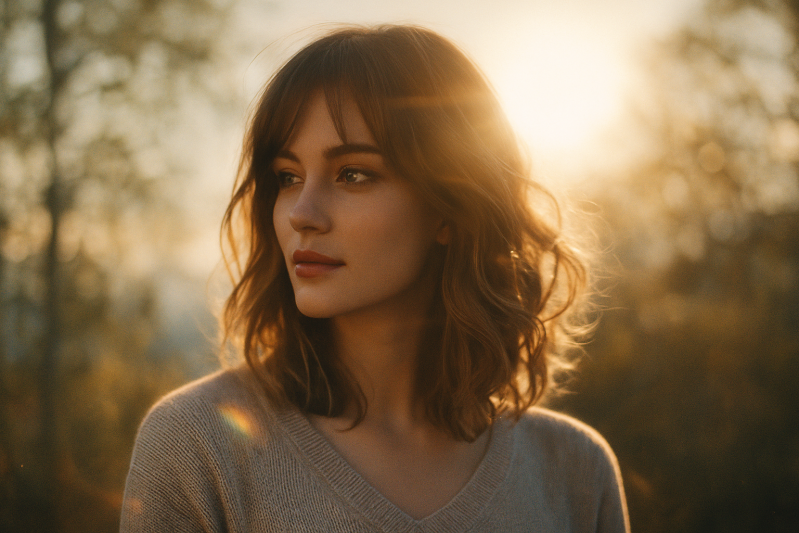
Generate a golden-hour cinematic portrait using the uploaded photo, 50mm lens look, f/1.4 creamy bokeh, soft backlit sunlight creating a warm halo, Kodak Portra-style color tones, light lens flare, mild diffusion glow, slightly desaturated highlights, wide cinematic aspect ratio.
3. Underground Chic
A cinematic, ultra-realistic portrait of a young woman standing on an underground subway platform at night. She is captured mid-turn, looking back over her shoulder toward the camera with a calm, confident, slightly mysterious expression. Long dark brown hair flowing naturally with motion blur, soft strands framing her face. Sharp winged eyeliner, natural skin texture, subtle glow, realistic pores. She is wearing a black leather jacket with a modern, minimal aesthetic. The environment is a gritty urban subway station with tiled walls, overhead fluorescent lights, steel beams, and a train passing by on the right side creating motion blur. Yellow platform edge visible. Background slightly blurred for depth, strong cinematic depth of field. Lighting is moody and cinematic: soft key light on face, cool greenish and warm yellow subway tones mixed, realistic shadows. Shot on a full-frame camera, 35mm lens, f/1.8, shallow depth of field. Film grain, high dynamic range, dramatic urban fashion photography style. Ultra-detailed, photorealistic, 8K quality, sharp focus on eyes, professional editorial photography, modern cinematic color grading.

4. Shoreline Masculinity
Full-body young man in white shirt, lower body submerged in sea water, faint muscular lines slightly visible through fabric, gaze directly at the camera with charming smile, gentle waves lapping around limbs, golden hour shoreline, cinematic texture, hyper-realistic, soft bokeh, 8K, wet fabric texture.

5. Sunset Beach Embrace
Young couple embracing on beach at sunset, forehead touching with gentle smiles, sunset glow draping over figures, orange-pink sky and sea, soft golden hour light, romantic warm atmosphere, cinematic texture, hyper-realistic, soft bokeh, 8K, shoreline with gentle waves.

6. Skyline Toast
Upper-body young couple toasting at candlelit dinner on high-rise terrace, floor-to-ceiling window with bustling city skyline view, warm candle glow, gentle smiles, elegant casual wear, romantic atmosphere, cinematic texture, hyper-realistic, soft bokeh, 8K, city night light reflection.

Cinematic Photo Prompts for Landscapes
7. Wide-angle Shot of Mountains
Majestic snow-capped mountain range at dawn, dramatic god rays breaking through storm clouds, wide-angle composition showing vast scale, rich contrast between shadowed valleys and illuminated peaks, cinematic aspect ratio 2.39:1, deep blues and warm highlights, IMAX quality detail.

8. Foggy Forest with Deep Contrast and Suspense
Dense ancient forest shrouded in thick morning fog, shafts of pale light filtering through twisted branches, high contrast with deep blacks and milky whites, unsettling atmosphere, wide establishing shot, desaturated green and gray tones, inspired by Nordic noir cinematography.

Cinematic Photo Prompts for Urban Night Cinematic Shots
9. Neon-lit Street with Moody Atmosphere
Empty Tokyo alleyway at midnight, multiple neon signs in pink, blue and yellow casting colorful reflections, lone figure in silhouette walking away, wet pavement reflecting lights, shallow depth of field, Wong Kar-wai inspired color grading, melancholic urban mood.

10. Rainy Cyberpunk Street with Reflections
Futuristic cyberpunk city street during heavy rain, holographic advertisements floating above crowded sidewalks, neon reflections on wet asphalt creating mirror effect, steam rising from street vents, teal and magenta color scheme, anamorphic lens flares, Blade Runner inspired dystopian atmosphere, 4K cinematic quality.

Cinematic Photo Prompts for Still Life
11. Portrait Blemish Removal + Skin Tone Adjustment
Create a cinematic portrait with subtle blemish cleanup, preserve natural pores and skin texture, 8K clarity, 85mm lens look at f/2.8, soft Rembrandt lighting, neutral film grade, gentle contrast, film grain at low intensity, 2.39:1 aspect ratio.

12. Food Still Life with Cinematic Lighting
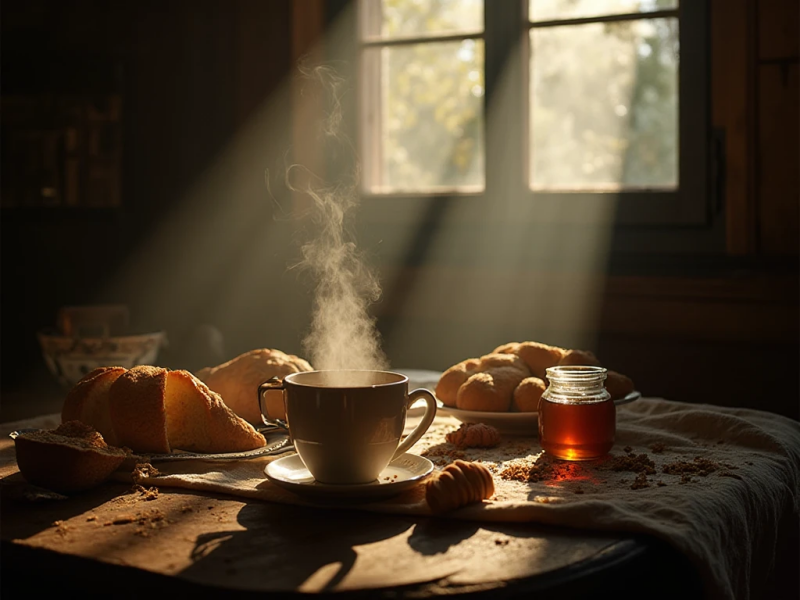
Rustic breakfast scene with steaming coffee, fresh bread and honey jar on farmhouse table, morning sunlight streaming through window creating long shadows, dust particles visible in light beams, warm earthy tones with cool shadow areas, shallow depth of field, cozy intimate atmosphere reminiscent of European art house films.
Part 3: How to Use These AI Prompts for Creating Cinematic Photos?
If you want consistent results, don't treat prompts like random sentences. Think like a cinematographer giving instructions to a crew. Here's a simple guide photo enthusiasts can follow:
- Start with the subject: Be clear about who or what is in the scene. Add a few specifics (age, clothing, environment, action). Example: "a tired boxer sitting in a locker room, sweat on skin."
- Choose a cinematic style: Reference a genre or vibe: noir, sci-fi, war film, romance, indie drama, documentary realism. Example: "moody noir atmosphere."
- Add camera and lens details: This shapes perspective and realism. Wide lenses (24-35mm) feel epic; 50-85mm feels intimate. Example: "shot on 85mm lens, f/2.0."
- Describe lighting like a filmmaker: Mention direction and quality: backlight, rim light, soft diffused light, harsh shadows, neon glow. Example: "single overhead spotlight, deep shadow falloff."
- Set composition cues: Tell the AI how the frame is built: close-up, wide shot, low angle, rule of thirds, centered symmetry. Example: "low-angle hero shot."
- Add atmosphere and mood: Fog, rain, smoke, dust, sunlight streaks, these add depth and story. Example: "thin mist, floating dust particles in light beams."
- Color grade: This is the "film finish." Think teal-orange, desaturated indie tones, vintage sepia, monochrome. Example: "muted tones with warm highlights."
- Quality and aspect ratio: Always include a cinematic ratio (2.39:1) and resolution cues (4K/8K) for crisp results.
- Use negative prompts when needed: If the AI keeps adding unwanted stuff, add exclusions like: "no extra people, no cartoon look, no over-smoothing, no text.
A quick reusable template
Subject, scene, shot type + lens, lighting, mood/atmosphere, color grade/film stock, texture, aspect ratio, quality, negative prompts.
The trick: treat every phrase like a camera instruction. If you do that, the AI will respond like a visual crew, not a random filter.
Conclusion
Whether you're a hobbyist polishing social posts or a pro exploring new workflows, cinematic prompt crafting opens up endless creative possibilities. Start playing with prompts today and turn your photos into big screen art.
PixPretty AI Photo Editor
- 100% free AI Image Generator (Nano Banana 2 powered)
- 4K image quality with fast generation speed
- AI effects & filters for personal and e-commerce use

Related Articles:
- Top 12 PolyBuzz Alternative in 2025 (Safe, Private & Less Filtered Options)
- 15 ChatGPT Tell Me About Myself Prompts (Fun & Insightful)
- Top 50+ AI Twerk Prompts for High-Quality Twerk Videos
- Rehman Dakait AI Prompt Guide — 20+ Dhurandhar Movie AI Prompts
- 20+ Aura Farming AI Prompts for ChatGPT and Gemini - Horse Portrait


