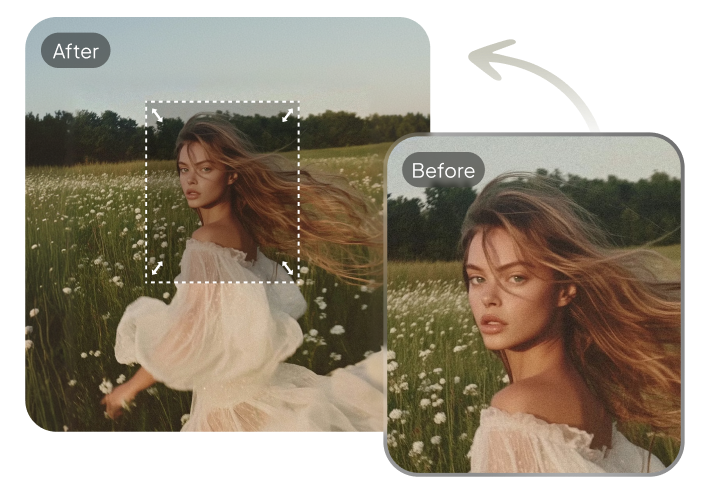
AI generators now make it easy to make it full body from any photo. Whether you have a headshot, half-body picture, or face photo, these tools can create stunning full-body images in realistic, anime, or creative styles. Free AI body generators let anyone transform photos into complete portraits quickly and effortlessly.
This guide shares the best tools, ready-to-use prompts, and practical tips to help you make it full body like a pro even if you're a beginner.

Table of Contents
Part 1: What Is an AI Full-Body Generator?
An AI full-body generator is a tool that creates complete body images from a single photo. Using advanced algorithms, it can turn a face, half-body, or headshot into a realistic full-body portrait. Many tools are free to use, making it easy for anyone to generate stunning results.
With an ai body generator free, you can create professional-looking full-body images for social media, art projects, or personal use quickly and effortlessly.
Part 2: How to Use AI Generators to Create Full-Body Images
AI generators make it simple to turn a headshot or half-body photo into a full-body image. Using an ai body generator free, you can create realistic, anime, or creative full-body portraits in minutes. This guide works for turning headshots or half-body photos into realistic full-body portraits.
Step 1: Choose a Free AI Body Generator
Start by selecting a tool that supports full-body generation. Look for options that are labeled ai body generator free. Popular free tools often allow uploading a photo and provide multiple styles, such as realistic, anime, or fantasy. You can use gemini and chatgpt also.

Step 2: Upload Your Photo
Use a clear headshot or half-body image. The AI works best when the face is visible, well-lit, and the photo is high-resolution. This step is key if you want to turn headshot into full body without distorted proportions.

Step 3: Select Full-Body Generation
Most AI tools let you choose between styles or output types. Make sure you select "full-body" or "complete body" option. This tells the AI to generate the entire figure instead of just enhancing the face or upper body.
Step 4: Add Prompts and Details
Prompts guide the AI to create the image exactly how you want it. Include details like:
-
Pose: standing, sitting, running, action pose
-
Clothing: casual, formal, cosplay, or costume
-
Style: realistic, anime, cartoon, or artistic
-
Background: studio, park, fantasy, or abstract
For example: "Turn headshot into full body: young woman standing, arms crossed, casual outfit, realistic style, sunny park background, full-body view."

Step 5: Generate the Image
Click the generate button and let the AI create your full-body image. Depending on the tool, this can take a few seconds to a couple of minutes.
Step 6: Review and Refine
Check the output for proportion errors, pose issues, or style mismatches. Many AI tools allow you to tweak prompts or regenerate the image multiple times until it looks perfect.

Step 7: Download and Use Your Full-Body Image
Once satisfied, download your image. You can now use it for social media profiles, character illustrations, creative projects, or personal art.
Part 3: Best Free AI Full-Body Generators
1. Pixelcut Full‑Body Image Generator
A beginner‑friendly AI tool that lets you describe a body and generate a realistic full‑body image from text. Trusted by millions, it's great for turning ideas into visuals with just a description. You can use it to turn headshot into full body by including your photo and prompt.

Features:
-
Create high‑quality full‑body figures instantly with a text prompt.
-
Customize body type, pose, clothing, and style in detail.
-
Fast generation with realistic lighting and proportion.
-
Download high‑resolution, watermark‑free results.
-
Works directly in browser without advanced skills.
2. SeaArt AI Body Generator
A powerful ai body generator free that produces lifelike full‑body photos from text prompts or descriptions. It includes tools to fine‑tune body types, poses, and outfits, making it ideal for creative and professional use.

Features:
-
Massive model library for diverse body customization.
-
Lightning‑fast generation and prompt refinement tools.
-
Works on phones, tablets, and desktops.
-
Produce extremely lifelike human photos.
3. Fotor AI Human Generator
This face to full-body generator focuses on realistic human creation. You can generate full‑body humans from text and even blend your face onto AI‑generated bodies. It's easy for beginners and doesn't require design skills.

Features:
-
Realistic and customizable human body generation.
-
Face swapping onto AI bodies.
-
No watermarks in output.
4. ChromaStudio Full Body Generator
A straightforward free AI full‑body generator that turns a face image into a full‑body version. Upload your photo, and the tool automatically expands it into a complete figure. Ideal for quick full‑body results.

Features:
-
Upload any face image and expand it into a full-body portrait effortlessly.
-
Generate full-body images in seconds with fast AI processing.
-
Supports realistic and stylized outputs for versatile creative use.
-
Free to use, perfect for social media, avatars, or personal projects.
Part 4: 10 Ready-to-Use Prompts for Full-Body AI Generation

Prompt 1:
Turn headshot into full body: A young woman standing confidently in casual clothing, arms crossed, wearing a blue denim jacket and white sneakers, realistic lighting, full-body portrait, outdoor city park background, natural pose, photorealistic style, high-resolution details, clear face and proportionally accurate body.
Prompt 2:
Face to full-body generator: A man in a business suit standing in a modern office, hands in pockets, brown hair, glasses, realistic skin tone, full-body view, soft studio lighting, high-definition, professional look, clear proportions, photorealistic style.
Prompt 3:
Half body to full body AI free: A teenage girl in a sporty outfit, standing on a running track, ponytail hair, wearing a red hoodie and black leggings, white sneakers, full-body portrait, realistic shadows, natural posture, high-resolution details, morning sunlight, photorealistic style.
Prompt 4:
AI body generator free: A young man in casual clothes, standing on a beach at sunset, wearing a white t-shirt and blue jeans, arms relaxed, looking forward, full-body view, realistic waves and sand background, photorealistic skin texture, natural lighting, proportional body shape.
Prompt 5:
Turn headshot into full body: A woman wearing an elegant evening gown, standing on a red carpet, long hair flowing, realistic fabric textures, full-body image, high-resolution lighting, realistic shadows, detailed shoes and accessories, photorealistic style, natural posture.
Prompt 6:
Face to full-body generator: A male athlete in running gear, jogging on a track, wearing a blue sports shirt and black shorts, full-body portrait, muscular build, realistic lighting, natural motion, high-definition details, photorealistic style, outdoor stadium background.
Prompt 7:
Half body to full body AI free: A young woman wearing a casual hoodie and ripped jeans, standing near a modern building, arms relaxed at sides, natural smile, full-body portrait, realistic textures and proportions, soft daylight, photorealistic style, urban cityscape in background.
Prompt 8:
AI body generator free: A man in a fantasy warrior outfit, standing on a rocky cliff, full-body image, leather armor with metal details, sword in hand, flowing cape, natural pose, realistic skin and hair, sunset background, photorealistic style, high-detail textures.
Prompt 9:
Turn headshot into full body: A child holding a colorful kite, wearing a yellow t-shirt and denim shorts, standing in a grassy field, full-body view, realistic facial expression, natural sunlight, proportional body, detailed clothing textures, photorealistic style, clear shadows and highlights.
Prompt 10:
Face to full-body generator: A woman in anime style, standing in a vibrant fantasy garden, wearing a flowing pastel dress, long hair, natural pose, detailed background with flowers and trees, full-body portrait, realistic proportions, soft shadows, high-resolution, photorealistic-style finish.
Bonus Tip: PixPretty AI Image Extender: Uncrop and Expand Photos with Perfect Precision
PixPretty AI Image Extender uses advanced AI to expand your photos seamlessly, restoring missing areas while keeping every detail natural. Whether it's a portrait, a product shot, or a social media image, the AI analyzes objects, lighting, and textures to rebuild the full scene with realistic precision.
From uncropping group photos to adjusting dimensions or ratios, PixPretty makes sure your images stay balanced, crisp, and visually perfect no manual editing required.
Conclusion:
AI tools make it easier than ever to make it full body from any photo. Whether you want to turn a headshot, half-body, or face photo into a realistic full-body image, free AI generators and detailed prompts simplify the process. With these tools, you can create high-quality portraits, social media images, or creative projects effortlessly. Start using AI today and bring your photos to life with full-body transformation.
PixPretty AI Image Extender
- Expand and uncrop images with realistic AI detail
- Resize photos to any ratio with perfect detail
- Perfect for portraits, products, and social media visuals