


Creating hyper-realistic BMW images with Gemini AI requires carefully crafted prompts that capture the essence of BMW’s luxury, performance, and style. Below are 15+ highly detailed BMW prompts designed for stunning 8K visuals with cinematic lighting and photorealistic textures.
Feel free to copy and paste these prompts directly to create your next masterpiece.
Table of Contents
Best 15+ BMW Prompts for Gemini AI in 2026 [Copy & Paste]
1. Asian Man with BMW M4
Create a hyper-realistic full-body image of a man with Asian features, slightly tanned skin, clean-shaven face, short styled black hair, and a light mustache. He wears rectangular black sunglasses and a black BMW racing jacket adorned with blue and white performance patches. Underneath, a fitted black T-shirt, black pants, and subtly worn white sneakers complete his look. He casually leans against a vibrant lime green BMW M4 parked on a paved outdoor area. The background features rolling green hills and distant mountains under a partly cloudy sky. Use cinematic natural lighting with soft shadows, shallow depth of field, DSLR style, ultra-sharp focus, realistic textures, 8K resolution, no watermark or distortion.

2. Red BMW M3 on Coastal Highway
Create a hyper-realistic image of a stylish man driving a red BMW M3 coupe speeding along a coastal highway during golden hour. The man has short dark hair, wearing sunglasses and a fitted black racing jacket with subtle BMW branding. The car’s sleek, glossy surface reflects the warm sunset light, emphasizing its dynamic curves. The ocean sparkles to the side, with waves gently crashing on rocks. Motion blur highlights the speed and energy of the scene. In the background, a vibrant sky with scattered clouds and distant cliffs completes the scenic view. Use natural cinematic lighting, realistic reflections on the car and sunglasses, detailed tire textures, and capture the man’s focused expression clearly. Shot in ultra-high 8K resolution, DSLR photography style, no watermark.

3. Woman in White Leather Jacket with BMW X5
Produce a photorealistic image of a stylish young woman wearing a white leather jacket and dark jeans, standing confidently next to a white BMW X5 SUV. The setting is an urban parking garage illuminated by neon blue and purple lighting. The BMW’s polished surface reflects the ambient colors. The woman has shoulder-length hair styled neatly and wears subtle makeup. Capture soft shadows and crisp textures with shallow depth of field, DSLR-quality 8K image, no watermark.

4. BMW i8 in Futuristic Cityscape
Create an ultra-sharp, hyper-realistic image of a confident woman standing beside a silver BMW i8 parked in the middle of a futuristic city at dusk. She wears a sleek metallic jacket with subtle BMW logos, futuristic sunglasses, and stylish boots. Surround them with holographic advertisements, neon signs, and towering glass skyscrapers reflecting vibrant colors. The wet ground mirrors the city lights and the car’s glowing blue accents. The BMW i8’s aerodynamic curves shine under cinematic lighting with subtle fog. Capture realistic reflections on the car and the woman’s sunglasses, detailed textures on clothing and pavement, and her poised expression. Shot in ultra-high 8K resolution, no distortion or watermark.

5. Vintage BMW 3.0 CSL in Autumn Countryside
Generate a detailed image of a man in vintage casual attire standing next to a classic vintage BMW 3.0 CSL in pristine condition, parked on a narrow country road surrounded by autumn trees with vibrant red, orange, and yellow leaves. The man wears a brown leather jacket, beige scarf, and a flat cap, gazing thoughtfully at the car. Fallen leaves scatter the ground, and soft sunlight filters through the branches, casting dappled light on both the polished car body and the man’s face. The background features gentle rolling hills and a clear blue sky. Capture a warm, nostalgic mood with DSLR-style sharp focus, ultra-high resolution, and natural lighting.

6. Male Model Wearing BMW Motorsport Gear
Produce a hyper-realistic portrait of a man wearing official BMW Motorsport gear: a fitted racing jacket with logos, black performance pants, and racing gloves. He stands beside a blue BMW M4 parked in a sleek urban environment with modern glass buildings. His face shows confidence with sharp features and short black hair. Use cinematic natural light, soft shadows, realistic fabric textures, 8K resolution, no watermark.

7. Aerial View of BMW Car Show Featuring a Man and His Car
Create a detailed aerial view focusing on a single man standing proudly beside his BMW M5 at a luxury car show plaza. The plaza features neatly lined-up BMW models including M3, i8, and X7 in various colors, but the main focus is on the man posing confidently next to his sleek black BMW M5. He wears a stylish leather jacket and sunglasses, with soft midday sunlight casting crisp shadows on the car and him. Capture realistic textures on the car’s polished surface and the man’s clothing, vibrant colors, and ultra-high 8K resolution, with no distortion or other people crowding the scene.

8. BMW 7 Series Interior Portrait with Driver
Generate an ultra-realistic close-up image of a single man sitting comfortably in the driver’s seat of a BMW 7 Series luxury sedan. The man’s face shows calm focus, one hand resting on the leather steering wheel with detailed stitching, the other adjusting the high-tech dashboard controls glowing softly with ambient blue lighting. The rich materials inside—leather seats, polished wood trim—are sharply in focus, complementing the driver’s sophisticated appearance. Use cinematic lighting and 8K resolution, no watermark or noise. The image highlights the personal connection between driver and car.

9. Couple Taking Selfies with BMW Z4 Convertible
Create a photorealistic image of a young couple standing next to a white BMW Z4 convertible on a sunny beach promenade. The woman holds a smartphone capturing a selfie, both smiling naturally. The car has the top down, showing a sleek interior. The background features palm trees, sandy beach, and ocean waves under a bright blue sky. Use natural sunlight with soft shadows, ultra-high resolution, realistic skin and fabric textures.

10. Moody Dawn Portrait of a Man with BMW M5 on Mountain Pass
Generate a moody, cinematic image of a man standing confidently next to a black BMW M5 sedan parked on a winding mountain pass at dawn. Light fog rolls gently over the asphalt, partially obscuring the distant peaks behind them. The car’s headlights cast a soft glow through the mist, illuminating the man’s silhouette. He wears a dark jacket and looks thoughtfully into the distance. The scene conveys quiet strength with cool blue tones, realistic reflections on the car, soft shadows, and detailed textures on the tires and clothing. Shot in 8K resolution with DSLR-quality focus.

11. Twilight Scene of Woman Charging BMW iX at Urban Station
Create a hyper-realistic image of a woman standing beside a metallic dark gray BMW iX electric SUV plugged into a sleek modern charging station during twilight. She is dressed in a stylish coat and holds a smartphone, looking at the charging progress. The urban street behind her glows softly with purple and orange hues of the sunset sky. Reflective wet pavement adds depth, mirroring the car’s glowing blue accents. Use cinematic lighting, soft shadows, ultra-sharp focus on both the woman and car, realistic textures, and 8K resolution, no watermark.

12. Male Model in BMW Casual Apparel by iX
Generate a full-body portrait of a man wearing BMW casual apparel: a fitted dark jacket with logo, black jeans, and sneakers. He stands confidently next to a white BMW iX electric SUV in front of a modern glass building. His hair is short and styled, with a slight smile. Use natural outdoor lighting with soft shadows and ultra-high 8K resolution, realistic fabric and skin textures.

13. Stylish Man with Yellow BMW M2 in Urban Graffiti Alley
Create a vibrant, hyper-realistic image of a stylish man standing confidently beside a bright yellow BMW M2 parked in an urban alleyway covered with colorful graffiti art. The man wears a black leather jacket, dark jeans, and sunglasses, with one hand resting casually on the car’s glossy hood. Neon signs cast multicolored glows that reflect vividly on the car’s paint and the surrounding walls. The dimly lit alley blends street culture with high-performance luxury. Use cinematic lighting, ultra-sharp focus on both the man and car, realistic reflections, and 8K resolution.

14. Woman Driving BMW Convertible in Sunny Weather
Produce a realistic image of a woman wearing sunglasses, driving a red BMW convertible with the top down on a sunny day. Her hair flows in the wind, and the background shows a tree-lined road under a clear blue sky. Capture natural sunlight, sharp shadows, realistic skin tones, and reflections on the car’s polished surface. Use DSLR photography style in ultra-high 8K resolution.

15. Intense Portrait of Driver and Blue BMW M3 Drifting on Race Track
Generate an action-packed image showing a focused male driver leaning out of the window of a blue BMW M3 drifting on a race track corner. Smoke billows from the rear tires as the car tilts sideways with dynamic motion blur. The driver’s determined expression is sharp and clear, wearing a racing helmet with the visor up, gripping the steering wheel. The blurred background shows grandstands and track barriers, enhancing the sense of speed and intensity. Use cinematic lighting, sharp focus on the driver and car, realistic tire textures, and 8K ultra-high resolution.

How to Use BMW Prompts with Gemini AI: Step-by-Step Guide
Here is step-by-step guide to use BMW prompts with Gemini AI. Follow this simple workflow:
- Choose Your Prompt: Pick one of the detailed BMW prompts above that fits your vision or customize it with your own details like car color, model, environment, or lighting.
- Open Gemini AI: Log into your Gemini AI platform and navigate to the image generation interface.
Paste the Prompt: Copy the full prompt text and paste it into the input box. Make sure to include all descriptive details for the best result.
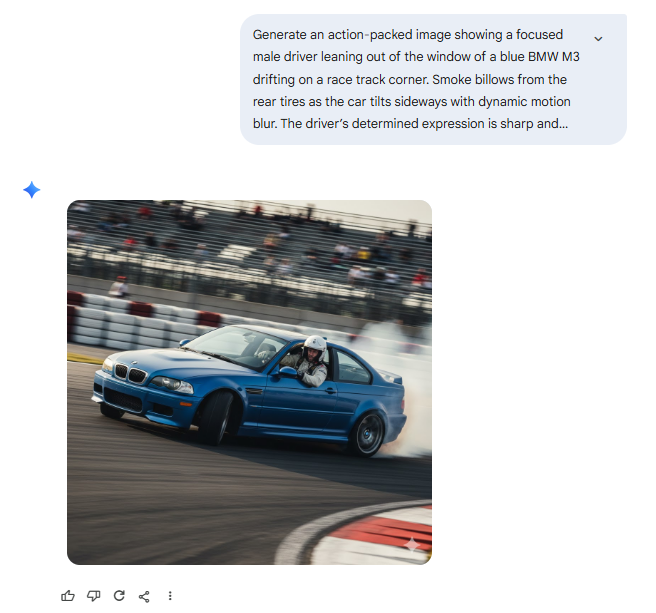
- Start Generation: Click “Generate” or the equivalent button to begin the image creation.
- Review and Refine: After the image is generated, review it. If needed, tweak the prompt to adjust details like lighting, background, or subject poses, and generate again.
- Download and Use: Once satisfied, download your image for marketing, social media, or personal projects.

Enhance Your BMW AI Creations with Pixpretty AI Image Describer
To make your prompt writing even easier and more effective, consider using Pixpretty AI Image Describer — a powerful tool designed to analyze and generate detailed image descriptions that can be used as precise prompts for Gemini AI.
Why Use Pixpretty AI Image Describer?
- Automated Detail Extraction: Upload a BMW image and Pixpretty AI will automatically generate a rich, descriptive prompt capturing colors, environment, lighting, and subject details.
- Save Time: No need to manually write long prompts; get professional-level descriptions instantly.
- Improve Prompt Accuracy: Use AI-generated descriptions to get more consistent and photorealistic results from Gemini AI.
- Customize Easily: Edit the AI-generated prompt to add your personal style or additional elements before pasting into Gemini AI.
How to Use Pixpretty AI Image Describer
Upload a BMW photo or related automotive image to Pixpretty AI Image Describer.
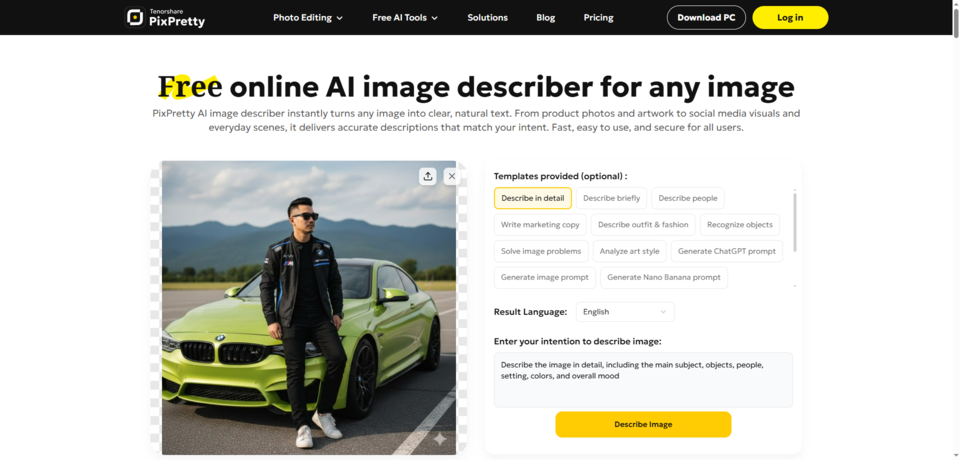
- Review the generated detailed description and prompts.
- Copy the description and paste it into Gemini AI’s prompt input.
- Generate your ultra-realistic BMW image with enhanced prompt quality.

By combining Pixpretty AI Image Describer with the detailed BMW prompts above, you can streamline your creative workflow and produce stunning, professional BMW images with ease.
Final Tips
- Always include specific details about car models, colors, environment, and lighting.
- Use camera style keywords like DSLR, cinematic, shallow depth of field for realistic effects.
- Aim for high resolution output and mention no watermark or distortion.
- Experiment with prompt tweaks and use Pixpretty AI Image Describer to refine your ideas.
PixPretty AI Photo Editor
- 100% free AI Image Generator (Nano Banana 2 powered)
- 4K image quality with fast generation speed
- AI effects & filters for personal and e-commerce use

Related Articles:


