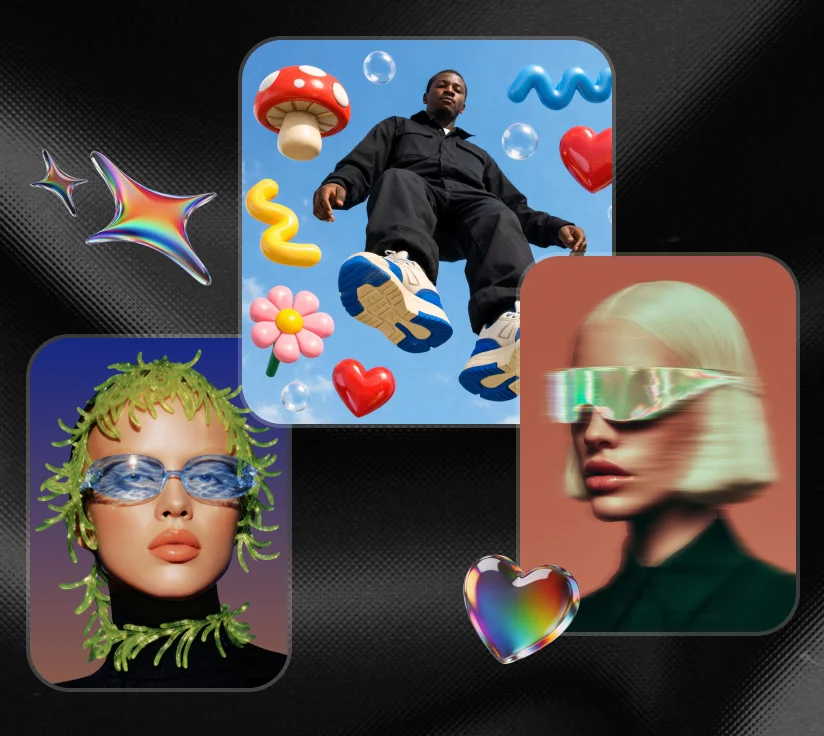
AI bubble images are a popular style of AI-generated artwork that combines creative bubble effects with photos, portraits, and digital illustrations.
Whether you want to create bubble art, generate bubble-themed portraits, or remove speech bubbles from existing images, modern AI tools make the process fast and simple. Tools such as PixPretty can help users create bubble-themed visuals without advanced editing skills.

Table of Contents
Part 1: What Is an AI Bubble Image?
An AI bubble image is any AI-generated or AI-edited photo that features bubble effects as a core visual element. This includes soap bubbles, cartoon speech bubbles, floating orbs, and stylized bubble art overlaid on portraits or illustrations. AI tools generate these effects from simple text prompts or by editing existing photos directly.
Bubble effects add a sense of wonder, softness, and visual depth that makes images instantly eye-catching. Creators use bubble-themed AI images for social media content, digital artwork, profile pictures, and creative marketing visuals. Comic and manga artists use AI to handle speech bubble cleanup and panel restoration.
Part 2: How to Create and Edit Bubble Images with AI
PixPretty is a dedicated AI image creation and editing platform built for creators who want professional results without design experience.
Step-by-Step: Create a Bubble Image with PixPretty
Step 1: Go to PixPretty and log in or create a free account with your email.
Step 2: Select the AI Image Generator tool from the main dashboard.

Step 3: Type your bubble image prompt into the text field
Step 4: Click Generate and review the results.
What You Can Create
-
Portrait-style bubble photos with realistic soap bubble effects
-
Cartoon and comic-style images with stylized speech bubble elements
-
Fantasy and dreamy bubble worlds with glowing orb effects
-
F250 AI image bubble style renders combining vehicle photography with atmospheric bubble overlays
-
Image generator AI with text bubbles outputs for comic layouts, meme formats, and social content
Tips for Better Bubble Image Results
-
Be specific in your prompts.
-
Mention the type of bubble (soap, cartoon speech bubble, floating orb, or glowing fantasy bubble).
-
Describe the lighting (soft natural light, studio lighting, or magical glowing effects).
-
Include the subject clearly --- portrait, full body, landscape, or product.
The more detail you give, the more accurate and creative the output becomes.
Part 3: AI Bubble Image Prompt Ideas
Use these detailed prompts directly in PixPretty or any AI image generator to create bubble-themed artwork:
Prompt 1: Stylish Portrait
"Elegant close-up portrait of a woman blowing a large iridescent soap bubble, soft natural window lighting from the left, shallow depth of field with a blurred cream background, photorealistic style, high detail on the bubble's rainbow surface reflections, warm skin tones, serene expression"

This prompt works for an AI image of black woman blowing bubbles in style. Simply add "Black woman with natural hair" to the subject description for a more specific output.
Prompt 2: Vibrant Outdoor Bubble Portrait
"Full body portrait of a beautiful woman blowing colorful soap bubbles in a sunny outdoor park setting, vibrant saturated colors, golden hour lighting, bubbles floating in the air catching the light, natural afro hair, joyful expression, lifestyle photography style, sharp focus on subject with soft bokeh background"
This is the ideal prompt for an AI image of cute black woman blowing a bubble with a bright, social-media-ready aesthetic.

Prompt 3: Cartoon Art Style Bubble Portrait
"Cute cartoon-style illustration of a woman blowing a large pink bubble gum bubble, bold outlines, flat color design with soft shading, pastel background, playful and fun mood, inspired by modern animated series art style, clean digital illustration"

Use this prompt when you want a stylized non-photorealistic take on the bubble portrait format.
Prompt 4: Comic Speech Bubble Illustration
"Comic book style illustration featuring a confident superhero character with dramatic speech bubbles containing bold text, halftone dot background pattern, strong ink outlines, primary color palette, dynamic action pose, vintage Marvel-inspired art style"
Prompt 5: Fantasy Glowing Bubble Character
"Fantasy character portrait surrounded by glowing magical floating bubbles in a dark enchanted forest, bioluminescent light reflecting off each bubble surface, mystical fog in the background, detailed fantasy costume, painterly digital art style, high contrast lighting, cinematic composition"

Prompt 6: Dreamy Rainbow Bubble World
"Wide-angle dreamscape scene of a surreal bubble world filled with giant floating soap bubbles with rainbow reflections, soft pastel sky with clouds, magical golden lighting, small human figure standing in the center for scale, hyper-detailed digital painting, ethereal and whimsical mood"
Prompt 7: Vehicle with Atmospheric Bubble Overlay
"Ford F-250 truck photographed at sunset on a desert road, atmospheric soap bubble overlays floating around the vehicle catching the warm light, dramatic cinematic sky, photorealistic style, high detail on chrome elements and bubble reflections"
This covers the f250 AI image bubble style --- combining automotive photography with creative bubble atmosphere effects.
Part 4: How to Remove Speech Bubbles from Images with AI
AI remove image bubble tools solve a practical problem that comes up constantly in content editing. Speech bubbles placed over images. Manual removal using traditional tools is time-consuming. AI handles it automatically in seconds.
How to Remove Speech Bubbles?
PixPretty's AI object removal tool identifies speech bubbles and text overlays automatically and fills the removed area with realistic background content that matches the surrounding image.
Step 1: Open PixPretty and upload the image containing the speech bubble.
Step 2: Select Erase tool from the editing dashboard.

Step 3: Use the brush to paint over the speech bubble or text overlay you want to remove.
Common Use Cases for AI Speech Bubble Removal
Manga and Comic Editing
Manga translators and editors remove speech bubble from image AI tools regularly to clean panels before re-lettering them in a new language. The AI fills the removed bubble area with the correct background detail automatically --- whether that is a textured wall, a sky, or a character's clothing.
Screenshot Editing
Social media managers and content creators remove speech bubbles and text overlays from screenshots to repurpose images for new contexts. AI inpainting fills the removed area cleanly so the final image looks unedited.
Meme Editing
Meme creators frequently need to strip existing text bubbles from popular meme formats to replace them with new text. AI bubble image removal tools handle this faster and more cleanly than manual erasing.
Image Restoration
Archivists and designers remove text overlays and speech bubbles from scanned illustrations, old comics, and historical images to restore the original artwork underneath.
FAQs
Is there currently an AI bubble?
Financially, yes, AI stock prices show clear signs of an asset bubble. Technologically, no, AI is a real foundational shift that is already changing industries.
What would an AI bubble look like?
An AI-generated bubble image typically features highly realistic iridescent soap bubble surfaces with accurate rainbow light reflections. Photorealistic AI bubble images capture the translucent quality and light distortion of real soap bubbles with impressive accuracy.
What is the AI bubble?
An AI bubble is an economic cycle where excitement over artificial intelligence drives company values far beyond their actual worth. In the context of AI image generation, an ai bubble image refers to any AI-created or AI-edited visual that features bubble elements.
What is the 30% rule for AI?
The 30% rule for AI is a general guideline used in content strategy and AI-assisted workflows suggesting that AI-generated content should be refined, fact-checked, and edited by a human before publication --- with human input accounting for at least 30% of the final output.
Conclusion
AI bubble image tools have made bubble-themed artwork, portrait photography, and speech bubble editing accessible to everyone. PixPretty gives you all of these capabilities in one platform --- image generation, bubble effect creation, object removal, and image enhancement. Open PixPretty, enter your prompt, and create your first bubble image today.
PixPretty AI Photo Editor
- 100% free AI Image Generator (Nano Banana 2 powered)
- 4K image quality with fast generation speed
- AI effects & filters for personal and e-commerce use