


Deleting a ChatGPT account is not complicated. But finding the right steps for your specific device takes longer than it should. Explore how to delete ChatGPT account on Web, iOS, and Android. Our guide covers different methods clearly so you can get it done in a few minutes.

Table of Contents
- Part 1: Why Users Are Choosing to Leave ChatGPT
- Part 2: 5 Ways to Delete Your ChatGPT AccountHOT
- Part 3: What Happens After You Delete Your ChatGPT Account?
- Part 4: Common Problems When Deleting a ChatGPT Account
- Part 5: Use a Secure AI Platform to Do Your Daily Work
- Part 6:FAQs about How to Delete Your ChatGPT Account
Part 1: Why Users Are Choosing to Leave ChatGPT
After OpenAI announced a partnership allowing the US Department of Defense to use its technology, a visible "QuitGPT" movement picked up momentum online. Users began raising concerns about government surveillance. Besides, users think deleting conversations does not actually remove that data from OpenAI's servers.
Beyond privacy concerns, some users are simply switching to competing AI platforms and no longer need their accounts. Whatever your reason, here is exactly how to delete a ChatGPT account.
Part 2: 5 Ways to Delete Your ChatGPT Account
Method 1: Delete via the ChatGPT Website
How to delete my ChatGPT account? This is the most straightforward method for anyone on a desktop or laptop computer.
-
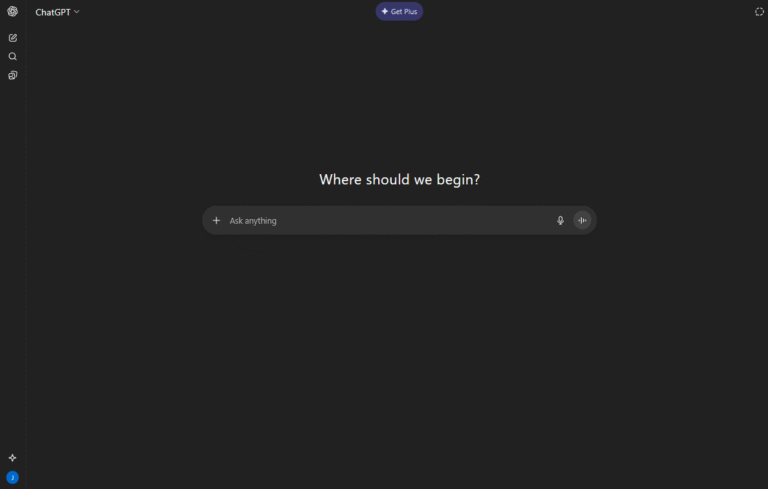
1.Go to chat.openai.com and log in with your email and password.
-
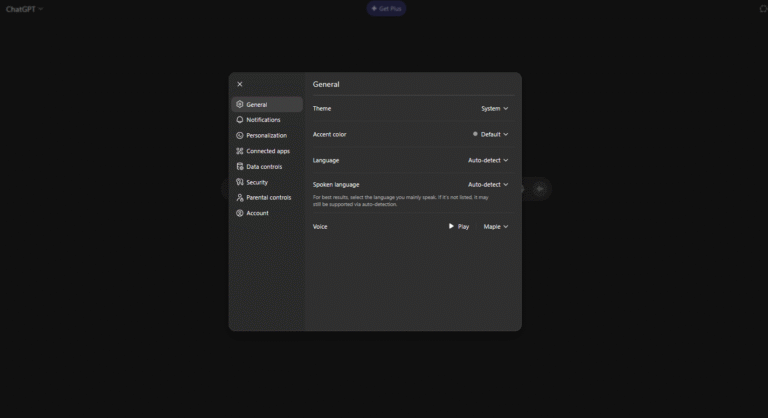
2.Click your profile picture in the bottom left corner of the screen.
-
3.Select Settings from the menu that appears.
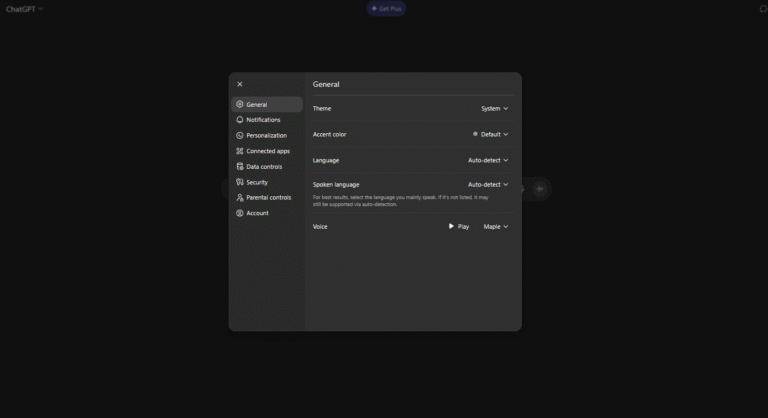
4.Click on Account in the left side menu.
-
5.Scroll down until you see the red Delete Account button at the bottom of the page. Click "Delete my account" to complete the process.


The red button and confirmation step are there to prevent accidental deletions. Make sure you want to proceed before typing the confirmation.
Method 2: How to Delete ChatGPT Account on iPhone
If you primarily use the mobile app, here is how to delete your ChatGPT account on iPhone directly from the iOS app without needing a computer.
1.Open the ChatGPT app on your iPhone.
-
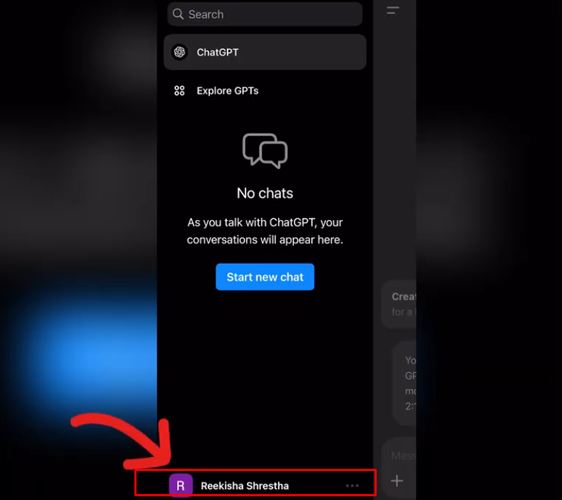
2.Tap your profile picture or the menu icon to open account settings.
-
3.Tap Data Controls.
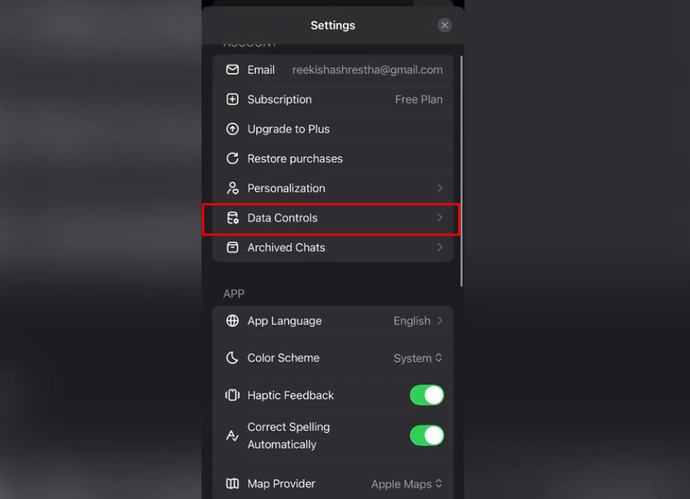
4.Select Delete Account from the options listed.
-
5.Confirm by tapping Delete Account or tap Cancel if you change your mind.


The process is quick and does not require you to log in through a browser. Everything is handled within the app itself.
Method 3: Delete ChatGPT Account on Android
The Android process follows the same logic as iOS, with slightly different navigation depending on your device.
1.Open the ChatGPT app on your Android phone.
-
2.Tap the menu icon or your profile picture.
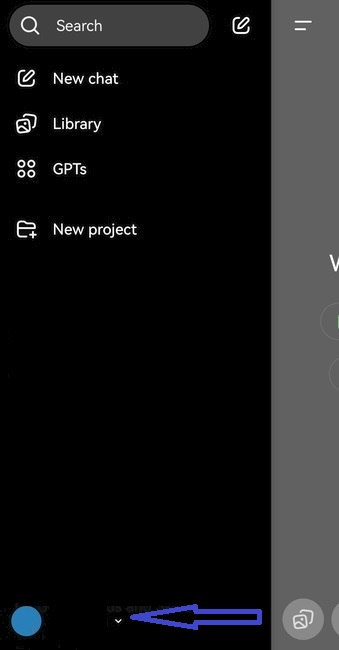
-
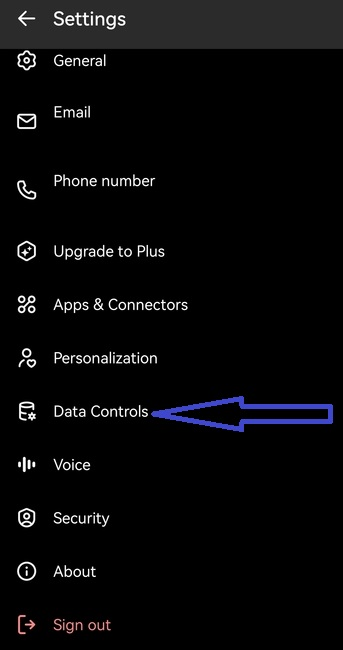
3.Go to Settings and look for Data Controls in the menu.
-
4.Tap Data Controls to access your data management options.
-
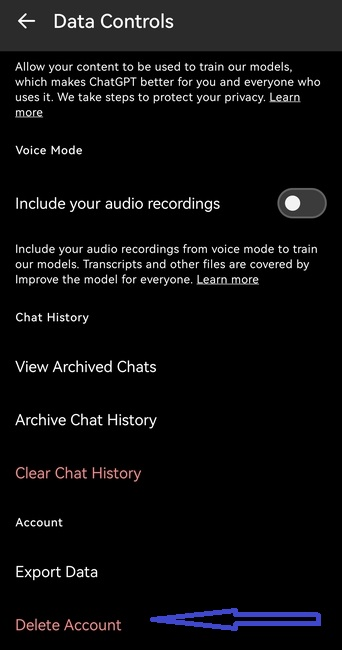
5.Scroll to the bottom and select Delete Account.
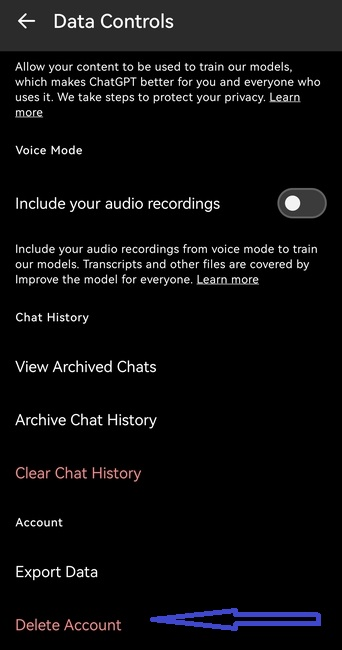
6.Follow the on-screen prompts to confirm your deletion.


If you do not see Data Controls immediately, look inside the general Settings menu. The option is there, but not always in the same position across different Android versions.
Method 4: Delete Directly Through Account Settings
This method works as an alternative route through the settings panel if the main delete button is not appearing as expected.
1.Open Settings from your profile menu.
2.Click Account inside the settings panel.
-
3.Under the Delete Account section, click Delete.
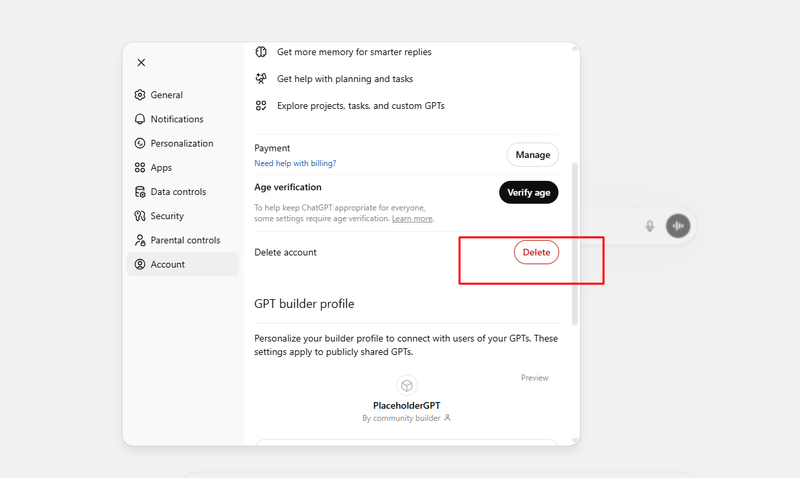

There is one important thing to know here. You can only delete your account if you have logged in within the last 10 minutes. If it has been longer than that, OpenAI will prompt you to sign in again before proceeding. This is a security measure to prevent unauthorized deletions.
Once you pass that check, a confirmation screen appears. You will need to type your account email address and the word "DELETE" into the input fields to unlock the Permanently Delete My Account button. Both fields need to be filled correctly before the button becomes active.
Method 5: Submit a Request Through the Privacy Portal
How to delete account on ChatGPT? If you cannot log in or prefer to handle deletion through an official data request, OpenAI provides a privacy portal specifically for this purpose. This is also the recommended path if you want a formal record of your deletion request.
-
Go to privacy.openai.com
-
Click Make a Privacy Request in the top right corner of the page.
-
Select "I have a consumer ChatGPT account" from the options.
-
Choose "Delete my ChatGPT account" and follow the steps shown on screen.

This method works even if you are having trouble accessing your account through the normal login process. If you cannot log in at all, the privacy portal page includes additional guidance for account recovery before deletion.
Part 3: What Happens After You Delete Your ChatGPT Account?
How long does it take to delete ChatGpt account? Immediately. Once the deletion is confirmed, your account access is removed immediately. You will be logged out and unable to sign back in using those credentials.
Your conversation history, saved settings, and any custom instructions you had configured are all removed from your visible account. OpenAI states that account data is deleted in accordance with their data retention policies, though some data may be retained temporarily for legal or compliance reasons, depending on your jurisdiction.
Any active ChatGPT Plus subscription should be canceled before deleting your account. Deleting the account does not automatically cancel a paid subscription, which means you could continue being charged after the account no longer exists. Cancel the subscription first through your account billing settings, then proceed with deletion.
Part 4: Common Problems When Deleting a ChatGPT Account
1.The Delete Button is Greyed Out or Not Responding
This is usually the 10-minute login window issue described in Method 4. Log out completely, log back in, and try again immediately.
2.You Are Not Receiving a Confirmation Email
Check your spam folder first. If nothing is there, try the privacy portal method as an alternative route.
3.The App is Not Showing Data Controls
Update the ChatGPT app to the latest version. Older versions sometimes have navigation differences that hide certain settings options.
4.You Forgot Your Password and cannot log in
Use the password reset option on the login page first. Once you are back into your account, proceed with deletion through whichever method applies to your device.
Part 5: Use a Secure AI Platform to Do Your Daily Work
Searching for a secure and powerful AI platform? PixPretty AI Photo Editor is a free AI-powered photo editing tool designed to make image editing fast and simple. Its standout feature is the AI background remover, which can remove complex backgrounds in about 3 seconds. The platform supports various image types such as products, people, cars, animals, and graphics, making it useful for both personal and business needs.

The tool also offers additional AI features like AI Object Remover, AI Clothes Changer, image resizing, and batch editing, allowing users to edit multiple photos at once.
Part 6:FAQs about How to Delete Your ChatGPT Account
Can you restore a deleted ChatGPT account?
No. Once the deletion is confirmed and processed, the account cannot be recovered. All associated data is removed, and there is no restoration option. Make sure you have saved anything you want to keep before completing the process.
If I delete my account, can I create a new account with the same email on ChatGPT?
Yes, but not immediately. After deletion is processed, you can register a new account using the same email address. There may be a short waiting period before that email becomes available for registration again, depending on how long the deletion takes to fully process on OpenAI's end.
How Long Does it Take to Delete ChatGpt Account?
Account access is typically removed immediately after confirmation. Full data deletion from OpenAI's systems can take up to 30 days to complete, depending on their internal retention schedules and any applicable legal holds.
Final Words
How to delete ChatGpt account? Deleting your ChatGPT account takes less than a minute once you know where to look. Use the website method if you are on a desktop. Use the app settings if you are on an iPhone or Android. Use the privacy portal if you cannot log in or want a formal request on record.
Cancel any active subscription before you delete. Save any conversation data you want to keep. Confirm the deletion when prompted, and you are done. And secure and powerful platforms like PixPretty AI Photo Editor to doyour work.
PixPretty AI Photo Editor
- 100% free AI Image Generator (Nano Banana 2 powered)
- 4K image quality with fast generation speed
- AI effects & filters for personal and e-commerce use



