


BeautyPlus is a popular photo editing app, but many users search for beautyplus mod apk to unlock premium features without paying. Before downloading, it's important to understand what this modded version offers, where it comes from, and the risks involved.
This guide explains everything in simple words, including features, common problems, and safer alternatives. If you want to edit photos smartly and avoid mistakes, read this complete guide carefully before installing anything on your device.

Table of Contents
Part 1: What Is BeautyPlus Mod APK?
BeautyPlus Mod APK is an edited version of the original BeautyPlus app for Android. It gives users free access to premium features that are normally paid.
This app helps you improve your pictures quickly. You can smooth skin, remove pimples, blur backgrounds, and apply beauty filters in just a few steps. Since it is a modified app, it is not available on the Google Play Store and must be downloaded from third-party websites.
1.1 Key Features of BeautyPlus Mod APK (Premium Unlocked)
Premium Features Unlocked
Use all paid beauty tools, filters, and effects without any subscription.
Advanced Face Retouching
Remove acne, pimples, wrinkles, and dark circles with natural-looking results.
AI Beauty Filters
Smart filters that adjust automatically based on face shape and skin tone.
Background Blur Tool
Highlight the main subject by blurring distracting backgrounds easily.
Makeup & Skin Tone Editing
Change skin color, hair color, eye color, and apply virtual makeup layers.
No Watermark
Save edited photos and videos without any BeautyPlus branding.
Ad-Free Experience
Enjoy smooth editing without pop-up ads or interruptions.
Built-in Camera with Beauty Effects
Capture photos using the in-app camera with real-time beauty adjustments.
Stickers, Text & AR Effects
Access hundreds of stickers, fonts, and AR effects to create engaging content.
Easy-to-Use Interface
Simple layout suitable for beginners and professional users alike.
Part 2: Where to Download BeautyPlus Mod APK
Many users look for BeautyPlus Mod APK on third-party APK websites because the modded version is not available on the Google Play Store. Below are some commonly used platforms where users usually find BeautyPlus APK files.
2.1 Trusted Third-Party APK Websites
These sites are popular for hosting Android APK files. Always check version details and file information before downloading.
1. LiteAPKs
A well-known site for modded apps. It usually offers BeautyPlus Mod APK with premium features unlocked and provides version details clearly.

2. APKModY
Focuses mainly on MOD APK files. Users visit this site for unlocked and ad-free versions of popular apps, including BeautyPlus.

3. LatestModAPKs
This site shares modded versions with changelogs. It often lists both new and old versions of BeautyPlus Mod APK.

4. Uptodown
A trusted APK platform that mainly provides original and old versions. It is useful if you want a stable BeautyPlus APK instead of a modded one. Beauty plus mod apk uptodown consider best site for apk with user reviews.

2.1 BeautyPlus Premium Mod APK Old Version -- Where to Find It
Many users prefer BeautyPlus premium mod apk old version because older builds often work better on low-end devices and have fewer bugs.
You can usually find old versions on:
-
APKModY
-
LiteAPKs
-
Uptodown (mostly original APKs)
Below are commonly available BeautyPlus APK old versions with release dates:
-
BeautyPlus 7.25.0 -- Dec 16, 2025
-
BeautyPlus 7.24.0 -- Nov 25, 2025
-
BeautyPlus 7.20.3 -- Oct 24, 2025
-
BeautyPlus 7.20.0 -- Sep 27, 2025
-
BeautyPlus 7.19.0 -- Sep 19, 2025
-
BeautyPlus 7.16.0 -- Aug 26, 2025
-
BeautyPlus 7.14.0 -- Jul 12, 2025
-
BeautyPlus 7.13.0 -- Jun 24, 2025
-
BeautyPlus 7.9.1 -- Mar 19, 2025
-
BeautyPlus 7.8.000 -- Dec 24, 2024
-
BeautyPlus 7.7.170 -- Nov 15, 2024
-
BeautyPlus 7.7.025 -- Jan 03, 2024
Older versions are helpful if:
-
Your phone is slow
-
New updates crash
-
You prefer the old interface
2.3 Beauty Plus APK Old Version vs Latest Version
| Feature | Beauty Plus APK Old Version | Latest Version |
|---|---|---|
| Performance | Faster on low-end phones | Needs better hardware |
| App Size | Smaller | Larger |
| Stability | More stable for some users | May have bugs initially |
| New Features | Limited | Latest AI & filters |
| Compatibility | Works on older Android | Needs newer Android |
| Best For | Old devices, simple edits | Advanced editing users |
Part 3: How to Download BeautyPlus Mod APK on Android (Step-by-Step)
Downloading BeautyPlus Mod APK on Android is a simple process, but it must be done carefully because the app is not available on the Google Play Store. Follow the steps below in the correct order to avoid installation errors.
Step 1: Check Device Compatibility
First, make sure your Android phone supports the app. Your device should be running Android 6.0 or higher and have enough free storage space. A stable internet connection is also important for a smooth download.
Step 2: Allow Installation from Unknown Sources
Because beautyplus mod apk is a third-party file, Android will block it by default. Go to Settings, open Security or Privacy, then allow Install unknown apps for the browser or file manager you are using.

Step 3: Download the BeautyPlus Mod APK File
Visit a trusted APK website and select the version you want to download. You can choose the latest version or an older one if your device works better with it. Tap the download button and wait until the APK file is fully downloaded on your phone.

Step 4: Find the Downloaded APK File
Once the download is complete, open your phone's File Manager and go to the Download folder. Look for the BeautyPlus Mod APK file and check that the file name and size match the version you selected.
Step 5: Install the App
Tap on the APK file and select Install. The installation process will take a few seconds. Do not exit the screen while the app is being installed, as this may cause errors.

Part 4: APK Beauty Plus -- Common Download Problems & Fixes
Even when following the correct steps, some users still face issues while downloading or installing APK Beauty Plus. Here are the most common problems and simple solutions.
Problem 1: "App Not Installed" Error
Cause:
This usually happens when the APK file is corrupted or not fully downloaded.
fix:
- Delete the current APK file.
- Download the file again from a trusted source.
- Make sure you allowed installation from unknown sources before installing.
Problem 2: App Crashes After Opening
Cause:
Your device may not be compatible with the version you downloaded.
fix:
- Uninstall the app.
- Try downloading an older version of BeautyPlus Mod APK.
- Older versions often work better on older or low-end phones.
Problem 3: Features Not Unlocked
Cause:
The downloaded mod may not be a proper premium version or might be missing files.
fix:
- Redownload from another trusted site.
- Check if you downloaded a "MOD" version and not an original APK.
- Install the correct mod file and retry.
4.1 Recommended Legal Alternatives to BeautyPlus Mod APK
If you want a safer way to edit photos without using modified apps, here are some great options you can try.
AirBrush
A user-friendly photo editor that lets you remove blemishes, whiten teeth, smooth skin, and apply natural beauty effects legally.
PhotoDirector
A more advanced photo editing app with powerful tools for color correction, background editing, filters, and creative effects.
Instasize
Best for social media creators, this app provides easy filters, resizing tools, and basic edits without risk.
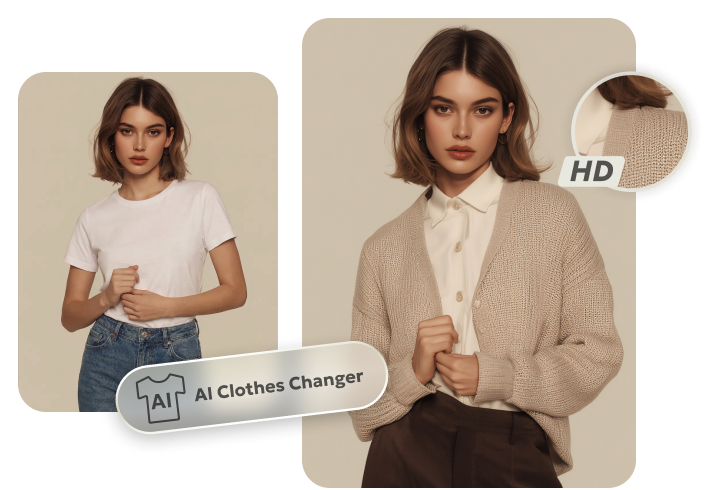
Bonus Tip: Try New Fashion Styles Fast with PixPretty AI Clothes Changer
PixPretty AI Clothes Changer lets you instantly see yourself in any outfit without trying it on. Simply upload your photo, or even upload a photo of any outfit you like, and watch the AI fit it perfectly to your body.
From casual wear to festive or party styles, PixPretty automatically transforms your look in seconds. It's perfect for planning your wardrobe, social media posts, or just experimenting with fashion. Make every photo stylish and share-ready with one easy click.
Final Words
BeautyPlus Mod APK is a great app for making your selfies and photos look amazing. It gives you premium filters, easy retouch tools, and fun effects to edit quickly and professionally. Be careful to download from trusted sources to stay safe. For fashion fun, try PixPretty AI Clothes Changer. You can upload any outfit photo and instantly see how it looks on you. It makes your photos stylish, creative, and ready to share.
PixPretty AI Clothes Changer
- Instantly change outfits with AI in 1 click
- Realistic AI previews for every top, bottom, or dress
- Create and explore endless outfits and OOTDs without editing
Related Articles:


