


Prank texts are fun when they surprise people without hurting feelings. Fake error messages work perfectly because they look technical at first glance, but turn silly a second later. Below are ready to use fake error messages to copy and paste, each with a short description so you know when to use them.
Table of Contents
- Text Error Message for iPhone
- Fake "Failed Message" Alerts
- Fake Blocked Text Message
- "You Have Been Blocked" Texts
- 5. Funny Error 404 Text Message Prank Copy and Paste
- This Number is No Longer in Service Texts
- Risks and Precautions: Prank Responsibly
- Turn Any Text into Funny Messages: Using Smart AI ToolsHOT
Text Error Message for iPhone
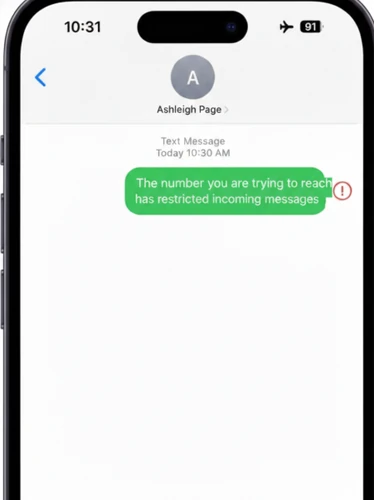
iPhone alerts have a very specific style. When you imitate that tone with something ridiculous, the result is instant comedy.
| Error Message | Description |
|---|---|
| The number you are trying to reach has restricted incoming messages. | Classic “blocked” alert that makes them think they’re restricted. |
| SMS Delivery Failed: Your texts have been temporarily suspended. | Pretends their messages can’t go through. |
| Message could not be delivered: Recipient has enabled humor filters. | Silly excuse for a “failed message.” |
| ERROR 102: All messages to this number are on hold for review. | Sounds official but ridiculous. |
| SMS ERROR: Your message contains too much laughter. | Funny reason that’s clearly fake. |
| Message failed: Recipient has activated emoji lockdown. | Imaginary tech rule for emojis. |
| SMS Alert: Texts from your number are temporarily restricted. | Neutral tone, works for most pranks. |
| Delivery Failed: Phone refuses to accept puns at this time. | Absurd, playful reason for a failed delivery. |
Fake "Failed Message" Alerts
A failed message prank pretends that the text could not go through. This is where the error message text fits --- it refers to any notification that imitates a system failure. The trick is making the reason funny, not scary.
| Message | Description |
|---|---|
| SMS ERROR: Too much sarcasm detected. | Perfect for sarcastic friends. |
| Delivery Failed: Joke level exceeded limit. | Acts like humor has a data cap. |
| System Notice: Text stuck in traffic. | Everyday problem turned digital. |
| ERROR 500: Message fell asleep. | Cute and harmless. |
| Message not sent: Needs more snacks. | Phones demanding food is funny. |
| SMS Alert: Grammar police intervened. | Great for friends who correct spelling. |
| Failed: Your text was too dramatic. | Gentle teasing without insult. |
Fake Blocked Text Message

Received Some people search specifically for a fake blocked text message idea. This type pretends the receiver has been blocked, but the wording must be obviously playful so no one feels rejected.
| Message | Description |
|---|---|
| The number you are trying to reach has restricted incoming messages. | Classic “blocked” style, makes them think their texts can’t go through. |
| SMS Delivery Failed: Your texts have been temporarily suspended. | Gives a fake “technical issue” feel. |
| Message could not be delivered: Recipient has enabled humor filters. | Playful and silly reason. |
| ERROR 102: All messages to this number are on hold for review. | Sounds official but ridiculous. |
| SMS ERROR: Your message contains too much laughter. | Makes it absurdly funny. |
| Message failed: Recipient has activated emoji lockdown. | Imaginary “system rule” for emojis. |
| SMS Alert: Texts from your number are temporarily restricted. | Neutral tone, fits most pranks. |
| Delivery Failed: Phone refuses to accept puns at this time. | Fun and obviously fake blocking reason. |
"You Have Been Blocked" Texts
These prank messages make your friend think they've been blocked. Only use with friends who will laugh---it's all in good fun!
| Error Message | Description |
|---|---|
| Message Error: The recipient has blocked all incoming messages from your phone number. | Classic “blocked” alert, looks official but harmless. |
| Alert: The person you’re trying to reach has blocked messages from this number. | Simple, believable, and easy to copy-paste. |
| SMS Error: Message delivery is not successful. Next messages may incur charges. | Adds a fake “cost” to heighten the prank. |
| Error 19245: Your messages to this contact have been blocked. | Technical-sounding, perfect for tech-savvy friends. |
| SMS Service Error 202: All messages from your number are rejected. | Sounds like a carrier-level restriction. |
| Delivery Failed: The recipient has enabled “Do Not Disturb Forever.” | Silly, humorous twist on blocking. |
| Msg 2133 – Your texts cannot be delivered to this number. | Feels like a real system alert. |
| SMS SERVICE ERROR 305: MESSAGE DELIVERY FAILED. You are blocked. | Dramatic, official-style message for bigger laughs. |
5. Funny Error 404 Text Message Prank Copy and Paste
Error 404 is famous from websites, so using it in texts feels nerdy and fun.
| Message | Description |
|---|---|
| Error 404: Phone number not found. | Classic internet reference. |
| ERROR 404: Joke missing. | Simple and effective. |
| Error 404: Text lost in space. | Sci‑fi flavor adds charm. |
| 404 Notice: Reality needs restart. | Over‑the‑top silliness. |
| Error 404: Brain unavailable. | Relatable on lazy days. |
| ERROR 404: Humor not detected. | Gentle roast. |
| 404: Message kidnapped by aliens. | Works great at night. |
Some prank sites even offer lines like this message is not available in your region prank copy and paste, which mimic streaming errors for extra confusion.
This Number is No Longer in Service Texts
| Error Message | Description |
|---|---|
| We're sorry, this number is no longer in service. | Classic prank, works well with casual friends. |
| Message to Your Number failed: Network problem detected. | Adds a technical-sounding reason for disconnection. |
| Error 97: SMS origination denied. | Pretends your phone is being blocked by the carrier. |
| 3412154 Error: Invalid number. Please retry. | Makes your texts sound like they’re being rejected by the system. |
| Msg 2114 – Number out of service. Please call later. | Official-style alert for a funny effect. |
| Service Disconnected: The number you are trying to reach is temporarily offline. | Adds urgency while still playful. |
| Network Notice: Subscriber not available or has traveled outside coverage area. | Sounds like a real network problem. |
| Alert: Phone number temporarily suspended. Service will resume shortly. | Suspenseful and realistic, but clearly a prank for friends. |
Risks and Precautions: Prank Responsibly
-
Never imitate banks, police, hospitals, or real emergencies.
-
Don't prank someone who gets anxious easily.
-
Reveal the joke within minutes.
-
Keep the tone silly, not threatening.
-
Avoid spamming repeatedly.
The best prank ends with both people laughing.
Turn Any Text into Funny Messages: Using Smart AI Tools
If you want to create your own personalized pranks instead of copying lines, try PixPretty AI Image Describer. This free online tool instantly turns any image into natural, clear text. You can upload a funny photo, generate a description, and transform it into a custom prank message that matches your friend's situation.

Features:
-
Describe memes or screenshots and convert them into witty alerts
-
Generate creative prompts for "system style" messages
-
Fast, secure, and works with JPG, PNG, WebP
-
Templates like Describe briefly, Write marketing copy, or Generate ChatGPT prompt
How to use PixPretty Image Descirber to Create a Funny Message?

Step 1: Upload
Go to PixPretty AI Image Describer. Drag and drop your image into the tool, or click to select a file from your device.
Step 2: Set Your Intent
Type in what you want the description to focus on, or choose a template. For example, you can ask it to describe in detail, recognize objects, or write marketing copy.
Step 3: Generate Description
Click the generate button and get a clear, natural text description of your image instantly. You can then copy, edit, or use it for your projects.
Final words
Use these fake error messages to copy and paste to prank friends. Just be mindful of the potential confusion they may cause, and always reveal the joke before anyone gets worried.
If you want to create smarter, more original pranks instead of reusing the same lines, PixPretty AI Image Describer can help you turn any screenshot, meme, or photo into natural, realistic text in seconds.
PixPretty AI Photo Editor
- 100% free AI Image Generator (Nano Banana 2 powered)
- 4K image quality with fast generation speed
- AI effects & filters for personal and e-commerce use

Related Articles:


