


Veo AI ASMR is a new tool that helps you create relaxing AI ASMR videos for free. You can choose voices, add triggers, and make calming sounds in seconds.
Whether you are a beginner or a creator who loves ASMR content, veo ai asmr makes everything simple and fun. This guide explains how it works, how to download it, and the best alternatives you can try.
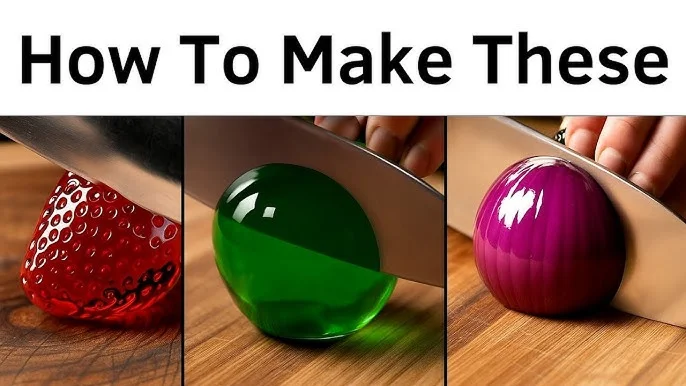
Table of Contents
Part 1: Veo AI ASMR App Overview
Veo AI ASMR is a smart tool that helps you create relaxing ASMR videos without recording anything yourself. It uses artificial intelligence to generate sounds, visuals, and full videos that give people calm and tingles. This app is perfect for beginners, ASMR fans, and content creators who want to make new videos quickly.
Features of the Veo AI ASMR app
- Ai asmr voice generator for soft whispering and relaxing voices
- Auto visuals like tapping, brushing, and gentle movements
- Asmr templates to create videos faster
- Ai asmr script generator for roleplays, sleep videos, and trigger lists
- Simple editing and export options for YouTube and TikTok
- Easy for anyone to use, even without recording equipment
Part 2: How to Use the Veo AI ASMR Video Generator
Step 1: Open Veo in a supported platform Use the Gemini app or Google Cloud’s Vertex AI. Sign in with your Google account.

Step 2: Select “Generate Video” Find the Video or Generate Video option. In Gemini, you may need to open the menu.

Step 3: Write your prompt or upload images Describe what you want in the video. You can also add reference images to guide the scene.
Step 4: Choose video settings Select length, aspect ratio, resolution, and whether you want audio.
Step 5: Generate the video Submit the prompt and wait while Veo creates your video.

Step 6: Review and improve Watch the result. If needed, edit your prompt and generate it again.
Step 7: Download or share Save the final video to your device or upload it to social platforms.
Part 3. Top Free Veo AI ASMR Tools (Best Alternatives)
If Veo is not available for you or you want more free tool there are several free tools to help create relaxing ai asmr videos, voices, and scripts. Below are the best Veo ai asmr alternatives to try right now.
Tool 1: Jogg AI — ASMR Script Generator + Video
Jogg AI lets you write a detailed calming script and transforms it into a full video with sound and animation. Perfect if you want AI ASMR script generator capability plus realistic scenes like rain, nature, or soft hands-on visuals. Better creative control compared to most AI ASMR generator options.

Features
- Script for ASMR video automation
- Optional voiceovers + ambient audio
- Supports human/animated subjects
- Multiple video model choices
- Motion direction + detail control
Tool 2: Mimic PC — Veo-Powered Realistic ASMR
Mimic PC uses Veo-like video modeling for smooth natural visuals. Good for Veo AI ASMR app users who want realistic materials: sand, water, slime, foam, and soothing hand interactions. It supports loop videos perfect for YouTube and Instagram.

Features
- Realistic physics & textures
- Motion-smooth slow visuals
- Manual prompt enhancement tools
- Loop-ready clips
- Clean exporting UI
Tool 3: ASMR.so — True AI ASMR Generator (Audio + Visual)
ASMR.so is dedicated to ASMR creation whisper vocals, binaural effects, tapping, brushing, and nature calming. Very beginner-friendly and quick results. A strong Veo AI ASMR alternative if your focus is relaxation videos for sleep, stress relief, or aesthetic ASMR channels.

Features
- Multiple trigger sound options
- Gentle motion visuals + soft colors
- AI whisper voice personalization
- HD export + fast rendering
- Very simple interface
- Works well for sleep therapy content
Tool 4: VEED.io — AI ASMR Generator and Editing Suite
VEED.io is an AI ASMR generator that helps you create relaxing videos fast. It includes script writing, whisper voice generation, audio clean-up, and visual effects in one editor. If you need a Veo AI ASMR alternative with strong editing tools, VEED is a great choice.
Key Features
- AI ASMR script generator for instant ideas
- Whisper voice recording + voice cloning
- Clean Audio tool removes harsh background noise
- ASMR visuals: backgrounds, graphics, and waveforms
- Branding options for professional ASMR channels
- High-quality export for YouTube, TikTok, and Shorts
Part 4: Veo AI ASMR APK: Is It Safe?
Many users search for Veo AI ASMR APK hoping to download a free app. However, Google’s Veo video model is not released as a standalone APK for Android. Any website offering a Veo AI ASMR app download is likely unofficial, modified, or fake. These APK files may contain malware, hidden ads, or data-tracking risks.
Bonus Tip: PixPretty AI Background Editing for ASMR Thumbnails and Branding
PixPretty AI helps you change background color online for free and create clean, eye-catching visuals. It removes backgrounds in seconds and lets you replace them with white, black, or creative colors.
It’s perfect for ASMR creators who want consistent thumbnails, branded covers, or product shots that look professional.
Key Features
- Automatic background removal (no manual cutout required)
- Change background color instantly with color picker
- Free HD downloads for clean presentation
- Creative options: textures, patterns, gradients
- Great for thumbnails, social posts, and channel branding
- Trusted by millions of users with high-rated results
How to Change Background Color with PixPretty AI
Step 1: Upload your photo Drag and drop or select an image. PixPretty automatically removes the background for you.

Step 2: Pick a new background color Choose preset tones like white or black, or use the color picker to match your ASMR brand style.

Step 3: Download in HD for free Preview your edit, make any final adjustments, and save in high quality for thumbnails or social posts.

Final Words:
Veo AI ASMR is a popular tool for creating relaxing and fun ASMR-style videos. It helps users make unique content with AI voices and effects. If you want to try ASMR creation, veo ai asmr can be a good starting point. And if you want more creative AI tools, try Pixpretty AI too. It lets you turn your photos into cool figures and stylish visuals in just a few seconds very fun for social media.
PixPretty AI Photo Editor
- 100% free AI Image Generator (Nano Banana 2 powered)
- 4K image quality with fast generation speed
- AI effects & filters for personal and e-commerce use



