


If you’ve come across ‘there was an unexpected error running this remix’ in Sora AI, you’re not the only one out there. Many users are coming forward with complaints, having faced this error. However, as it is a new one, you will not find much official support and definite answers so far on the internet.
There is nothing to be worried about, though, as you have landed on the right page. Here in this guide, we’re going to elaborate on the plausible causes of this glitch and describe some solutions to troubleshoot it accordingly.
Table of Contents
Part 1: What Is the Sora AI Remix Feature?
The Remix feature in Sora AI can edit videos just by typing what you want to change, like asking to adjust or replace a part. It lets you add, remove, or edit objects, change backgrounds or scenes, and apply new visual styles while keeping the original motion. You can also add new elements, remove unwanted ones, and refine your edits step by step for better results with precise control.

Part 2: What Causes ‘There Was an Unexpected Error Running This Remix’ in Sora AI
The ‘there was an unexpected error running this remix’ in Sora AI manifests when something goes wrong while you’re remixing footage. This could be caused because of the reasons mentioned beneath:
- Server Issues: A remix unexpected server error might materialize in Sora AI due to temporary server outages or high user traffic.
- Prompt Problems: Prompts that break content rules, are too complex, or contain logical errors can fail.
- Account Issues: Some features, like Sora 2, may only be available to Plus/Pro users.
- Technical Glitches: A full or corrupted app cache, a poor internet connection, and video resolutions not matching might result in the remix error.
- Model Limits: Sora is still improving, so expect minor issues. The remix tool may make only small changes, and videos have length limits.
Part 3: 5 Ways to Fix ‘There Was an Unexpected Error Running This Remix’ in Sora AI
Here are 5 ways to troubleshoot ‘there was an unexpected error running this remix’ in Sora AI, based on the reasons this issue might manifest:
1.Inspect OpenAI’s Server Status
When too many people use OpenAI’s services at once or a temporary outage can result in the remix unexpected server error in Sora AI. To verify whether it is so, see the and see the real-time updates.
In case of a persistent issue, wait and decide later when there is a decreased amount of traffic. A tool like StatusGator can also monitor the status of OpenAI and give an alert in case of outages via email, SMS, or any other medium.

2.Simplify or Rephrase the Prompt
A Sora unexpected error while running a remix might materialize if your request breaks OpenAI’s content rules, is too complicated, or doesn’t make logical sense. So, make sure your prompt follows the content policy and avoids inappropriate topics. In addition, make it easy, that is, begin with simple ideas and build upon them.
An example of this can be a prompt, “a busy street in the city, flying cars, holographic billboards, people in the future clothes.” Instead, write “a city street with flying cars.” If Sora misinterprets your prompt, see what happens by rephrasing it, and make certain that it is a realistic situation.
An example is to change a sentence like “make the sky a vibrant crimson” to “change the color of the sky to deep red.” Another way to make this better is to use clear, descriptive language, such as when a director gives camera or lighting directions.

3.Examine Sora AI Account Access and Subscription Limits
Some Sora features, like Sora 2 or Sora 2 Pro, are limited to certain subscription plans, such as ChatGPT Plus or Pro. This might result in ‘there was an unexpected error running this remix’ in Sora AI. Thus, make certain your subscription is up to date and it has the features you wish to use.
Also, ascertain that you are logged in properly to your Sora account, and, where necessary, log out and back in again. Remember, it can take days to have full approval of new accounts, and not all regions can access all Sora features.

4.Fix Sora AI Remix Errors Caused by Technical Issues
A Sora unexpected error while running a remix can manifest if your app cache is corrupted, your internet connection is poor, or your video resolution doesn’t match Sora’s requirements. Thus, clear the Sora AI append browser cache to remove temporary files and refresh performance. Here’s how:
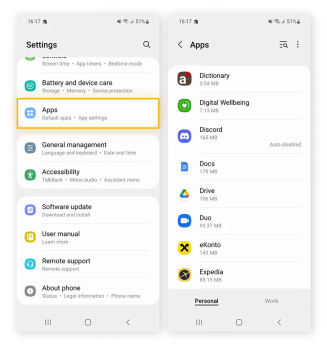
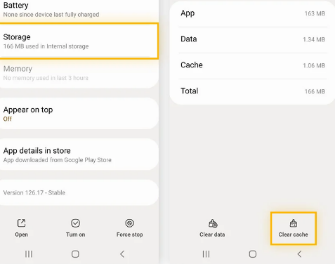
On Android: Head to “Settings.” Then, choose “Apps.” Tap “Sora AI.” Then, select “Storage.” Next, click “Clear Cache.”
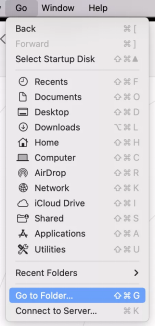
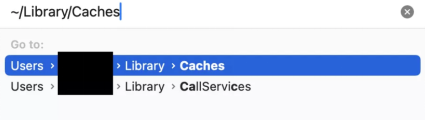
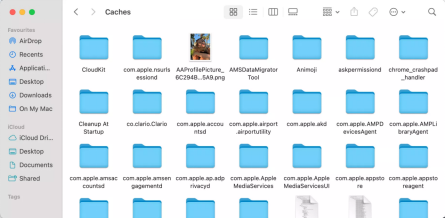
On Mac: Open “Finder.” Then, click “Go” in the menu bar. Choose “Go to Folder.” Type “~/Library/Caches.” Hit “Enter.” Find the “Sora AI” folder. Erase its cache files.
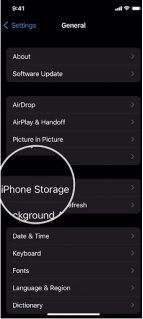
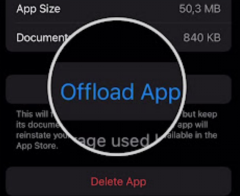
On iPhone: Head to “Settings.” Then, choose “General.” Tap “iPhone Storage.” Select the “Sora AI” app. Click “Offload App” to clear the cache but keep your data. Then, reinstall it.
- On Windows 10/11: For instance, you’re using Sora on Google Chrome:
- Then, open Google Chrome. Click the “three dots” in the top-right corner.
Head to “More Tools.” Next, tap “Clear browsing data.”
- Choose a time range (like All time).
After this, select Cached images and files and Cookies. Hit “Clear data.”
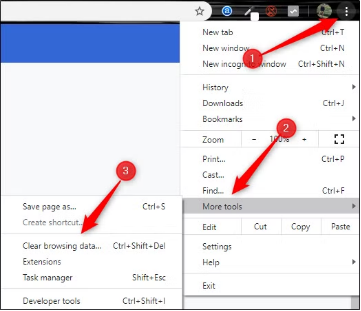


In addition, make certain that your internet connection is stable. You can examine its speed by employing Speedtest or Google Fiber Speed Test, or reboot your router. Furthermore, ascertain that your video resolution is within the supported configurations of Sora to prevent any malfunctions in remixing.
Knowledge of Constraints and Continuous Development
Sora is still developing. Therefore, there can be limits on some of its capabilities, or they may not always operate correctly. This might lead to the ‘there was an unexpected error running this remix’ in Sora AI. Also, the remix tool could only do minor adjustments, and videos could be limited to approximately 20 seconds. So, be patient with technology as it improves.
[Bonus Tip] Use an AI Image Enhancer to Boost Visuals
While you can generate high-resolution videos out of low-quality pictures using the Sora AI Remix feature, it’s best if you do this in conjunction with another AI Enhancer. Tenorshare PixPretty is a free AI-powered photo enhancer trained on millions of real-world images to produce professional results.
It can retouch facial and body contours using embedded filters, presets, and effects. Moreover, the backdrop can also be extended, edited, removed, or changed in color. The tool can also perform batch image resizing, improvement, compression, conversion (WeBP to PNG or JPG to PNG), and watermark removal.
Final Words
The ‘there was an unexpected error running this remix’ issue in Sora AI can manifest due to server overload, complex prompts, account limits, or technical glitches. To troubleshoot them, examine OpenAI’s server status, simplify your prompt, verify your subscription, clear cache files, and ascertain a stable internet connection.
For better video results in Sora from images, improve your pics first with an AI-powered free tool likeTenorshare PixPretty. . It can retouch, upscale, and refine visuals for more professional-looking Sora videos.
PixPretty AI Photo Editor
- 100% free AI Image Generator (Nano Banana 2 powered)
- 4K image quality with fast generation speed
- AI effects & filters for personal and e-commerce use



