


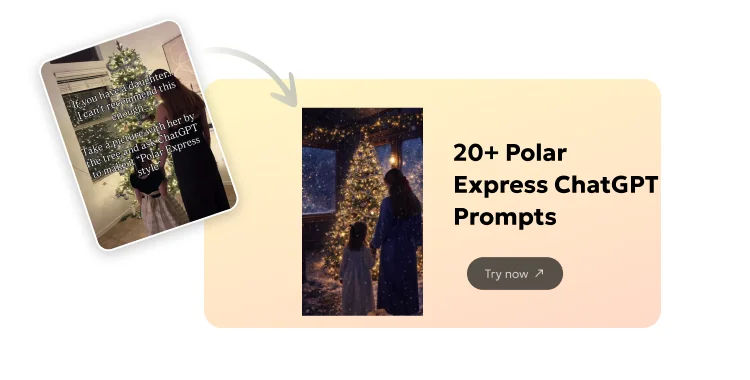
The Polar Express movie brings holiday magic with its snowy train rides and festive scenes. Many people now use ChatGPT to turn family photos into Polar Express-style Christmas portraits. This trend is popular on social media like Instagram, Facebook, and Threads. Parents love it for cute kid pictures by the Christmas tree.
These AI images look warm, snowy, and dreamy, just like the film. They make great holiday cards or posts.
Table of Contents
How to Generate AI Christmas Portraits in Polar Express Style
It is easy to create these images. You need ChatGPT Plus for the latest image tools.
Steps by Steps Guide:
- 1.Open Chatgpt and start a new chat.
- 2.Upload your photo (one or more for better face match).
3.Copy and paste a prompt from below.

- 4.Wait a few seconds for the AI to make the image.
- 5.Ask for changes if needed, like "add more snow" or "add spotted fawns or elves etc."

You can use free tools like Gemini too, but ChatGPT works best for this style. Always use clear, high-quality photos for good results.
Here are some classic Polar Express movie scenes for inspiration:
20+ Polar Express ChatGPT Prompts
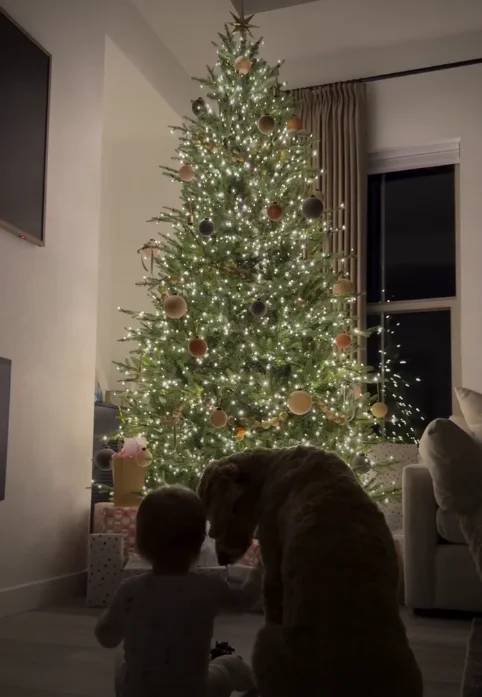
Use these ready-to-copy prompts with your uploaded photo in ChatGPT.
They keep faces, hair, poses, and clothes exactly the same while adding the cozy, snowy magic of The Polar Express.
1. Transform this photo into a Polar Express winter wonderland. Make it warm, snowy, and festive with Christmas trees. Keep the people exactly as they are — same faces, hair, poses, and clothes. Add cozy magical light, gentle snowfall, and a peaceful feel like a Christmas movie scene.

2. Turn this family photo into a magical Polar Express-style portrait. Place them in a snowy North Pole village with twinkling lights and the famous train in the background. Keep faces, expressions, and outfits unchanged. Use warm golden glow and soft falling snow for a dreamy holiday look.

3. Create a Polar Express adventure scene from this photo. Show the children on the magical train, looking out at snowy forests. Do not change their faces, hair, or poses. Add festive steam, holiday decorations inside the train, and magical northern lights outside.

4. Make this photo look like a still from The Polar Express movie. Set it in a cozy train car with hot chocolate and tickets. Keep everyone exactly the same. Add warm lantern light, snow outside windows, and a sense of wonder and joy.

5. Transform the uploaded photo into a snowy forest scene from Polar Express. Include evergreen trees covered in snow and faint train tracks. Preserve all facial features, proportions, and clothing. Use soft blue tones with warm highlights for a magical Christmas feel.

6. Turn this picture into a North Pole arrival moment like in Polar Express. Show elves and reindeer in the distance, with the big train. Keep the subjects' faces and poses identical. Add festive lights, snowflakes, and a warm, exciting atmosphere.

7. Create a Polar Express hot chocolate scene with this photo. Place the family in the dancing waiter car, with floating cups. Do not alter faces or bodies. Add cheerful steam, holiday music feel, and golden warm lighting.
8. Make this photo a magical sleigh ride over snow in Polar Express style. Keep people unchanged. Add flying reindeer shadows, starry sky, and gentle snow. Use cinematic warm light for a peaceful holiday vibe.
9. Transform into a Polar Express ticket punch scene. Show the conductor in background with "Believe" ticket. Preserve exact faces and outfits. Add soft train interior glow and snowy views outside.
10. Turn this into a rooftop Polar Express pickup moment. Show the train on snowy roof with steam. Keep children exactly as in photo. Add wonder in eyes, warm lights, and falling snow.
11. Create a cozy cabin Polar Express view from this photo. Show family looking at passing snowy landscapes. No changes to faces or poses. Add warm interior light contrasting cold blue snow outside.
12. Make it a Polar Express ice lake crossing adventure. Include slippery tracks and wolves in distance. Keep subjects identical. Use dramatic yet warm lighting for excitement and magic.
13. Transform to North Pole square celebration like Polar Express ending. Add Santa, elves, and bell. Preserve all details of people. Use bright festive lights and joyful snow.
14. Turn photo into Polar Express departure from home scene. Show train in backyard snow. Keep faces and clothes same. Add mysterious steam and holiday anticipation glow.
15. Create a dreamlike Polar Express bell ringing moment. Show the silver bell floating. No face changes. Add soft magical sparkles, warm light, and peaceful Christmas eve feel.
16. Make this a Polar Express conductor check scene. Include "All Aboard!" feel. Keep everyone exact. Add lantern light, snow, and friendly holiday warmth.
17. Transform into snowy mountain pass from Polar Express. Show steep tracks and aurora. Preserve proportions and expressions. Use epic warm vs cool tones for magic.
18. Turn into festive Polar Express dining car with cookies and milk. Keep subjects unchanged. Add cheerful decorations, steam, and cozy glow.
19. Create a returning home Polar Express dawn scene. Show train fading in morning light. No alterations to people. Add bittersweet warm sunrise and lingering snow.
20. Make this photo a full Polar Express group on train steps waving. Add holiday pajamas if needed but keep faces same. Use bright snow, steam, and joyful energy.
21. Transform the photo into an enchanting Polar Express cover art style. Blend snowy train journey with family portrait. Keep all personal details exact. Add golden hour light, falling snow, and timeless Christmas magic.
Tips and Best Practices for Perfect Polar Express ChatGPT Prompts
Follow these to get great results every time.
- Upload clear photos with good lighting. Front views work best.
- Always say "keep faces exactly the same — no changes to features, hair, or expressions."
- Add words like "warm golden light," "gentle snowfall," and "magical cozy feel" for the movie style.
- Start simple, then ask for tweaks like "more snow" or "brighter lights."
- Use multiple photos of the same person for better face match.
- Try at night for holiday mood — it fits the theme.
- Save your favorite images fast.
- Be patient; regenerate if the first try is off.
Elevate Your Polar Express Portraits with PixPretty Free AI Clothes Changer
Want to make your Polar Express AI portraits even more magical and festive? Try PixPretty AI Clothes Changer — it's completely free to start and super easy to use.
After generating your snowy Polar Express scene in ChatGPT, simply upload the image to PixPretty. In seconds, you can swap everyday clothes for cozy Christmas pajamas, cute elf outfits, Santa hats, warm scarves, or classic holiday sweaters. The AI keeps faces, poses, and lighting perfectly matched for realistic results.
Why you'll love it:
- Free daily uses — no payment needed to try
- High-quality, natural-looking outfit changes
- Perfect for holiday cards, social posts, or family fun
- Fast and simple — one-click magic
Visit Tenorshare PixPretty now and give your Polar Express portraits that extra holiday sparkle!
Conclusion
Polar Express ChatGPT prompts bring holiday joy to your photos. They create magical memories for family and friends. Try the prompts today and share your creations. For extra festive touches, use PixPretty to change outfits easily. Happy holidays!
PixPretty AI Photo Editor
- 100% free AI Image Generator (Nano Banana 2 powered)
- 4K image quality with fast generation speed
- AI effects & filters for personal and e-commerce use



