


Turn ordinary photos and clips into viral AI dancing videos that capture attention on TikTok. From dance challenges to cute baby clips, free AI dance video generators turn images and characters into fun 9:16 vertical videos.
Upload your images, use a TikTok dance video as a motion guide, and let AI add smooth movements, energetic steps, and playful expressions. Follow how to create viral ai dancing videos to generate images, animate them, and produce fun, shareable videos that can go viral on social media.

Table of Contents
Part 1: What Are AI Dancing Videos?
AI dancing videos are short clips where artificial intelligence animates photos, avatars, or videos to perform dance moves. These videos can mimic real-life TikTok dances or create unique choreographies. Key features include:
AI generates motion from still images or avatars.
Dance moves are synced to music automatically.
-
Can be used for TikTok, Instagram Reels, YouTube Shorts, or social content.
-
Offers creative ways to make videos without professional filming or editing skills.
1.1 How AI Dance Videos Get Attention on Social Media
AI dancing videos are popular because they combine creativity, automation, and trendiness. Using a free AI dance video generator TikTok, anyone can create videos that stand out without editing skills. Here’s why these videos grab attention:
1. Instant Trend Participation: Follow viral TikTok dances and join challenges effortlessly.
2. Personalized Animations: AI allows avatars, baby photos, or even your face to dance uniquely.
3. High Shareability: Short, fun, and visually appealing clips are more likely to go viral.
4. Creative Effects: Add colorful backgrounds, smooth motion, or special effects for extra engagement.
5. Quick and Easy Production: Generate multiple clips fast, perfect for frequent posting.
6. Eye-Catching Variety: From realistic moves to playful baby dance videos, AI keeps viewers interested.
Part 2: Best Tools to Create AI Dancing Videos
1. Kling O1: The All-in-One Multimodal AI Video & Image Creator
Kling O1 is a next-generation AI tool that lets your creativity move to the rhythm. Ideal for dance videos and motion clips, it understands natural language prompts and multi-modal inputs like images, videos, and characters.
Every step, pose, and scene stays consistent, letting you choreograph cinematic stories, branded visuals, or personalized artistic projects with precision and style. With Kling O1, your creations don’t just move they dance with life.

Video AI:
Make videos from text, images, or video
Keep characters and scenes consistent
Add camera effects and edit content
Image AI:
Copy style and colors from reference images
Adjust details, tone, and style
Use multiple reference images
Smart Lab:
Combine video and image tools
AI assistant for easier creation
Organize projects visually
Pricing:
Subscription Plans:
-
Basic: 360 credits/month (~36 videos) → $7.99/month
-
Pro: 1320 credits/month (~132 videos) → $25.90/month
-
Studio: 3600 credits/month (~360 videos) → $59.90/month
2. APOB AI Dance Generator
APOB AI offers a surprisingly powerful web‑based tool that turns your photos or AI avatars into animated dance videos. It’s designed for TikTok, Instagram, and YouTube content creators who want to convert still images into smooth, trend‑ready motion without complex software. Signed‑up users get free daily credits so they can generate multiple dance videos every day.

Key Features:
-
Create AI‑generated dance videos straight from a photo or avatar.
-
Includes a “Revideo” feature for full‑body character replacement and motion preservation.
Works in the browser on mobile or desktop without downloads.
Ideal for TikTok challenges and trending content.
Pricing:
Free: 80 daily credits upon signup for generating videos.
Premium: Optional upgraded plans for more credits and higher‑quality outputs (varies by subscription).
3. Media.io AI Dance Generator
Media.io’s AI Dance Generator is a browser‑based tool that converts still photos into dynamic dance clips. It’s designed with simplicity in mind: upload an image, pick a dance style, and get an HD download that’s ready to share across TikTok and other platforms.

Key Features:
Realistic AI‑animated dance moves with smooth body motion.
Works fully online, no software or app installation needed.
Exports high‑resolution MP4 videos without watermarks.
Supports multiple dance styles, from hip‑hop to freestyle.
Pricing:
Free: Free credits available after signup to generate and download dance videos.
Paid: Optional subscription for more credits or priority processing. (Check Media.io tool for current pricing.)
4. Pollo AI Dance Generator
Pollo AI provides an easy dance‑style restyling tool that animates any uploaded static image into a fun, movement‑rich AI dance video. It’s beginner‑friendly and offers trendy templates for different social platforms.

Key Features:
Upload an image and apply a dance motion in minutes.
-
Variety of dance styles, including hip‑hop, TikTok trends, and breakdance.
Designed to create engaging shareable dance clips.
No editing experience required.
Pricing:
Free: 10 free credits unlocked by default to experiment with dance animation.
Paid: Credits are used per video generated; the free credits help you try it before using additional credits.
5. Pippit.ai AI Dance Generator
Pippit.ai’s free online AI dance video generator is perfect for quick, scroll‑stopping clips. Just upload your photo or type a prompt and watch as Pippit’s AI turns it into a dance video. It’s simple, automatic, and perfect for creators who want to boost engagement without advanced editing.

Key Features:
-
Generate dance videos from any photo with AI-powered animation.
-
Built-in editor to add music, effects, and transitions for TikTok or Reels.
Works on both desktop and mobile browsers.
-
Includes marketing video creation, avatars, and image studio.
Multi-platform publishing with scheduler and analytics.
-
500 GB cloud storage with creative assets for commercial use.
Pricing:
Free plan: Basic AI dance video generation available with limited features.
Paid Plan: $50/month (billed yearly at $600).
Part 3: How to Create Viral AI Dancing Videos – Step by Step
Want to create a trending AI dance video that goes viral on TikTok or Instagram? Using a free AI dance video generator TikTok you can transform still images into fun, energetic dance clips. Follow these steps to make your video stand out!.
Step 1: Find Inspiration on TikTok
Open TikTok on your mobile. Tap the Search icon and type “baby dance video” or other trending dance hashtags. Watch videos and take a screenshot of the pose or moment you want to recreate.

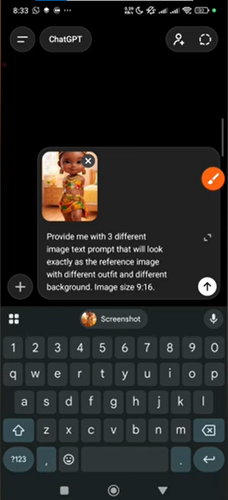
Step 2: Generate Different Poses Using ChatGPT
Use ChatGPT to create multiple dance poses from your screenshot so your video looks dynamic.
Example prompts for ChatGPT:
-
1.“Generate 3–4 images of this baby in different dance poses. Keep the same outfit, hairstyle, and facial expression, with playful and energetic movements.”
-
2.“Create 4 variations of this baby dancing. Include hand movements, jumping, and small leg movements while keeping the background simple.”
-
3.“Make 3 cute baby dance poses for a TikTok video in HD style, keeping consistent colors and clothing.”

Step 3: Prepare Your Prompt for the AI Video Tool
-
1.Open your ai baby dance video generator free (like Kling AI) on mobile or desktop.
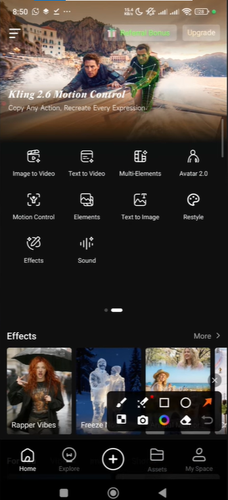
2.Upload your character images from ChatGPT.
-
3.Upload the TikTok dance motion video you downloaded this will guide the AI to replicate movements.
-
4.Write a prompt describing the style, energy, and motion you want.
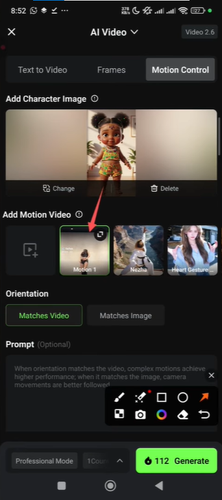


Example video prompts for Kling AI:
- 1. “Animate these baby images into a fun TikTok dance video. Include smooth transitions, energetic steps, lively background music, and playful expressions. Format 9:16, HD resolution, colorful and cheerful atmosphere.”
- 2. “Create a viral AI baby dance video using these images. Add trending dance moves, realistic motion, joyful vibe, and looping seamless transitions.”
- 3. “Generate an AI dance video for TikTok from uploaded baby images. Include cute gestures, hand claps, hopping steps, and bright background with fun energy.”
Step 4: Generate the Video
Click generate in the AI tool. Wait for the AI to process most tools finish within a few minutes. Preview and make adjustments to timing, transitions, or energy of dance moves.

Step 5: Export & Post
Export the video in 9:16 vertical format. Upload to TikTok or Instagram Reels. Use trending hashtags: #BabyDance, #AIDance, #ViralDance, #TikTokTrends. Engage viewers with captions, challenges, or duet reactions to boost reach.

Bonus Hack: Step Up Your Style Game with PixPretty AI Clothes Changer
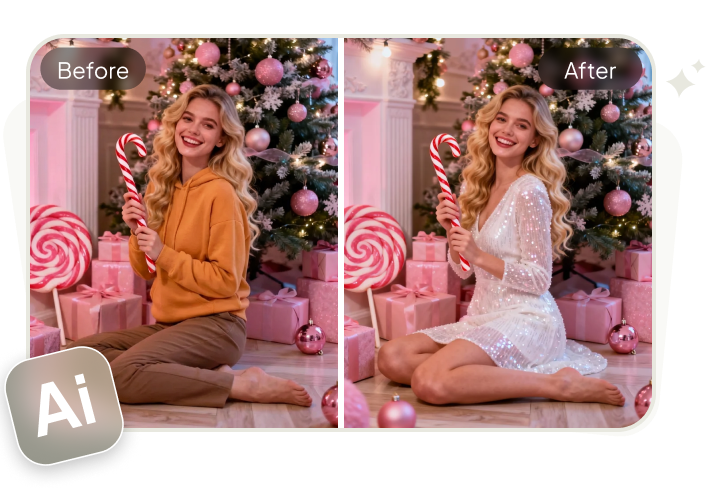
Upgrade your wardrobe instantly with PixPretty AI Clothes Changer. This smart tool lets you try on different outfits, experiment with colors, and see yourself in trendy styles all in just a few clicks.
Perfect for fashion enthusiasts, social media creators, or anyone wanting a fresh look, PixPretty AI makes styling fun and effortless. Transform your photos, share new looks, and explore endless outfit possibilities in HD.
Features:
Realistic outfit try-ons in HD
Change colors, patterns, and styles instantly
Supports casual, formal, and trendy outfits
Easy-to-use interface, no design skills needed
Save, share, and download new looks
Final Words:
In this article, we explored how to create viral ai dancing videos, including tips for using free AI dance video generators, generating images, uploading characters, and animating baby dance clips. By following these steps, anyone can make fun, shareable, and trending dance videos for TikTok and social media. For an extra creative touch, you can also try PixPretty AI Clothes Changer to experiment with different outfits and styles, making your videos even more engaging and visually appealing.
PixPretty AI Clothes Changer
- Create charming Christmas looks with ease
- Turn everyday photos into festive holiday scenes
- Perfect for Christmas photos and family moments
Related Articles:
- 50 Best AI Prompts for Kurti to Create Aesthetic & Realistic Images
- Best Truck AI Video Prompt to Create Realistic Cinematic Truck Scenes
- Best AI Prompts for Valentine’s Day 2026 to Create Stunning Images
- Best 40+AI Prompts to Create Romantic New Year Couple Photos
- 20+ Aura Farming AI Prompts for ChatGPT and Gemini - Horse Portrait


