AI image generation is trending across social platforms like Instagram, TikTok, Reddit, and Gemini AI tools. Users love creating funny, stylish, and surreal scenes using their own photos and smart prompts.
One viral idea is placing people into police station scenes with creative storytelling notes. This article gives 20+ police station AI prompts and show how to make them.
Table of Contents
Part 1. 20+ Police Station AI Prompts
Prompt 1. Arrested for Public Mischief
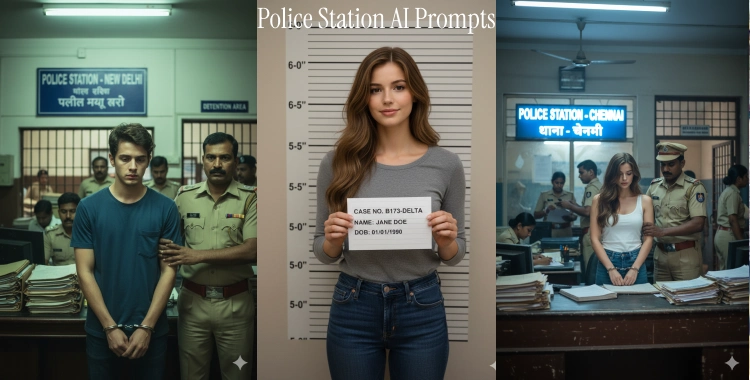
Generate a realistic, high-detail photograph of the interior of an Indian police station. In the center, a young lady with the exact same face as the reference image (do not alter facial structure, skin tone, facial features, or identity) stands with her head bowed and a tense expression. She has dark hair, styled long, and is wearing metal handcuffs. A male Indian police officer in a khaki uniform with a mustache is holding her arm, escorting her. In the background, a prominent blue sign reads 'POLICE STATION - Lucknow' in both English and Hindi script. A barred gate labeled 'DETENTION AREA' is visible behind them, along with stacks of office files and other police officers in uniform. Authentic fluorescent lighting, cinematic documentary style, ultra-realistic, 8K resolution.

Prompt 2. Caught Stealing in the Market
Generate a realistic, high-detail photograph of an Indian police station’s interior. A young woman, with the exact same face as the reference image, stands at the booking desk, her hands cuffed behind her. She looks guilty, with her head slightly lowered, her dark hair hanging loosely. A male police officer in a khaki uniform holds her arm firmly, escorting her to the detention area. In the background, visible through a large window, is a bright sign that reads 'POLICE STATION - CHENNAI' in both English and Hindi. The detention area gate is in the background with a stack of paperwork and officers moving around. Soft fluorescent lighting and a cinematic documentary style, ultra-realistic 8K resolution.

Prompt 3. Arrested for Mischievous Pranks
Generate a high-detail, realistic photograph of the interior of a police station. In the center, a young boy with the exact same face as the reference image (no changes to facial features, skin tone, or identity) is standing with his head down and a somber expression. He has short, dark hair and wears metal handcuffs. A male Indian police officer in khaki, with a mustache, holds the boy’s arm as he escorts him past the booking desk. In the background, a prominent blue sign reads 'POLICE STATION - NEW DELHI' in English and Hindi. A barred gate labeled 'DETENTION AREA' can be seen, along with files stacked on the desk and other officers in the background. Authentic fluorescent lighting, cinematic documentary style, ultra-realistic, 8K resolution.

Prompt 4. Photorealistic Police Booking Portrait
Create a highly detailed photorealistic image using the attached photo, keeping 100% facial accuracy. The subject stands in front of a height measurement board inside a police booking area, wearing plain clothes. Add a placard with a fictional case number, soft studio light, subtle shadows, clear skin texture, and slight film grain for realism.

Prompt 5. Casual Break Room Meeting
Produce a detailed scene inside a police break room. The person in the uploaded photo sits at a round table with uniformed officers having coffee mugs. Bright daylight streams through blinds, snacks and notes on a corkboard, soft tone colors, friendly atmosphere, realistic textures on furniture.
Prompt 6. Police Dog Training Yard
Render an outdoor police canine training yard. The subject’s face from the photo is on the trainee’s badge pinned to a vest. A German Shepherd sits beside, training obstacles and fences in the background, grass and sunlight with warm tones, lively and crisp detail.
Prompt 7. Intense Interrogation Scene
Generate a dark, cinematic interrogation room scene. The uploaded photo’s face is on the suspect seated at a metal table. A single overhead lamp casts dramatic shadows. Two detectives in suits stand on either side, serious expressions, concrete walls, visible microphone on table, subtle reflections on the floor.

Prompt 8. Forensic Lab Investigation
Generate a clean forensic laboratory environment. The subject from the uploaded image wears latex gloves and examines evidence under a microscope. Bottles, labels, papers and LED lights fill the background. Focus on crisp details, realistic reflections, and cool neutrals.
Prompt 9. Night Dispatch Center
Create a nighttime dispatch room scene. The uploaded photo’s person is at a desk with multiple monitors showing city maps and call logs. Headset, soft blue screens glow, small desk lamp, slight motion blur for busy activity, calm but urgent atmosphere.
Prompt 10. Traffic Stop Tablet Inspection
Show a roadside traffic stop: a police officer holds a tablet showing data, and the uploaded face appears as the driver in the car. Cones, flashing lights from police cruiser, urban street in background, slight motion blur, tension yet professional tone.
Prompt 11. Busy Police Station Hallway
Create a sharp, dynamic image of a police station hallway. The subject from the photo appears on a wanted poster pinned to a bulletin board. Officers and clerks move about in the background. Fluorescent ceiling lights, glass doors, camera fixtures, and office signage are visible with accurate depth and focus.

Prompt 12. Police Press Conference
Make an image of a press conference inside a station. The subject from the photo is behind a podium with police emblem. Reporters with cameras and microphones are in front, bright studio lights, clear branded backdrop text, balanced lighting with crisp detail.
Prompt 13. Crime Scene Tape Street Scene
Generate a city street cordoned off with police tape. The subject’s photo appears on flyers scattered near the tape. Chalk outline on the wet pavement, tall buildings in the distance, dusk lighting, reflective puddles and subtle fog for atmosphere.
Prompt 14. Evidence Board Analysis
Make a high-detail image of a police detective studying an evidence board. The user’s face photo appears as the central suspect on multiple pinned photos, connected by red string. Include maps, scribbled notes, office lights, tiny paperclips, office clutter on a table beneath the board.

Prompt 15. Field Crime Investigation Team
Generate a field investigation scene. The person’s face appears on the CSI vest of a field agent collecting evidence. Small markers on grass, other officers with tools, wide daylight, clear shadows, grass texture and gear details visible.
Prompt 16. Busy Detective Desk
Create an image of a cluttered detective desk. Open case files, coffee stains, reading glasses, and the uploaded photo’s face as the top file cover. Warm soft light from a window, scattered pens and notepads with slight dust detail.
Prompt 17. Intriguing Jail Cell Window
Render the scene from outside a jail cell window. The uploaded face is visible inside, faint silhouette behind bars. Warm lighting inside contrasts the dark exterior. Rain droplets on the glass add moody detail, soft reflections with realistic light fall-off.
Prompt 18. Late Night Watch Desk
Make an image of a 3 a.m. watch desk scene. The subject from the uploaded photo sits with coffee and stacks of reports. A warm desk lamp contrasts cool background, old clocks showing time, dark outside windows, relaxed but focused mood.
Prompt 19. Community Event at Station
Create a friendly outdoor event at a police station. The photo subject interacts with families and kids near banners and balloons. Sunny day, bright colors, station building visible with flags, warm and inviting style.
Prompt 20. Creative Police Sign Redesign
Generate a polished sign redesign concept for a police station. The uploaded image face is integrated into a modern mascot logo. Sharp typography, bold shapes, high-resolution graphic style, clean vectors and balanced color scheme.
Prompt 21. Vintage Police Car Backdrop
Create a retro 1980s police car scene. The uploaded face is on a billboard behind the cruiser. Classic uniforms, chrome police lights, gritty street at dusk with neon signs behind, warm film grain filter and slightly faded colors.
Part 2. How to Generate Police Station AI Images Step by Step
Here’s a simple step-by-step guide to create your police station AI images:
Step 1: Select an AI Image Tool
Choose from popular generators like ChatGPT, Gemini, MidJourney, Stable Diffusion. Different tools may give different styles, so pick one that fits your idea.
Step 2: Upload Your Photo
Use a clear portrait photo of a person if your prompt needs a real face.
Step 3: Enter the Text Prompt
Copy a detailed prompt from above and paste it into the prompt box or chat.
Step 4: Add Style Preferences
Optional: add tags like photorealistic, cinematic, soft lighting, wide shot, or specify an aspect ratio.
Step 5: Create and Refine
Generate the image. If it’s not perfect, tweak the prompt by adding more detail or adjusting the scene.
Part 3. Tips for Generating Police Station AI Images
Here are some helpful ideas to get great results with AI images:
- Be Clear and Detailed - A prompt must describe who, where, what, and how. The more descriptive you are about lighting, mood, and objects, the better the output.
- Use Natural Language - Write prompts with natural sentences, not just tags. This helps the AI understand context and composition.
- Test Variations - Try changing small parts of a prompt (like lighting or mood) to see different results.
- Respect Safety - Always label AI-generated images as fictional to prevent confusion. Misleading AI visuals have caused real emergency calls when people thought they were real.
Part 4. Boost Realism: Use AI Clothes Changer for Police Uniforms
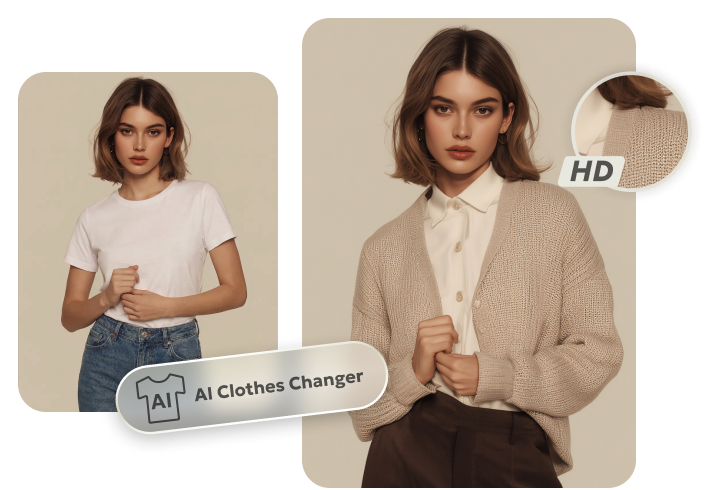
AI clothes changers are tools that let you upload a photo and then change or try on new outfits using artificial intelligence. PixPretty AI Clothes Changer analyzes your photo and adds new clothing that looks natural, matching body shape, lighting, and shadows so the person appears dressed in the new outfit realistically.
Why Use It for Police Station AI Prompts
Before you generate an AI image of a police scene, using PixPretty AI Clothes Changer to put the subject in uniforms or thematic outfit:
- Improves visual consistency with your prompt
- Helps AI focus on the right style (e.g., police attire)
- Reduces confusion in generated images about what the subject should wear
- Enhances realism and audience engagement on social platforms
This step is especially helpful if your original photo has unrelated or casual clothes that don’t match your police‑themed idea.
Conclusion
Police station themed images are a fun and engaging way to use AI. With these 20+ prompts, you can create dramatic, funny, or stylish visuals that attract attention on social media.
Be clear in your prompts, use good tools, and always mark your creations as fiction. Try combining these prompts with tools like PixPretty AI Clothes Changer to boost your creative process and make images that stand out.
PixPretty AI Clothes Changer
- Instantly change outfits with AI in 1 click
- Realistic AI previews for every top, bottom, or dress
- Create and explore endless outfits and OOTDs without editing