


Naruto is one of those anime and manga series that just sticks with you. Watching Naruto Uzumaki and his friend go from scrappy kids to powerful ninjas, fans can’t help but make art, reimagining scenes or even dreaming up brand new characters. These days, with AI in the mix, making Naruto-inspired art is way easier.
You’ve got tools for generating characters, and Naruto prompts to create art. Here, we’ll share the top 6 prompts and character generators, and over 10 ready-to-use prompts for creating striking Naruto art. We’ll also throw in a bonus tip on how to play around with different outfits for your Naruto characters.

Table of Contents
Part 1: Top 3 Naruto Prompt Generators In 2026
Here are the top 3 Naruto prompt generator tools in 2026 that you can utilize to generate text prompts. Next, you can use these prompts in your desired text-to-image generator, like Stable Diffusion, Midjourney, etc.:
1. PromptHero’s Naruto AI Art Generator
PromptHero is a general platform for finding and learning from AI image prompts, including Naruto and other anime content. Its main purpose is to help users discover and copy prompts used to create specific images, along with details about the AI models needed. This makes it useful for learning how prompts work, saving time, and recreating certain styles.
However, PromptHero does not generate images itself. The quality of prompts also depends on community uploads, and users need some experience with AI image tools like Stable Diffusion or Midjourney to use the prompts effectively. Unlike dedicated Naruto AI generators, it focuses on prompt sharing rather than direct image creation.

2. AIPRM for ChatGPT
AIPRM is a helpful browser extension that operates inside ChatGPT to create Naruto prompts faster. It offers a large library of ready-made prompts that users can search and use as templates, especially for creative writing or AI image generation.
You can customize prompts by changing characters, scenes, and styles, and adjust the tone to get better descriptions. However, AIPRM does not generate images by itself, requires ChatGPT and other AI tools, takes some time to learn, and only operates through a web browser with an internet connection.

3. prompttoMANIA
promptoMANIA is a free, web-based tool that helps users build detailed prompts for AI art generators like Midjourney and Stable Diffusion. To create Naruto art, you must manually type in all character and scene details.
Its visual menus make it easy for beginners to add styles, lighting, and other effects without knowing complex prompt rules, and it also operates with multiple AI models. While it is great for experimenting and costs nothing to use, it does not offer Naruto-specific options, and has limited control over exact character details.

Part 2: Top 3 Naruto Character Generators In 2026
Here are the top 3 Naruto character generator tools in 2026 that can generate whatever Naruto character you want:
1. PixAI.art
PixAI.art is an anime-focused AI art platform that’s excellent for creating Naruto-style characters, especially due to its large community model library. Users can choose special character models to get very specific looks and use advanced tools to control poses and details.
It also includes editing and upscaling tools and offers free credits to start. However, the many model choices can be confusing, image quality depends on the model used, and costs are based on a credit system. Advanced features also take time to learn.

2. Pixelcut
Pixelcut’s AI Naruto Character Creator Online for free is a tool made specifically for creating Naruto-style characters from text descriptions. Users can describe details like village, clan, abilities, outfits, and jutsu, and the AI generates a high-quality anime-style ninja image that matches the Naruto look.
It is very easy to use, functions quickly, and produces high-resolution, watermark-free images, making it great for fan characters, stories, and avatars. However, good results depend on how well you describe the character, and advanced features may require a subscription. It’s also mainly focused on single character portraits rather than full scenes.

3. Komiko
Komiko is an AI tool for creating anime and manga content, including Naruto-style characters. It offers anime-focused models and a Naruto generator, making character creation easy. The tool’s main strength is keeping characters consistent across multiple images, which is helpful for stories and comics.
It also supports scenes, comic panels, and simple animations. However, it can feel overwhelming for new users, has limited detailed control, and is mainly designed for anime and manga styles.

Part 3: 10+ Ready-Made Naruto Prompts to Use With Text-to-Image Generators
Here are 10+ ready-made Naruto prompts for making Naruto-themed AI art using tools like Midjourney, Stable Diffusion, or PixAI.art. The prompts are grouped by style to help create different looks, from classic action scenes to creative alternative ideas. You can also mix and match them to create your own Naruto art:
Classic Action & Character Portraits
The following prompts focus on iconic Naruto characters in powerful, memorable moments, outlining their strength, emotion, and signature abilities in a dramatic anime style:
-
1.Naruto Uzumaki in Six Paths Sage Mode, floating mid-air with nine Truth-Seeker Orbs orbiting around him, glowing yellow staff in hand. Vibrant, god-like aura, determined expression, anime keyframe, detailed line art, vibrant colors, official art style.
-
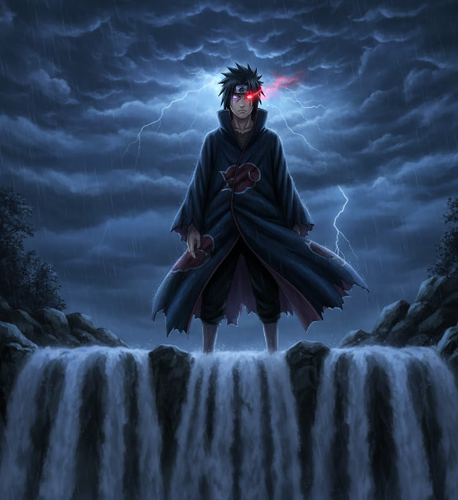
2.Sasuke Uchiha, standing atop the Final Valley waterfall. He activates his Rinnegan in one eye and a fully evolved Mangekyo Sharingan in the other, a dark storm brewing behind him. Moody lighting, detailed cloak, sharp features, and dramatic composition.
-
3.Kakashi Hatake, mid-action, performing Lightning Blade (Chidori) in the rain at night. The blue-white lightning illuminates his face and the falling raindrops. Blurred motion, speed lines, cinematic lighting, and Uchiha Obito in the blurred background.

Iconic Village & Landscape Scenes
These prompts shift the focus from Naruto characters to the world they live in. They capture the mood, history, and beauty of iconic Naruto locations through detailed landscapes:
-
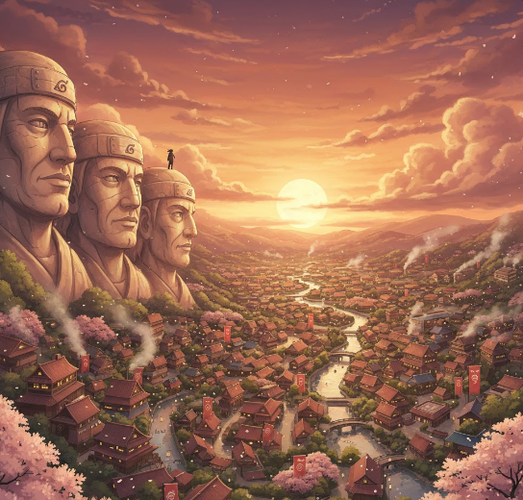
1.Panoramic view of the Hidden Leaf Village (Konoha) at sunset from the Hokage Mountain. The stone faces are illuminated, lights are turning on in the houses below, and cherry blossoms are falling. Studio Ghibli style, breathtaking vista, warm colors, and highly detailed.
-
2.The Valley of the End at dawn. The massive statues of Hashirama Senju and Madara Uchiha stand shrouded in mist, with the waterfall roaring between them. Epic scale, ancient, moss-covered stone, rays of sunlight piercing the fog.
-
3.The Akatsuki hideout, interior. Itachi Uchiha and Kisame Hoshigaki are silhouetted against a giant stone statue in a dark, cavernous space. Red clouds on their cloaks, a moody red and black color palette, and an ominous atmosphere.

Dynamic Jutsu & Battle Scenes
Here are some Naruto prompts that capture the thrill and intensity of epic battles, displaying each ninja’s unique jutsu, speed, and power in dynamic, action-packed moments:
-
1.Rock Lee, having opened the Fifth Gate, releasing a devastating Front Lotus on Gaara. A whirlwind of green energy and sand, explosive impact, a blur of motion, a dynamic fighting pose, and intense facial expressions.
-
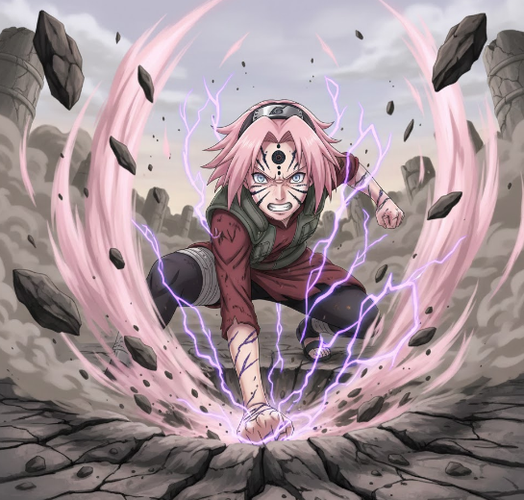
2.Sakura Haruno, in the Fourth Great Ninja War, her Byakugou seal fully released. She punches the ground, creating a massive crater with seismic force, her pink chakra flaring around her. Powerful, determined, cinematic, detailed destruction.
-
3.Minato Namikaze, the Fourth Hokage, in mid-Flying Thunder God Technique (Hiraishin). Multiple glowing kunai are in the air, and he is teleporting in a flash of yellow light, leaving an afterimage. Speed and motion are emphasized, with a bright yellow and blue color scheme.

Creative & Alternative Concepts
The following Naruto prompts traverse imaginative and unexpected takes on familiar characters.
They blend fantasy, modern life, and everyday moments to create fresh, visually striking ideas:
-
1.A Tailed Beast (like the Nine-Tails or One-Tail) reimagined as an ancient, benevolent forest spirit in a mystical Japanese forest. Ethereal, glowing, surrounded by fireflies and ancient trees, Makoto Shinkai art style, beautiful and serene.
-
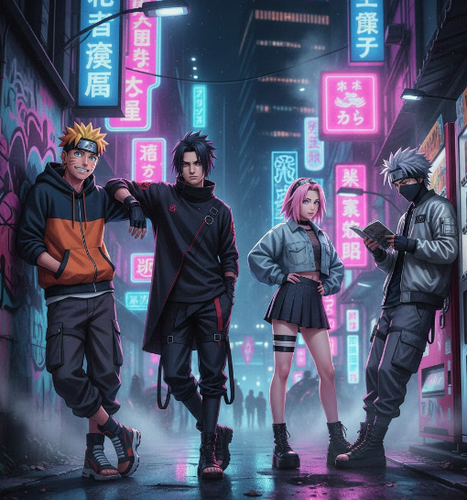
2.The members of Team 7 (Naruto, Sasuke, Sakura, and Kakashi) in a modern-day streetwear photoshoot in Tokyo at night. Neon lights, urban backdrop, cool and casual poses, fashion photography, cinematic lighting, and vaporwave aesthetic.
-
3.Jiraiya, the Toad Sage, writing his novel at a small wooden desk in a hot springs inn. Steam rises from the bath, scrolls and ink bottles are scattered around, a nostalgic and peaceful mood, a detailed painterly style, and warm light.

[Bonus Tip] See How You Look in Different Dresses With a Free AI Clothes Changer
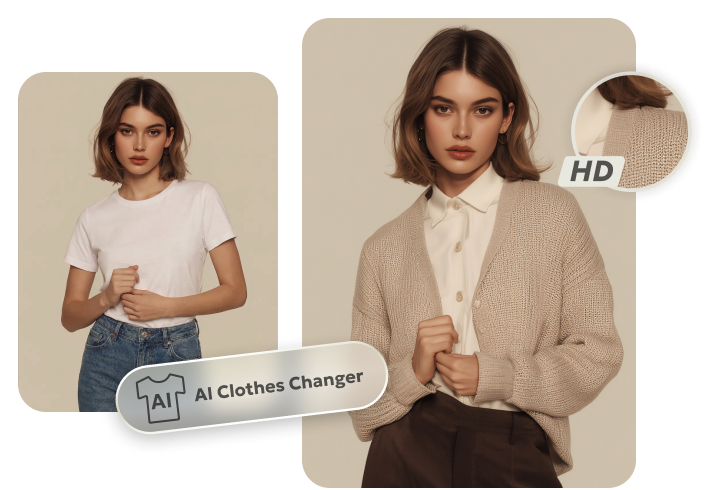
You can dress up yourself in photos with a free tool like Tenorshare PixPretty. It offers a free Online Clothes Changer, which allows you to upload your desired clothing pictures and swap the outfit you’re wearing with the one you want. The tool will adjust the clothes to fit your body shape, pose, and lighting with realistic HD results. Here’s more to this tool, such as:
It can swap dressing, showing realistic fabric and color.
You can mix and match tops, bottoms, or full outfits.
-
Perfect for users who want new looks without taking pictures in different outfits or checking how a brand’s clothing will look on them.
-
It’s a user-friendly web tool, so there’s no download, subscription, or technical skills needed.
Here’s how to use the PixPretty Clothes Changer to see how you or a person looks in a different dress:
Step 1: First, upload your or a person’s picture and the image of the dress you want to try on.

Step 2: Pick the uploaded dress or combine a top and bottom from the given clothing to build your own style. You can also include shoes, and accessories, like a purse, jewelry, etc.

Step 3: Next, hit “Generate” to see how the clothes look on the person in the picture.

Conclusion
Creating Naruto AI art is now easier than ever with tools for Naruto prompts and character creation. PromptHero, AIPRM, and promptoMANIA help you make detailed prompts. While PixAI.art, Pixelcut, and Komiko let you generate high-quality Naruto characters with control over poses, outfits, and expressions.
For extra fun, Tenorshare PixPretty’s free Online AI Clothes Changer lets you quickly try different outfits, making it simple to customize the person’s look in the pic. The tool can adjust outfits to the body shape, pose, and lighting perfectly, offering realistic and natural results in HD.
PixPretty AI Clothes Changer
- Instantly change outfits with AI in 1 click
- Realistic AI previews for every top, bottom, or dress
- Create and explore endless outfits and OOTDs without editing
Related Articles:


