


As more of what we do moves online, having clear and accurate image descriptions really matters. It’s not just about making content accessible. But good descriptions help with SEO, make sites easier to use, and help manage content. But writing those descriptions can eat up a lot of time, especially if you don’t have the right tools. That’s why we took a close look at the top 10 AI Image Description Generator tools of 2026. Whether you’re working solo or running a big team, you can pick an option that fits your workflow and helps you get the job done faster.
Table of Contents
- Part 1: What Is an Image Description Generator?
-
Part 2: Best 16 AI Image Description Generator ToolsHOT
- 1. PixPretty AI Image Describer
- 2. FoundMyself Image Description Generator
- 3. DocsBot AI
- 4. Pics.io AI
- 5. Pallyy Image Description Generator
- 6. Nuelink
- 7. Krea AI Image Generator
- 8. AltText.ai
- 9. Vidnoz Free AI Image Describer
- 10. Repixify
- 11. Image Describer
- 12. Modelia
- 13. Hugging Face
- 14. Microsoft Azure Computer Vision
- 15. Google Cloud Vision API
- 16. Amazon Rekognition
- Part 4: What Is an Image Description Used For?
- Part 5: FAQs About Image Description Generator
Part 1. What Is an Image Description Generator?
An AI Image Description Generator is an AI tool that "sees" an image using computer vision and then "describes" it in text. It helps make visual content understandable, accessible, and easy to search. The tool combines computer vision and natural language processing to do this. Here are the detailed Image Description Generator functions:
- 1. Analyzes the Image: The AI detects objects, their attributes, actions, and the overall scene using techniques like Convolutional Neural Networks (CNNs) or Vision Transformers (ViTs). This visual information is then converted into a compact representation that the language model can understand.
- 2. Generates a Caption: Using models like RNNs, LSTMs, or Transformers, the AI predicts the most likely words to describe the scene, producing a clear, human-like sentence.
Traditional systems use an encoder-decoder setup, with a CNN as the encoder and a language model as the decoder. Whereas modern vision-language models, such as BLIP, Flamingo, or GPT-4V, handle vision and language together in a single system, often producing more detailed and context-aware descriptions.
Part 2. Best 16 AI Image Description Generator Tools
Here are the 10 best Image Description Generator tools to try in 2026, with their core features, pros, and cons mentioned in detail:
1. PixPretty AI Image Describer
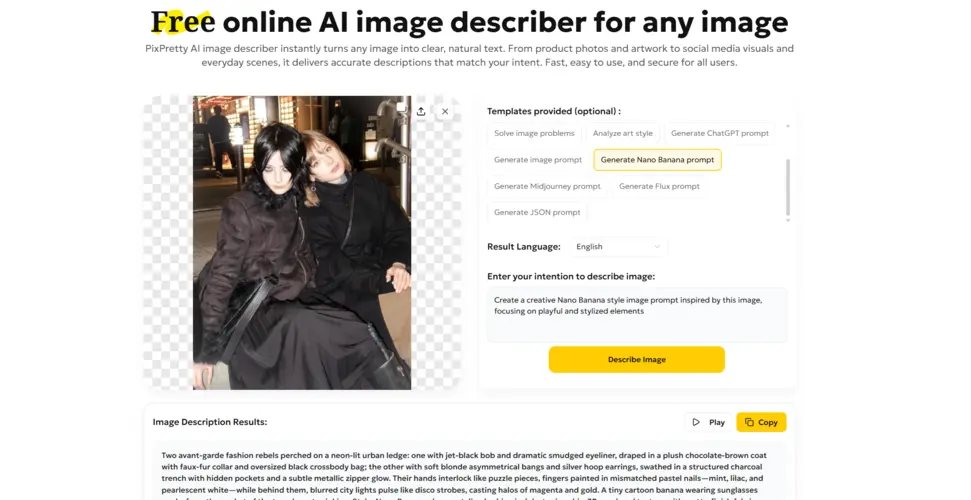
PixPretty AI Image Describer is a user-friendly, AI-powered tool that allows new users to generate high-quality image descriptions for free without needing to register. To get started, simply upload an image, select a template to set your desired style, such as marketing copy or a Nano Banana prompt, and choose your preferred result language. For more tailored results, you can even enter your specific intention to guide the AI as it analyzes the visuals and delivers a comprehensive description in just seconds.
Furthermore, images are temporarily stored on a secure server, processed by a trusted third-party AI, and erased immediately after the description is generated. PixPretty requires no technical skills to use, and with one click, it can generate a detailed description of an image.
2. FoundMyself Image Description Generator
FoundMyself offers a straightforward AI image description generator focused on helping creators quickly turn images into clear, written descriptions for accessibility, captions, and better context in visual content.

Pros:

Cons:

Simple interface that makes it easy for beginners to upload an image and get a readable description.
Fewer advanced options compared with more modern AI platforms such as style control or multiple formats.
Helpful for accessibility and alt text use cases where you just need a plain language description without extra complexity.
Not as tightly integrated with social media scheduling or content pipelines, so it is more of a standalone utility.
Works directly in the browser so there is no need to install software or learn a complex workflow.
Information about limits, pricing or data handling is less detailed than some dedicated SaaS tools.
3. DocsBot AI
DocsBot provides a free AI image description generator that emphasizes accessibility, SEO ready alt text, and content marketing use cases all in one tool. It is positioned as a no login utility that can support websites, e commerce stores, and social media teams.

Pros:
Cons:
Free to use with no login which makes it easy to test and integrate into your workflow quickly.
Mainly focused on single image use rather than deep bulk automation, so high volume teams may still need extra tooling.
Strong focus on accessibility and SEO so it clearly explains use cases like WCAG compliance and image search visibility.
Limited control over tone or style of the descriptions which can be a drawback for brands with strict voice guidelines.
Supports multiple scenarios including blogs, e commerce product images, social media posts, and large image libraries.
Advanced features of the broader DocsBot platform such as custom chatbots are separate from the free image description tool.
4. Pics.io AI
Pics.io offers a free AI image description generator that not only writes descriptions but also creates titles and SEO friendly keywords for each image. It is designed for content teams that need structured data they can export and plug into their CMS or store.

Pros:
Cons:
Generates description, title, and keywords at the same time which saves a lot of manual SEO work.
Free tier is limited to five generations per day which may not be enough for large catalogs.
Allows exporting results as JSON or CSV files so you can import them into WordPress, Shopify, or other systems.
Bulk generation is only available if you move into the broader Pics.io product which adds another layer to manage.
No signup is required and the tool clearly states that images are processed and then deleted which helps with privacy concerns.
Interface and messaging are geared toward users who already understand metadata workflows so beginners may face a mild learning curve.
5. Pallyy Image Description Generator
Pallyy’s image description generator is part of a larger social media toolkit that includes publishing, analytics, replies, and link in bio features. The tool lets you upload an image, optionally add context, and get an AI generated description tailored for social use.

Pros:
Cons:
Built inside a social media management platform so your descriptions can easily feed into captions and posts.
Best value appears when you also use Pallyy Pro, which means some users may feel pushed toward the paid social suite.
Simple flow that explains how the AI analyzes an image first and then converts that analysis into a human friendly description.
Less emphasis on SEO metadata export compared with tools designed around JSON or CSV output.
Offers other related AI tools such as an image caption generator and alt text generator so you can cover multiple content needs in one place.
Not ideal if you only want a standalone image description tool and have no interest in social media scheduling or analytics.
6. Nuelink
Nuelink’s image description generator is marketed as accurate, free, and available with no login while also acting as an entry point into its full social media management platform. It focuses on social workflows such as scheduling, reposting, and cross posting across major networks.

Pros:
Cons:
Free to use without login which makes it accessible for quick tests or occasional use.
File size limits and supported formats such as JPEG and PNG may be restrictive for very high resolution or specialized assets.
Lets you pick a tone of voice such as casual or formal so descriptions can better match your brand style.
Many of the most useful features around scheduling and automation sit behind a free trial and paid plans.
Deep integration with the Nuelink platform that includes unified social calendars, AI caption writing, bulk scheduling, and analytics.
The interface and marketing copy are heavily focused on social media teams which may feel like overkill for simple accessibility tasks.
7. Krea AI Image Generator
Krea is primarily a powerful AI image generator that combines multiple leading models in one place, including its own Krea 1 model as well as other engines. While it is not a classic image description generator, users can generate or upload images and then work with text prompts and variations, which can also inform manual descriptions.

Pros:
Cons:
Access to several state of the art image models with fast generation times which is ideal if you both create and describe visuals.
Does not focus on automatic text descriptions in the same way as dedicated image description generators, so you may still need a separate alt text tool.
Offers advanced controls such as styles, aspect ratios, variations, and image prompts that help you shape consistent visual content.
Commercial use rights and licensing depend on the plan, which means businesses must read the terms carefully before using images in campaigns.
Provides free daily credits so you can experiment with image creation before deciding whether to move to a paid plan.
Rich feature set and multiple models can feel overwhelming if you only want a quick description and are not interested in creative control.
8. AltText.ai
AltText.ai is an AI Description Generator from an image that automatically generates descriptive alt text for images individually, in bulk, or by scanning webpages for missing tags. It functions with WordPress SEO plugins like Yoast SEO and Rank Math to include focus keywords for better SEO.
The tool's InstantAlt feature uses a single JavaScript line to create alt text in real-time, perfect for platforms like Webflow or Squarespace. Besides, it supports modern formats like AVIF and SVG, and users can customize output with prompts to match a brand voice, with support for 130+ languages.

Pros:
Cons:
Saves a lot of time by automating tedious alt text tasks, especially for large image libraries.
Costs can rise for very large image catalogs, despite a free trial.
Integrates flawlessly with platforms like WordPress and Shopify, and supports APIs and automation tools like Zapier and n8n.
Some users report technical issues, like incomplete bulk updates or inconsistent functionality.
Boosts SEO and accessibility by ensuring images have descriptive alt text, helping meet WCAG and ADA standards.
It can produce generic or slightly inaccurate descriptions and struggles with abstract concepts or complex visuals.
Supports agencies managing multiple client sites, with credit-based pricing usable across unlimited sites.
9. Vidnoz Free AI Image Describer
Vidnoz is a web-based, free AI Image Description Generator tool that generates text from images without registration or limits. It offers specialized modes for different tasks. Detailed scene descriptions, text extraction using OCR, product-focused descriptions, and solutions for visual problems like diagrams or math questions.
Users can also provide custom prompts for personalized outputs, such as a specific writing style. The tool supports popular image formats, including JPG, PNG, BMP, and WEBP, and places no watermarks on the generated text.

Pros:
Cons:
Completely free and easy-to-use Image Description Generator with no sign-up, daily limits, or hidden fees.
Generates text only in English, limiting use for non-English content.
Offers task-specific modes like OCR, product descriptions, and problem-solving, useful for professional or educational purposes.
Text cannot be edited directly in the tool, and the edits must be done in another application.
Simple and fast interface. Upload an image, choose a mode, or enter a prompt, and get results quickly.
Accuracy can vary, and complex or unclear images may produce errors, so review is recommended.
It's a standalone tool separate from Vidnoz's AI video generator, so video credits do not apply.
10. Repixify
Repixify provides an Image Description Generator that uses Google's Gemini AI to analyze images and create descriptions for social media captions, SEO-friendly alt text, accessibility, and even character descriptions for creative writing. It is free to use with no sign-up required. Users simply upload a JPEG, JPG, or PNG image (up to 3MB), click generate, and copy the result.

Pros:
Cons:
Free to use with no sign-up, making it quick and easy for simple tasks.
Limited customization with no options for different styles, languages, or custom instructions.
Fast and simple interface that generates descriptions in seconds.
Only supports JPG, JPEG, and PNG images under 3MB.
Useful for multiple needs, including alt text, social media captions, and basic accessibility.
Descriptions can be generic and may need manual editing.
Images are processed temporarily and not stored, supporting user privacy.
Displays ads, which can affect the user experience.
11. Image Describer
Image Describer is an online tool that uses advanced AI to understand images and create more than basic captions. It can generate short or detailed descriptions, detect mood or emotions, create social media captions with hashtags, write product descriptions, and produce Midjourney prompts.
Users can customize outputs with their own instructions or templates. Moreover, this Image Description Generator for blind persons supports text-to-speech, and OCR for text extraction. It has a feedback system to improve results.

Pros:
Cons:
Useful for many tasks, including alt text, marketing copy, and AI art prompts.
Image size is limited to under 5MB.
Allows customization by letting users set their own intention for better results.
Descriptions can be generic without clear user instructions and may need editing.
Includes built-in OCR to extract text from images.
Free trial details and usage limits are not clearly explained.
Images and descriptions are not stored without user consent.
12. Modelia
Modelia's Image Description tool is built into its creative platform for flawless, efficient use. It is trained specifically on fashion, recognizing clothing types, fabrics, colors, patterns, and fit details. Users can generate different outputs, such as SEO-friendly text or full product descriptions with titles, materials, fit, and care info.
The tool can describe multiple items in one image and supports multiple languages for global use. Since it operates directly within Modelia, users can go from image creation to text without switching tools.

Pros:
Cons:
Saves time by automating product description writing.
Best suited for fashion images and less effective for other image types.
Improves SEO and product discoverability with keyword-rich alt text and descriptions.
Accuracy depends on image quality, and small or complex details may be missed.
Improves accessibility by generating descriptive alt text for screen readers.
Functions mainly within the Modelia platform, not as a standalone tool.
Maintains consistent tone and detail across large product catalogs.
Uses a credit or subscription system, which may limit high-volume use.

Note:
Below are more professional image description generators. These tools offer advanced capabilities and highly accurate results, but the setup and usage process is more complex and often requires manual configuration. They are better suited for advanced users or professionals who need greater control and customization.
13. Hugging Face
Hugging Face is an open-source platform hosting thousands of AI models, including many Image Generation tools based on text descriptions. Users can look into Hugging Face Hub to find models like BLIP, Qwen2.5-VL, or CLIP, or use ready-made applications in the Spaces section.
The platform offers advanced vision-language models that can describe, categorize, and extract data from images, with options ranging from lightweight, fast models to state-of-the-art reasoning models. Tools like AI Sheets even integrate vision models into spreadsheet-style workflows for structured image analysis.

Pros:
Cons:
Many image description generator models are open-source and free, making them cost-effective for developers, researchers, and hobbyists.
Has a steep technical learning curve, and selecting, configuring, and deploying models requires developer knowledge.
Offers high customization, and models can be fine-tuned on your own data or integrated into custom applications.
Usually requires self-hosting or using the Hugging Face Inference API, which may have limits or costs.
Access to thousands of cutting-edge, community-shared pre-trained models for experimenting with the latest computer vision research.
Results can vary between models, and the platform lacks the integrated editing tools of commercial design or marketing apps.
14. Microsoft Azure Computer Vision
Azure Computer Vision is a cloud service with pre-trained AI models accessible via API. It generates image captions and tags, and its Read API extracts printed and handwritten text in 25+ languages. The service also supports spatial analysis, video tracking, and content moderation.
Designed for enterprises, it meets standards like GDPR, HIPAA, and ISO, offering encryption, private endpoints, and role-based access control. Moreover, Computer Vision integrates flawlessly with Azure tools like Blob Storage, Cognitive Search, and Power Automate for automated workflows.

Pros:
Cons:
Strong OCR performance for digitizing documents and recognizing handwritten text.
Pay-as-you-go pricing can get expensive for high-volume use, with some features billed separately.
Offers a wide range of vision capabilities with enterprise-grade security and compliance, ideal for regulated industries.
Cloud-based processing may cause latency, and offline use requires complex edge deployment.
Pre-trained models allow rapid development without needing machine learning expertise.
Core models are generalized; niche tasks need Azure Custom Vision for custom training.
Highly scalable through the Azure cloud, supporting large workloads and global deployments.
API-based services require technical integration, and are not suitable as a standalone drag-and-drop tool.
15. Google Cloud Vision API
The Google Cloud Vision API is a set of pre-trained models that analyze images via API. It can generate descriptive keywords (Label Detection), locate objects precisely (Object Localization), and find related images online (Web Detection).
It also includes advanced OCR for printed and handwritten text, face detection with emotions, and landmark and logo recognition. In addition, the tool offers content moderation (SafeSearch), and analysis of image properties like dominant colors.

Pros:
Cons:
High accuracy and scalability using Google's advanced ML models, capable of processing millions of images daily.
API-based service requires technical integration, and is not suitable for non-developers.
Integrates well with Google Cloud Platform, enabling automated pipelines with Cloud Storage, BigQuery, and other services.
Costs can add up with high-volume usage, and each feature and image is billed separately.
The free tier offers 1,000 units per month for easy testing and prototyping.
The free tier is limited for production, and paid usage is needed for large-scale applications.
Enterprise-grade security and compliance with standards like ISO 27001, SOC 2/3, and HIPAA.
Cloud-dependent, and cannot operate offline.
Some features, like Celebrity Recognition, have been deprecated and will be removed after September 16, 2025.
16. Amazon Rekognition
Amazon Rekognition is a cloud AI service for image and video analysis at enterprise scale. It detects objects, scenes, activities, landmarks, and image quality features like brightness and contrast. Facial recognition analyzes attributes, compares faces, and searches private collections.
The service also supports OCR, celebrity recognition, PPE detection, and content moderation for explicit or violent material. Users can create Custom Labels for specific objects or concepts. As an AWS service, it integrates with S3, Lambda, and other tools, is HIPAA-eligible, and supports private network access for secure enterprise use.

Pros:
Cons:
Combines multiple advanced vision features, face analysis, OCR, video, and custom labels into one scalable service.
Raises privacy and ethical concerns, especially around facial recognition, bias, and regulatory compliance.
No ML expertise is needed, and developers can use pre-built deep learning models via simple APIs.
Costs can grow quickly with high-volume image or video processing.
Integrates easily with AWS, benefiting from security, compliance, and pay-as-you-go pricing with a free tier.
General models may not cover niche objects, requiring Custom Labels and extra effort.
High accuracy for facial recognition, object detection, and analysis, using models Amazon employs in its own services.
It's overly complex for simple tasks like generating captions or alt text, and simpler tools may be more efficient.
Part 4. What Is an Image Description Used For?
Individuals or enterprises may want to generate descriptions of images due to the following reasons:
- 1. Digital Accessibility: Image descriptions (alt text) help screen readers convey visual content to blind or visually impaired users and ascertain compliance with accessibility standards like WCAG.
- 2. SEO Benefits: Descriptions allow search engines to understand images, improving indexing and driving traffic through Google Image Search.
- 3. Better User Experience: Descriptions provide context when images fail to load or when additional explanation is needed, like labeling people or clarifying graphs.
- 4. Content Creation & Workflow: AI-generated descriptions can create social media captions, hashtags, metadata for easy image organization, and prompts for AI art generation.
- 5. Professional & Educational Uses: In e-commerce, they detail product features, in education, they make diagrams and charts accessible, and in journalism, they accurately describe events, people, and locations.
Part 5. FAQs About Image Description Generator
Q1. What is the top Image Description Generator?
Tenorshare PixPretty is considered a top Image Description Generator because it is free, fast, and requires no registration, and technical skills to use. It allows you to choose a description style and produces clear and detailed image descriptions using AI. Moreover, it offers other image editing features as well.
Q2. Is an AI-generated image description accurate?
AI-generated image descriptions are usually accurate for identifying objects, scenes, and basic details. However, they can sometimes miss context or small details, so a quick human review is recommended.
Q3. Are image description generators better than writing descriptions manually?
Image Description Generators are faster and save a lot of time, especially for many images. Manual writing can be more precise, but AI tools are more efficient for bulk and everyday use.
Conclusion
AI Image Description Generator tools are valuable for making images accessible, improving SEO, and user experience, and simplifying content creation for work, education, and creative projects. Their options range from powerful enterprise tools like Amazon Rekognition and Azure Computer Vision to easy-to-use platforms like Repixify and Image Describer.
But for a fast, free, and user-friendly option, Tenorshare PixPretty is an excellent choice. It offers detailed AI-generated descriptions, creative style options, secure processing, and built-in image editing, making it ideal for both individuals and teams.
PixPretty AI Photo Editor
- 100% free AI Image Generator (Nano Banana 2 powered)
- 4K image quality with fast generation speed
- AI effects & filters for personal and e-commerce use

Related Articles:


