Webcam AI videos are now widely used for vlogs, tutorials, presentations, online courses, and any content where you want to talk straight to your audience without spending hours filming. However, the finished video is only as good as the prompt you give it. When you can craft the perfect webcam AI prompt, the whole video just looks more convincing.
But if your prompt misses the mark, the result can feel awkward or just plain weird. In this article, we’ll share the core elements of making great AI webcam prompts, alongside 20+ ready-made examples that you can mix and match, and change according to your needs!

Table of Contents
Part 1: Core Elements of Crafting Webcam AI Prompts
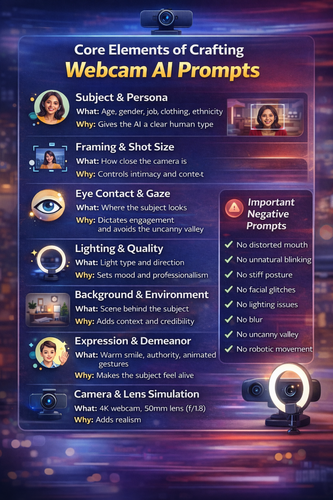
Before you craft a perfect webcam AI prompt for a video, here are the core elements you must remember that make an effective prompt:
Subject & Persona
What: Age, gender, job, clothing, ethnicity.
Why: Gives the AI a clear human type.
-
Example: 30-year-old female software engineer in a minimalist black sweater.
Framing & Shot Size
What: How close the camera is.
Why: Controls intimacy and context.
-
Options: Extreme close-up (eyes/mouth), close-up (head/shoulders), medium shot (chest-up), bust shot (mid-torso).
Eye Contact & Gaze
What: Where the subject looks.
-
Why: Most important factor for engagement and avoiding the uncanny valley.
-
Commands: Perfect eye contact with the lens, or a brief side glance, then back.
Lighting & Quality
What: Light type and direction.
Why: Sets mood and professionalism.
-
Setups: Soft ring light, window light from left, three-point studio lighting, Rembrandt lighting (one side bright).
Background & Environment
What: Scene behind the subject.
Why: Adds context and credibility.
-
Options: Blurred bookshelf, gray backdrop, cozy living room with plants, virtual modern office.
Expression & Demeanor
Why: Makes the subject feel alive.
-
Styles: Warm smile, calm authority, energetic gestures, thoughtful nods.
Movement & Micro-Gestures
Why: Prevents a frozen look.
-
Examples: Natural head movement, subtle hand gestures, gentle shrug, normal blinking.
Speaking Style (Implied)
Why: Guides facial and mouth movement.
-
Cues: Measured pace, fast and passionate, pauses for emphasis.
Camera & Lens Simulation
Why: Adds realism.
-
Specs: 4K webcam, shallow depth of field (f/1.8), 50mm lens, cinematic 24fps.
Style & Genre
Why: Matches a known visual format.
-
Tags: Corporate training, authentic vlog, YouTube documentary, news teleprompter.
Important Negative Prompts (Always Add)
1.No distorted mouth.
2.No unnatural blinking.
3.No stiff posture.
4.No facial glitches.
5.No lighting issues.
6.No blur.
7.No uncanny valley.
-
8.No robotic movement.

Part 2: 10+ Easy Webcam AI Prompts For Videos
Web camera prompts for AI video are the basis of creating videos for vlogs, presentations, tutorials, and talking-to-camera content. The goal is to make videos look natural, engaging, and polished while avoiding the “uncanny” AI look. These 10+ webcam AI prompts function well with numerous tools:
1. The Confident Executive Brief: A professional business executive in a crisp suit, speaking directly to the camera with calm authority. Medium close-up, perfect eye contact, soft office background with subtle bokeh. Clean, studio-quality lighting. 4K webcam.
2. The Engaging Tech Presenter: A friendly tech expert in a smart casual shirt, gesturing thoughtfully while explaining a complex concept. Slight, natural head movements. A sleek, modern home office with a bookshelf in soft focus behind it.

3. The Empathetic Customer Support: A patient and kind customer service representative, nodding slightly to show understanding. Bust shot, warm and even lighting to appear approachable. Simple, neutral background with a company logo subtly blurred behind the shoulder.
4. The News Anchor Update: A poised news anchor delivering a report, speaking clearly with measured cadence. Shoulders-up framing against a virtual news studio background (e.g., a city skyline or news graphics monitor). Professional, shadowless key light.
5. The Enthusiastic Science Teacher: An energetic teacher in a lab coat, smiling and using hand gestures to demonstrate a principle. A green screen background that can be keyed to show educational graphics or formulas appearing beside them.

6. The Step-by-Step Cooking Host: A chef in a home kitchen, looking at the camera, then glancing down at their hands to demonstrate a technique before re-establishing eye contact. Slight “over-the-shoulder” framing feel, warm lighting.
7. The Clear Language Tutor: A language tutor in a minimalist black sweater, speaking slowly and articulating clearly. Close-up on mouth and upper chest to show pronunciation, with the target word appearing as clean text at the bottom of the screen. Minimalist background. 4K webcam.
9. The Authentic Lifestyle Vlogger: A creator with a personal, relatable vibe, speaking candidly as if to a friend. Slight, natural handheld camera movement. Cozy bedroom or living room background with string lights, and shallow depth of field.

10. The Dynamic Gaming Streamer: A gamer with expressive reactions, wearing a headset, celebrating a win, or reacting to gameplay. Dynamic RGB lighting in the background, and a green screen for game footage insertion. Energetic and exaggerated expressions.
11. The ASMR-Style Whisper: Extreme close-up on a person’s face, whispering softly and calmly to the camera with minimal movement. Super shallow depth of field, only eyes and mouth in focus. Very soft, dim lighting for a relaxing mood. 4K webcam.
12. The Trendy “Get Ready With Me”: A close-up, portrait-oriented shot of a person applying skincare or makeup while talking about their routine. Natural morning window light, clean bathroom background. Casual, intimate eye contact.

Part 3: 10+ Web Camera Movement AI Prompts For Videos
Here are 10+ web camera movement AI prompts that add movement to simple webcam-style shots. These camera movement AI-free prompts turn static talking-head videos into more engaging, cinematic content while keeping a direct connection with the viewer:
1. The Slight Dutch Tilt for Dramatic Shift: A person delivering a serious or surprising revelation. At the moment of disclosure, the webcam frame transitions from a perfectly level shot to a subtle, slow-motion Dutch tilt (canted angle) to visually underscore the emotional shift. No stiff posture. 4K webcam.
2. The Rack Focus Transition: A 40-year-old chef holding up a spice jar beside their face. The shot starts with the jar in sharp focus and the chef's face softly blurred. As they begin to speak, the focus racks smoothly and professionally onto their eyes, pulling the viewer’s attention to the host. 4K webcam.

3. The Whiteboard Reveal Pan: A teacher in a medium shot. As they say, “Let me show you,” they step laterally to their right, and the camera pans smoothly to follow, revealing a clear graphic or equation that has been waiting just outside the initial frame.
4. The “Breaking Frame” Dutch Tilt: A tech reviewer delivering a controversial opinion. On the controversial statement, the entire webcam frame smoothly tilts 10-15 degrees into a subtle Dutch angle, breaking the standard horizontal plane to visually signal a disruptive or edgy point. Shallow depth of field (f/1.8).

5. The 360-Degree Camera control AI Prompt: An unboxer holding a new device centered in the frame. The host remains static, maintaining eye contact. While the background appears to rotate smoothly 360 degrees around them, creating the illusion of a professional orbital camera move around the subject and product.
6. The Motivational Low-Angle Tilt-Up: A fitness instructor starts seated, looking down at their phone. As they begin their pep talk, they stand up with energy, and the camera executes a slow, powerful tilt-up from a low angle, finishing in a strong, dominant medium low-angle shot. Shallow depth of field (f/1.8).

7. The “Glitch” Transition Move: A host in one outfit against a white background using subtle hand gestures. A digital glitch effect warps the frame for 6 frames, and as it resolves, the camera executes a swift, seamless jump-cut to a different angle (e.g., from medium to close-up) with the host in a different outfit.
8. The Parallax Lean: A creator sharing a secret. As they conspiratorially lean in towards the lens, the camera remains locked on their face, but the background exhibits a subtle, smooth parallax blur and shift, intensifying the feeling of intimacy and focus. Cinematic 24fps.
9. The Rack Focus Transition: An authentic vlog of a chef holding up a spice jar beside their face. The shot starts with the jar in sharp focus and the chef's face softly blurred. As they begin to speak, the focus racks smoothly and professionally onto their eyes, pulling the viewer’s attention to the host.

10. The Comparison Pan (Two Subjects): Two debate participants in a split-screen webcam setup, speaking fast and passionately. The “camera” (a digital wipe or pan) moves horizontally from the speaker on the left to the reacting listener on the right, mimicking a live cut, then pans back as the response begins. Cinematic 24fps.
11. The Confident Emphasis Push-In: A corporate training business coach speaking to the camera from a medium shot. At the climax of their key message, a slow, smooth digital dolly push-in to a tight close-up on their eyes, holding for emphasis. Maintain unbroken eye contact throughout the move. No stiff posture. Shallow depth of field (f/1.8).

12. The Reflective Pull-Back: A storyteller finishing an emotional anecdote. Starting in a close-up, the camera executes a gentle, slow pull-back to a medium shot as they lean back slightly, creating physical and emotional space for reflection with the viewer.
[Bonus Tip] Swap Dressing In Pictures With an AI Clothes Changer
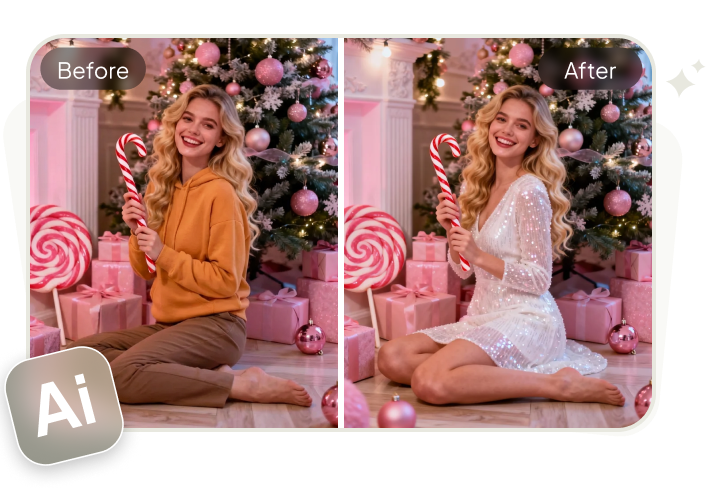
If you want to see how different outfits look on you, try Tenorshare PixPretty’s Online Clothes Changer for free. It lets you try different outfits instantly and get realistic HD results in seconds. The tool adjusts clothing to match body shape, pose, and lighting for a natural look.
PixPretty AI also includes filters, effects, and presets, along with features to resize, compress, and convert images. You can retouch portraits, refine face, and body features, and change hair, and skin color. Moreover, you can remove backgrounds or watermarks, and even replace or extend complex backdrops.
Conclusion
Crafting a good webcam AI prompt boils down to being clear and detailed about things like the subject, camera framing, eye contact, lighting, background, expressions, and movement. When these are done well, AI videos look more natural, engaging, and professional.
But if you want to see how you look in different clothing, Tenorshare PixPretty’s AI Clothes Changer is a free tool you can try. It allows you to swap clothes in pictures with your desired ones. The tool also offers easy photo editing features like retouching, background changes, and image and color enhancements.
PixPretty AI Clothes Changer
- Create charming Christmas looks with ease
- Turn everyday photos into festive holiday scenes
- Perfect for Christmas photos and family moments