


Thanksgiving is a special time for warmth, family, and creativity. With the right Thanksgiving Day AI prompt, anyone can create touching images, social posts, and greeting cards that reflect the spirit of gratitude. AI art tools can now turn simple words into beautiful visuals within seconds. In this guide, we’ll explore what makes a perfect Thanksgiving Day AI prompt, show examples, and explain how you can use it for marketing, design, or personal projects.
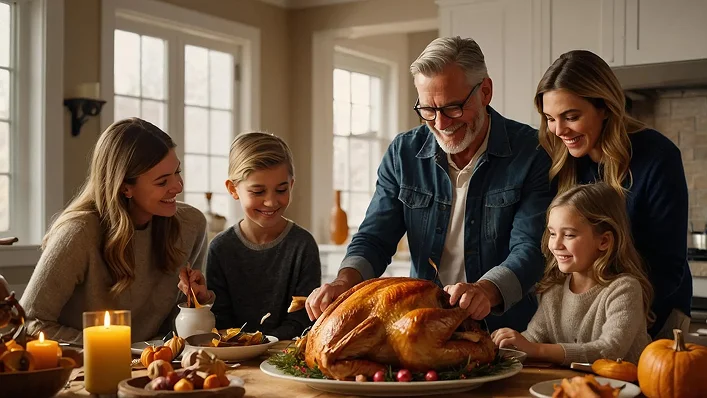
Table of Contents
- Part 1: Understanding the Thanksgiving Day AI Prompt
- Part 2: Key Elements of a Strong Thanksgiving Day AI Prompt
- Part 3: Practical Examples of Thanksgiving Day AI Prompts
- Part 4: How to Use AI Prompts in Your Workflow
- Part 5: Mistakes to Avoid When Writing AI Prompts
- Bonus Tip: Pixpretty AI Object Remover: Perfect Companion for Thanksgiving Day AI Prompts
- FAQs
Part 1: Understanding the Thanksgiving Day AI Prompt
Before creating beautiful holiday visuals, it’s important to understand what a Thanksgiving Day AI prompt really means. The prompt is your guide that tells AI exactly what kind of image or content you want. It describes the scene, style, lighting, and mood. For example:

“Warm family dinner with turkey on a rustic table, candlelight glow, and fall leaves outside the window.” Such descriptions help AI generate art that matches your vision.
Why Clear Prompts Matter
Good prompts save time and prevent repeated edits. Clear details about colors, feelings, or objects guide the AI effectively. When you type a vague line like “Thanksgiving dinner”, results often look plain or unrelated. A well-planned Thanksgiving Day AI prompt creates realistic, attractive, and useful images.
Benefits of Using AI Prompts on Holidays
- Helps non-designers create professional visuals
- Saves hours of manual drawing or photo editing
- Adds a creative spark to your holiday campaigns
- Perfect for cards, blog posts, and ad visuals
Part 2: Key Elements of a Strong Thanksgiving Day AI Prompt
To get the most from your Thanksgiving Day AI prompt, focus on its building blocks. Each word affects how your AI tool interprets the image. A few small changes can turn a basic picture into a stunning one that captures real holiday warmth and emotion.
1. Define the Main Subject
Always start your prompt with the subject what or who should appear in the scene. It could be a turkey, a family, or a festive table. Being specific like “three kids laughing while setting the Thanksgiving table” makes your AI result detailed and lively.
2. Choose the Right Setting
Describe where the scene happens:
- Cozy indoor dining room
- Outdoor harvest field
- Fireplace corner with golden light
Adding environmental cues gives the AI context and makes the final image more realistic and consistent with Thanksgiving themes.
3. Add Mood and Lighting Details
Mood defines emotion, and lighting brings it to life. Use phrases such as “soft candlelight”, “evening glow”, or “morning sunlight through window”. These make your Thanksgiving Day AI prompt more expressive, helping AI capture the true spirit of gratitude.
Part 3: Practical Examples of Thanksgiving Day AI Prompts
Here are some ready-to-use examples of Thanksgiving Day AI prompts for your designs and posts. Each one delivers a different feel from cozy family dinners to simple digital cards. Try them and modify to suit your campaign or personal creative idea.
Example 1: Family Celebration Scene
“A large family gathered around a Thanksgiving dinner table, roasted turkey in the center, smiling faces, soft warm lighting, realistic photo style.”
This prompt works best for realistic images that show emotion and family bonding. Perfect for blogs, ads, or greeting cards.

Example 2: Minimalist Greeting Card Design
“Minimal Thanksgiving card on white background, watercolor leaf border, text ‘Give Thanks’, gentle autumn colors, modern layout.”
Use this when you want elegant and simple images for social posts or printable cards.

Example 3: Outdoor Harvest Theme
“Autumn field with pumpkins, baskets of apples, and golden sunset sky on Thanksgiving Day, artistic style, wide view.”
This Thanksgiving Day AI prompt gives a bright, colorful outdoor look great for seasonal banners or website backgrounds.

Part 4: How to Use AI Prompts in Your Workflow
Once your Thanksgiving Day AI prompt is ready, it’s time to bring it to life using your AI tool. The process is simple but benefits from a few smart steps. Following a clear workflow ensures every image fits your needs and looks professional.
1. Input and Adjust the Prompt
Enter your written prompt into the AI generator. Preview the result and adjust the words if it looks off. For instance, adding “soft focus” or “autumn palette” can change the visual tone. Test multiple small edits for best outcomes.
2. Refine the Result with Tools
If your Thanksgiving image includes unwanted objects or messy backgrounds, you can easily fix it using the Pixpretty AI Object Remover. This tool removes distractions while keeping lighting, texture, and details natural. In just seconds, your Thanksgiving Day AI prompt image looks cleaner, balanced, and ready to share.
3. Publish and Track Performance
After finishing, use your visuals for:
- Blog headers or email banners
- Holiday social media posts
- E-cards and digital ads
Track likes, clicks, or shares to measure how well your Thanksgiving Day AI prompt performs online.
Part 5: Mistakes to Avoid When Writing AI Prompts
Even experienced users make small errors that reduce output quality. Avoiding common mistakes helps your Thanksgiving Day AI prompt stay effective. Let’s go through the usual problems and how to fix them before you start creating your next batch of holiday images.
1. Being Too Vague
General words like “Thanksgiving celebration” or “holiday dinner” give confusing results. Instead, include visual and emotional clues. Example: “family passing dishes at sunset under warm candlelight.” This helps the AI focus on a clear concept.
2. Overloading the Prompt
Adding too many details “10 people, snow, fireworks, turkey, parade” can confuse AI. Keep it simple. One subject, one mood, one scene. Add optional notes later once the main structure works.
3. Ignoring Image Consistency
If you post several AI-generated images, match style and color across them. This maintains your brand tone. For example:
- Use similar color warmth (amber, orange, gold)
- Stick to one illustration style
- Keep lighting direction consistent
4. Skipping Post-Editing
Sometimes AI adds random objects or distortions. A quick fix with the AI Object Remover can save your design. Simple edits make your visuals cleaner and ready for publishing.
Bonus Tip: Pixpretty AI Object Remover: Perfect Companion for Thanksgiving Day AI Prompts
When creating Thanksgiving visuals through AI tools, you might notice extra elements like messy utensils, distorted faces, or blurred corners in your final image. The Pixpretty AI Object Remover solves this problem instantly. It removes unwanted parts from your AI-generated Thanksgiving scenes without affecting the natural look. Whether you’re designing greeting cards, ads, or digital posts, this tool cleans up every detail while keeping lighting and texture consistent. It’s simple, fast, and reliable making it an ideal choice for anyone who wants polished results from their Thanksgiving Day AI prompts.
Key Features of Pixpretty AI Object Remover
- Smart AI Detection: Automatically detects unwanted objects or messy backgrounds in Thanksgiving Day AI prompt images and removes them precisely without harming the main focus.
- Realistic Auto Fill: After removal, the AI refills empty spaces with accurate color, light, and texture, making your Thanksgiving image look completely natural.
- Quick and Simple Editing: Users can drag or brush over the unwanted area, and Pixpretty completes clean edits within seconds no learning curve needed.
- Supports All Image Styles: Works smoothly on realistic photos, digital art, or illustrations created from your Thanksgiving Day AI prompts, maintaining image quality.
- No Design Skills Required: Perfect for beginners Pixpretty interface is easy to use, helping you clean and prepare professional Thanksgiving visuals instantly.
FAQs
Q1. What is the ideal length for a Thanksgiving Day AI prompt?
A clear Thanksgiving Day AI prompt should be around 10–30 words. Short, focused prompts guide AI better and produce accurate, creative, and visually appealing results every time.
Q2. Can I use Thanksgiving Day AI prompts for video creation?
Yes, you can. Add motion-related phrases like “cinematic view” or “camera pan” to your Thanksgiving Day AI prompt for smooth animation or AI-generated video effects.
Q3. How many times should I use the keyword “Thanksgiving Day AI prompt” in my article?
Using the keyword 12–13 times naturally in a 1300–1500-word article improves SEO while keeping your content readable and engaging for your audience.
Q4. What tools help improve AI-generated Thanksgiving images?
Use the Pixpretty AI Object Remover to remove unwanted parts and clean visuals, making your Thanksgiving Day AI prompt images look professional and polished.
Q5. Can I post AI-generated Thanksgiving art commercially?
Yes, you can share or sell them, but always check the AI platform’s license policy to ensure your Thanksgiving Day AI prompt results are cleared for commercial use.
Conclusion
Creating visuals with a Thanksgiving Day AI prompt is a fun and simple way to express gratitude this holiday season. Anyone can design warm, meaningful scenes that capture the true spirit of Thanksgiving. Start by writing clear prompts and polishing your AI-generated images using the Pixpretty AI Object Remover. This tool helps you erase distractions and keep your visuals clean, natural, and ready to share. With thoughtful prompts and precise editing, you can turn your creative ideas into beautiful digital art that delights friends, followers, and customers making this Thanksgiving truly memorable.
PixPretty AI Photo Editor
- 100% free AI Image Generator (Nano Banana 2 powered)
- 4K image quality with fast generation speed
- AI effects & filters for personal and e-commerce use



