


Grok has its issues. Short videos, tight content restrictions, and, it just isn’t always dependable. So, a lot of creators want a better Grok alternative for video generation. Here, we’ve rounded up the top five Grok alternatives for 2026.
You’ll get a look at what each one offers, what they get right, and where they fall short. If you’re after cinematic visuals, more creative freedom, or just want something that’s simple to use, this review will point you in the right direction.
Table of Contents
Part 1: Why Use a Grok Alternative?
Creators might need a Grok alternative for video generation for the following reasons:
1. Content restrictions: Even with “Spicy Mode,” some prompts are blurred or blocked, limiting full control.
2. Short videos: Video length is usually limited to about 6–15 seconds.
3. Usage limits: Daily generations are capped, especially for free users, and higher tiers allow more but are still restricted.
4. Legal and regulatory risks: Grok faces investigations and possible bans in multiple countries, making access and long-term reliability uncertain.
5. Brand safety concerns: NSFW features make it less suitable for professional or brand-safe content.
6. Special features: Options like AI lip-sync, upscaling, image generation, or uncensored outputs.
7. Editing-focused tools: Some emphasize video editing, optimization, and templates over raw generation.
8. Use-case specific: Some alternatives are better for social media, marketing, animated characters, or product videos.
9. More creative control: Many tools offer better control, faster workflows, and more style options.
10. Multiple models: Some platforms let you test and compare different AI video models in one place.
11. Easier to use: Several alternatives focus on simple, beginner-friendly interfaces.

Part 2: Top 10 Grok Alternatives for Video Generation
Here are the top 10 Grok AI video alternatives, free and paid, with their features, strengths, and weaknesses listed in detail:
1. Google Veo (Veo 3 / 3.1)
Google Veo 3/3.1 is a powerful alternative to Grok that creates cinematic videos with built-in sound. It can make short videos from text, images, or frames, adding synced voices, sound effects, and background audio. Videos support 1080p or 4K and both horizontal and vertical formats.
Moreover, Veo understands camera-style instructions and can keep characters consistent across scenes. Its main strengths are realistic visuals and strong prompt accuracy. But it is expensive and can have issues with text, lip-sync, and complex motion. Longer videos also need extra steps, and its realism raises misuse concerns.

2. OpenAI Sora (Sora 2)
OpenAI’s Sora 2 is a premium Grok alternative for video generation, known for very realistic visuals, accurate physics, and built-in sound. It can create short, cinematic videos with synced dialogue, sound effects, and background audio, all in one step. Sora 2 follows detailed prompts well and supports many styles, from realistic to animated.
It also has social features like inserting yourself into scenes and remixing others’ videos through a social-style app. However, it is expensive, mostly invite-only, limited to short clips, and restricted by strong content rules and regional access. This makes it best suited for professional creators rather than casual users.

3. Kling AI
Kling AI is another excellent Grok alternative for video generation for free, known for cinematic video quality, built-in audio, and strong creative control. It offers two main models. Kling 2.6 focuses on making videos with synced dialogue and sound effects.
While Kling O1 adds advanced features like text-based editing and keeping characters consistent across scenes. Kling’s strengths include realistic motion, native audio, easy public access, and affordable pricing. However, users report reliability issues, slow generation times, weak customer support, and extra costs when audio is enabled.

4. Pika Labs 2.0
Pika Labs 2.0 is a good Grok AI alternative for free for creators who want cinematic, stylish, and playful short videos. It’s best for social media clips, ads, and creative ideas, especially with bold looks like neon or cyberpunk. Pika can generate videos from text, images, or other videos, and offers fun effects, camera controls, and tools to add custom characters or objects.
It’s easy to use and great for fast experimentation, but videos are usually very short and not ideal for long stories or consistent characters. It also lacks a full public API, can get expensive with heavy use, and sometimes can’t generate fine details like hands, text, or complex motion.

5. WaveSpeedAI
WaveSpeedAI is not a single AI video model but an alternative to Grok that gives API access to hundreds of different video models. It’s designed mainly for developers and teams who want to test, compare, or scale video generation across many styles and use cases.
The tool’s main strengths are access to 600+ models, flexible pay-as-you-go pricing, support for high-resolution and longer videos, and no waitlists. However, it requires technical skills, and the quality depends on the model you choose. Costs can also add up with heavy use, and it lacks a simple, user-friendly creation interface.

6.Runway Gen-3 and Gen-4
Runway’s Gen-3 and Gen-4 are good Grok alternatives that create short, high-quality videos from text or images. Gen-3 is best for controlling motion, while Gen-4 helps keep characters and scenes looking consistent.
The platform also offers easy online editing tools for adjusting videos, adding movement, removing backgrounds, and improving quality, all without installing software.
However, videos are short, credits can be costly, the tools take time to learn, and audio must be added separately.

7.Luma AI Dream Machine
Luma Dream Machine is an excellent Grok alternative for video generation that creates short, cinematic videos from text or images. It has a strong focus on realistic motion, lighting, and camera movement.
The tool is fast, easy to use, and can generate high-quality videos quickly, making it great for testing ideas and experimenting. The platform also includes simple tools for organizing projects, extending or looping clips, and helping generate creative ideas.
However, videos are usually very short, and the Luma Grok AI video alternative’s free version is also limited, with watermarks, fewer credits, and slower generation times.

8.Adobe Firefly
Adobe Firefly is a decent alternative to Grok for people who already use Adobe Creative Cloud, since it functions directly inside apps like Premiere Pro and After Effects.
It can generate very short video clips from text or images and offers basic control over style, lighting, and camera movement.
However, videos are limited to about five seconds, credits can be expensive, and the video quality is generally lower than that of competitor tools. It also lacks advanced creative controls and has technical limits, such as browser restrictions and rules on using famous people or brands.

9.Stability AI Stable Video Diffusion
Stable Video Diffusion by Stability AI is an open-source Grok AI alternative for free, mainly for developers and technical users, not casual creators. It operates by turning a single image into a very short video.
The tool can be run on your own computer, giving users full control over settings like frame rate and model type. Moreover, it can create multiple camera views from one image, which is useful for product or 3D-style shots.
However, it is hard to install and use, needs strong hardware, and only makes very short clips. It is not recommended for commercial projects, faces issues with people and text, and offers limited control through prompts.

10.Kaiber AI
Kaiber AI is a creative video tool made mainly for artists and musicians. It specializes in stylized, music-driven visuals, offering modes to create abstract animations, add motion to images, or apply artistic styles to existing videos.
One of its best features is syncing visuals to music, making it especially popular for music videos. The tool also allows users to connect multiple scenes and control camera movement and style.
But it is not ideal for precise or business use. Results can be unpredictable, realistic motion is limited, and it lacks the tools needed for corporate or educational projects. The credit system can also be costly with experimentation. Though users can use the Kaiber AI Grok alternative for video generation for free, they may experience slow processing times.

Want to See How Different Clothes Look on You in Reality? Try This Free AI Clothes Changer
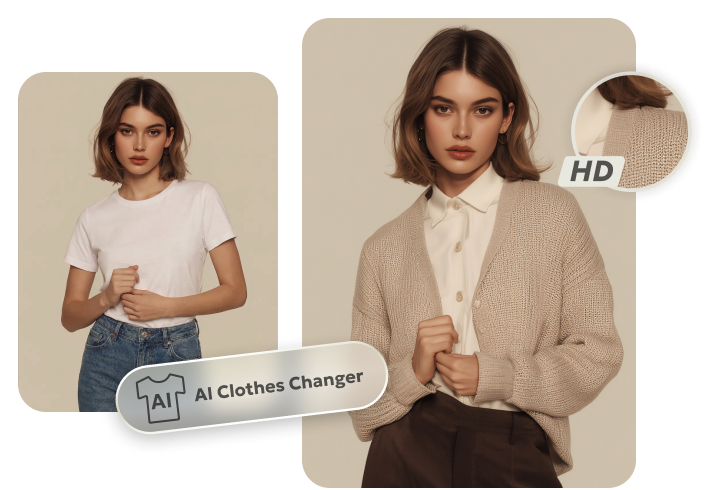
If you want to check how different dressing styles look on you in photos, a tool like Tenorshare PixPretty offers a free Online Clothes Changer. The tool enables you to change clothing, and adjust outfits to fit the body shape, pose, and lighting with realistic HD results.
PixPretty also offers editing features such as resizing, compressing, and converting images in bulk. It enables you to apply filters, shadow effects, and presets to your pictures. Moreover, PixPretty can retouch portraits, refine hair and skin texture and color, remove blemishes and wrinkles, and perform face and body contouring. You can also extend or replace backgrounds, and remove watermarks and backdrops.

Conclusion
Many creators look for a Grok alternative for video generation because of short video limits, usage caps, content rules, legal concerns, and brand-safety issues. Options like Google Veo, OpenAI Sora, Kling AI, Pika Labs, and WaveSpeedAI offer different benefits.
They provide better creative control, built-in audio, easier access, and tools for social media, marketing, or large projects. As an extra tip, if you want to check how different dresses look on you in photos, Tenorshare PixPretty offers a free Online Clothes Changer that can swap and adjust clothing to fit your body shape. It also offers retouching portraits, and improving images.
PixPretty AI Clothes Changer
- Instantly change outfits with AI in 1 click
- Realistic AI previews for every top, bottom, or dress
- Create and explore endless outfits and OOTDs without editing
Related Articles:


